Direct mail export file with broadlog id in Adobe Campaign Classic | Community
Skip to main content
ujjyals87155580
March 6, 2020
Solved

Direct mail export file with broadlog id in Adobe Campaign Classic

  • March 6, 2020
  • 3 replies
  • 3683 views


Hi Experts,


I have a direct mail campaign in ACC. This is exporting data in a flat file with different data getting picked from the broadlog and data linked to the broadlog schema. In the file I am successfully able to export different fields of data linked to broadlog schema. But  I am failing to export the fields of the broadlog schema. Any field of broadlog itself is always getting exported with a value ´0´.


Any suggestions, on how can I solve it.


by the way, I have configured a service provider with service defined in it. The service has the extraction file mappings. I am also using the out of the box delivery template and routing external account for direct mail.


Thanks,

Ujjyal
This post is no longer active and is closed to new replies. Need help? Start a new post to ask your question.
Best answer by iambhosale

Hi @ujjyals87155580 


We have done a similar setup for multiple projects as we have implemented file-based channel integration. Also, we add the broadlogid on the file we generate so as to have reconciliation key when we receive a response back from the vendor.


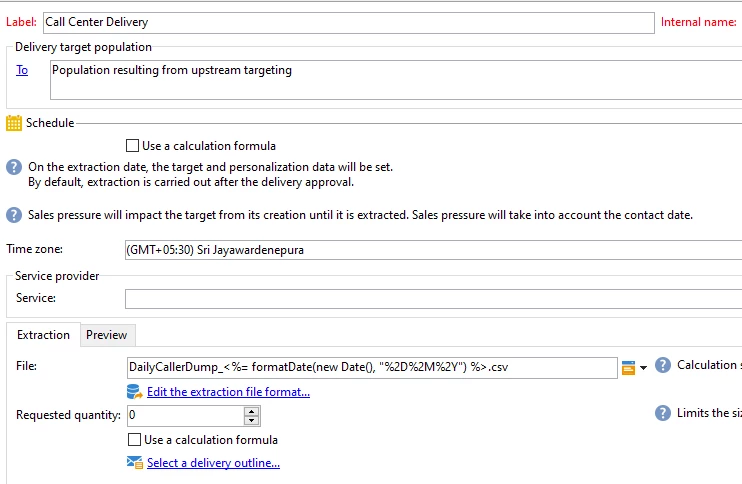
--> We have used direct mail delivery as follows.


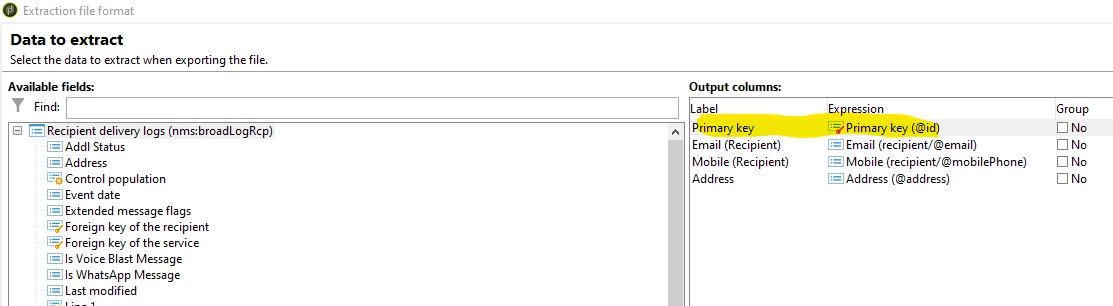
--> During Extraction of file format you will get all option from the broadlogRcp schema including broadlogid


--> Then we used to push this file to vendor SFTP using file transfer activity.


3 replies

iambhosale
iambhosaleAccepted solution
Level 2
April 27, 2020

Hi @ujjyals87155580 


We have done a similar setup for multiple projects as we have implemented file-based channel integration. Also, we add the broadlogid on the file we generate so as to have reconciliation key when we receive a response back from the vendor.


--> We have used direct mail delivery as follows.


--> During Extraction of file format you will get all option from the broadlogRcp schema including broadlogid


--> Then we used to push this file to vendor SFTP using file transfer activity.


ujjyals87155580
July 9, 2020

We tried all the options. Eventually deleted the full set up of service provider and delivery template. It started working post that.

Jonathon_wodnicki
Community Advisor
Community Advisor
August 31, 2020

Hi,


There's a bug in Campaign where if broadlog id is aliased at all, it'll export as 0.

Remove the field alias and it should be fine.


Thanks,

-Jon