
Difference in "date field" between Target Data and HTML content | Adobe Higher Education
Skip to main content
israel_sanchez
Level 3
September 6, 2022
Beantwortet

Difference in "date field" between Target Data and HTML content

  • September 6, 2022
  • 3 Antworten
  • 1505 Ansichten

Hello all, I'm facing a weird issue as follows:

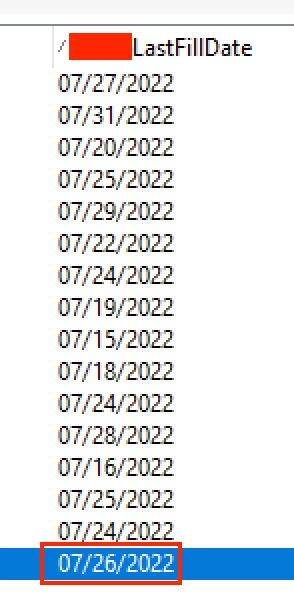
In the database and after querying a list I have a column that contains a specific date in a regular format
I'm manipulating the data with this JS code:

var lastDate = formatDate(targetData.LastFillDate,"%2M/%2D/%2Y");

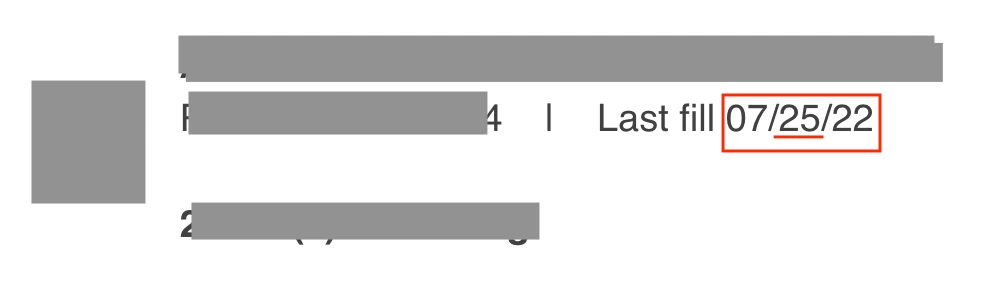
So, after sending proofs I can see the date was modified showing one day less, like:
So, have you faced this issue, and do you know how to resolve it? Thank you.

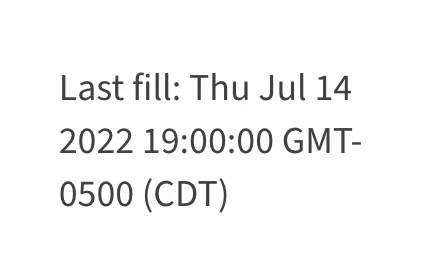
Note: If I don't modify the data with JS, I get something like this (see the format):
Dieses Thema wurde für Antworten geschlossen.
Beste Antwort von Tobias_Lohmann

Hi,

storing and presenting date(time) fields can be tricky. I had the exact same issue and it turned out the Campaign server was set up to use a different timezone than UTC. That means the date/time values are stored in UTC. 

They way they are presented can be completely different, eg. when your Campaign operator is set to use a different timezone (see operator details).

I recommend reading this page: https://experienceleague.adobe.com/docs/campaign-classic/using/installing-campaign-classic/install-campaign-on-prem/time-zone-management.html?lang=en

As mentioned by others I would also recommend using the timezone parameter on the formatDate function to force a specific timezone.

Best regards, Tobias

3 Antworten

Anita_punmiya
Level 5
September 7, 2022

Hi @israel_sanchez ,

Try adding RX1_LastFillDate in an enrichment activity and apply ToDate function

and then use formatDate function in your HTML on that date field. 

Hope this helps.


Thanks.


israel_sanchez
Level 3
September 7, 2022

Hello, thank you for the insight, it didn't work, we are searching for another option.

Manoj_Kumar
Community Advisor
Community Advisor
September 7, 2022

Hello @israel_sanchez 


Try adding a timezone parameter in the formatDate function or change the timezone in the workflow properties.


formatDate (adobe.com)

Manoj     Find me on LinkedIn
Tobias_Lohmann
Adobe Employee
Adobe Employee
September 9, 2022

Hi,

storing and presenting date(time) fields can be tricky. I had the exact same issue and it turned out the Campaign server was set up to use a different timezone than UTC. That means the date/time values are stored in UTC. 

They way they are presented can be completely different, eg. when your Campaign operator is set to use a different timezone (see operator details).

I recommend reading this page: https://experienceleague.adobe.com/docs/campaign-classic/using/installing-campaign-classic/install-campaign-on-prem/time-zone-management.html?lang=en

As mentioned by others I would also recommend using the timezone parameter on the formatDate function to force a specific timezone.

Best regards, Tobias