Solved
Deriving Countif in a query
How to use countif in workflow/query? I am trying to get to the highlighted values (count of states that have a a group value greater than 0).
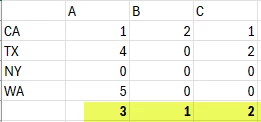
How to use countif in workflow/query? I am trying to get to the highlighted values (count of states that have a a group value greater than 0).
Hi @rntrp ,
I'm not entirely sure of your full use case or how you plan to use the final result, but based on your question, here’s an approach I would suggest:
Import the file (or query the data if it's already in a table).
Use a Split activity and define three sub-conditions based on your logic — for example, where Column A is not zero, Column B is not zero, and Column C is not zero. * Enable the data over lap from setting of split activity. So all data flow from each condition.
This will give you three separate outputs from the Split activity.
After each Split output, you can retrieve the row count using the variable vars.recCount.
This will give you the number of records for each condition — essentially your final result.
If your goal is data reporting or analysis, this approach should help. However, if you plan to use this data for another specific purpose, feel free to share more details.
Note: SQL GROUP BY works on row-level data. Since you are trying to analyze column-based conditions (e.g., count of non-zero values in specific columns), a standard SQL query won't be sufficient. You'll need to handle it at the workflow logic level as described.
Hope this helps!
Kind regards,
Parvesh
Enter your E-mail address. We'll send you an e-mail with instructions to reset your password.