Define automatically the folder id in an input form | Community
Skip to main content
salvdangelo
Level 5
September 7, 2020
Solved

Define automatically the folder id in an input form

  • September 7, 2020
  • 8 replies
  • 8866 views

Hello all,
I've added a link to "Folder" within my custom schema "Theme":

At the same time I have an input form for the creation / editing of records of "Theme" schema and I would like to set the folder id automatically (as done in native "Recipient" and "Service" forms).
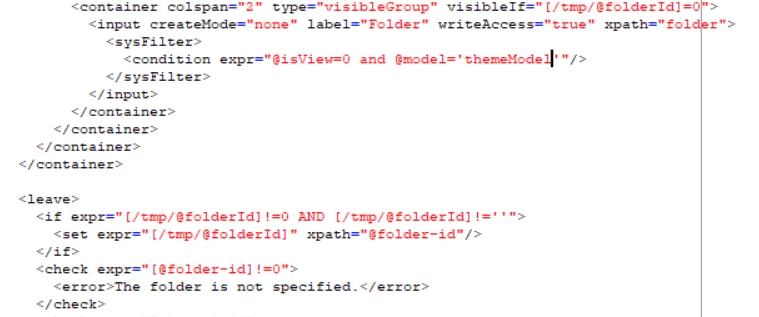


As per my tests, I receive the error shown above: "The folder is not specified".
Could you tell me what I'm missing?

Thank you,
Salvatore
@milan_vucetic 
@jonathon_wodnicki 

@jean-serge_biro 

@raj_ganta-1 

@jyoti_yadav 

This post is no longer active and is closed to new replies. Need help? Start a new post to ask your question.
Best answer by kapilKochar

Hi Salvatore,


I understand what you saying now. I replied based on initial question where you were getting error from that <check> tag under form . I checked the nms:core Navigation hierarchies and over there you can see for nodeModel of recipient,groups and Reports they have used <command> to call another form and there they have might set the folderId Not sure exactly how it is working. But something you can look into .  


8 replies

Level 2
September 9, 2020
Anyone that can help here?
salvdangelo
Level 5
September 10, 2020
Hello, is there anyone that can give me an answer to my question?
Jyoti_Yadav
Level 8
September 16, 2020

Hi,


If you look at folder definition in 'Recipient' or 'Service' schema, Default Folder definition is always specified, i.e if user is not specifying where record will be saved, there is always a default Folder location.


You need to specify default folder location in your 'Theme' Schema and it will work correctly.


How do you assign recipients to specific Folder: By explicitly specifying Folder internal name or primary key. And in case if nothing is specified, then it will be saved to 'Default Folder'.


Similar logic you need to implement.


Thanks.

salvdangelo
Level 5
September 16, 2020
Sukrity_Wadhwa
Community Manager
Community Manager
September 21, 2020

Hi @salvdangelo,

Were you able to resolve this query with the given solution? Do let us know.

Thanks!

Sukrity Wadhwa
salvdangelo
Level 5
September 21, 2020

Hello @sukrity_wadhwa,

No I was not.

Salvatore

salvdangelo
Level 5
September 24, 2020

Is there anyone here that can help me? @sukrity_wadhwa 

Sukrity_Wadhwa
Community Manager
Community Manager
September 25, 2020
Hi, I have escalated it to our SMEs. They will get back on this thread. Thanks!
Sukrity Wadhwa
kapilKochar
Level 6
September 25, 2020

Hi Salvdangelo,


Just to replicate the issue I have created custom schema for Theme and also one form and navigation hierarchy for this custom schema. 


Schema Definition:


Form : 


Navigation Hierarchy :


Folder created by using above navigation  hierarchy  and also after creating folder  ,click on advance properties and check for template name for me it's 'kkktheme'. This name have to be same in your schema and form screenshot shared above. 


Using form to enter values , result is below. You can see Folder ID is coming automatically and no error for related to folder. 


Point to check 

1. Make sure you have set default value at schema level and use correct name as the name coming after creating  folder using navigation hierarchy 

2. In Form use correct model name (case sensitive)

3. In navigation hierarchy use correct schema name 


Thanks,

Kapil Kochar

salvdangelo
Level 5
September 25, 2020

Hello @kapilkochar ,

I made these checks again on the schema / navigation item / input form
and I confirm you that all the references are correct.

Could you create another folder (folder 2) with the same navigation item and see if the Folder id assigned to your records is different compared to records created within the first folder (folder 1) you created?
My issue is that: folder id is assigned correctly when I create the first folder, but when I create another folder with the same model records created here have folder-id of the first folder!
Furthermore, in the navigation view I should only see records belonging to the current folder (note: isView = false), not all of them


Please, let me know.
I'll try to create them again in the meanwhile.


Thanks,
Salvatore


salvdangelo
Level 5
September 25, 2020

Hi @kapilkochar ,

I REPLICATED the same schema, navigation item and input form (except for the namespace that is "cus") and I confirm you what I said in the previous message:

Folders created using the same navigation item:


I've created "Customer 1" within Folder 1
and "Customer 2" using Folder 2
... but the folder-id is the same!


In addition, I should NOT be able to see Customer 1 in the view of Folder 2 (since the folder is not a view)


I hope that now it's clear what is wrong in the solution proposed so far.
Please let me know! thank you in advance

Cheers,
Salvatore

kapilKochar
kapilKocharAccepted solution
Level 6
September 26, 2020

Hi Salvatore,


I understand what you saying now. I replied based on initial question where you were getting error from that <check> tag under form . I checked the nms:core Navigation hierarchies and over there you can see for nodeModel of recipient,groups and Reports they have used <command> to call another form and there they have might set the folderId Not sure exactly how it is working. But something you can look into .