Decrypt the email address from cryptstring id=<%= escapeUrl(cryptString(targetData.email)) %> | Community
Skip to main content
Level 5
August 21, 2024
Solved

Decrypt the email address from cryptstring id=<%= escapeUrl(cryptString(targetData.email)) %>

  • August 21, 2024
  • 1 reply
  • 3257 views

Hi there,

"I am passing the recipient's email through a survey URL generated in Adobe Campaign and need to decrypt this email address. I'm using a JavaScript function to extract the email parameter from the URL, decrypt it, and send the data to a table. However, the decrypted string is still appearing as an encrypted string for some reason."


?email_id=<%= escapeUrl(cryptString(targetData.email)) %>


function decryptString(encryptedEmail) {
// Implement your decryption logic here
return encryptedEmail; // Placeholder: returning the input as-is
}

// Function to decrypt and extract the email address from the URL
function getEmailFromUrl() {
const params = new URLSearchParams(window.location.search);
const encryptedEmail = params.get('email_id');

// Decrypt the email address using the decryptString function
const email = decryptString(encryptedEmail);
return email;
}

// Function to validate the survey, set values, and submit the form
function validate() {
// Get the email address from the URL
const email = getEmailFromUrl();

if (!email) {
alert("Error: Email address is missing.");
return false;
}


if (isValid) {
// Set the email address to the "Email_Address" path
document.controller.setValue("/ctx/FOD_SurveyResponse/@Email_Address", email);

// Submit the form if validation passed
document.controller.submit('next', '_self', 'next');
}

return isValid;
}


This post is no longer active and is closed to new replies. Need help? Start a new post to ask your question.
Best answer by rvnth

Hello @rvnth 

In Javascript activity you can just use this


const decryptedEmail=decryptString(ctx.vars.email_id); 


Hi @_manoj_kumar_ ,


Thank you for your assistance. The code below successfully enabled me to decrypt the email string and store it in the corresponding schema column.

.


ctx.vars.key256Bytes = "fFKwuLzAsmMYoY6f1lxpMKuFSTWLCgdc"; ctx.vars.Email_Address = ctx.vars.Email_Address.toString(); ctx.FOD_SurveyResponse.@Email_Address = decryptString(ctx.vars.Email_Address, ctx.vars.key256Bytes);


1 reply

Manoj_Kumar
Community Advisor
Community Advisor
August 21, 2024

Hello @rvnth  This is because you have created a function with similar name it is not doing anything.


remove this code:

function decryptString(encryptedEmail) { // Implement your decryption logic here return encryptedEmail; // Placeholder: returning the input as-is }


Also, I would suggest you to some other identifier than email 

Manoj     Find me on LinkedIn
rvnthAuthor
Level 5
August 22, 2024

Hi @_manoj_kumar_ ,


Thank you for your response. After removing decryptString, I'm encountering an error stating that decryptString is not defined in the code block below. Since the Adobe decryptString function isn't working here, is there an alternative way to decrypt?

function getEmailFromUrl() { const params = new URLSearchParams(window.location.search); const encryptedEmail = params.get('email_id'); // Decrypt the email address using the decryptString function const email = decryptString(encryptedEmail); return email; }

Thank you in advance. 


Is it possible to decrypt this directly at the attribute level within the Schema, or do I need to send only the decrypted string data?

rvnthAuthor
Level 5
September 9, 2024

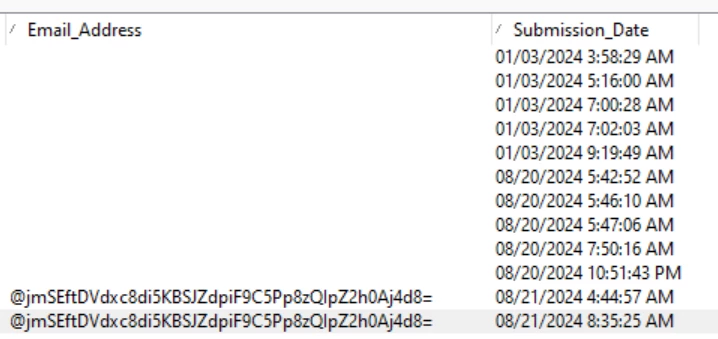
I initially had not declared the key32bytes in the WebApp properties variables, but I have now added it and can see the "Thank You" page after submission. However, the email address is still not being stored, despite selecting the email address in the Storage activity checkbox. Please advise.


Thank you in advance!


Update: @_manoj_kumar_ 

I have used the following JavaScript code, but while the survey responses are being captured in the schema, the email address is not being recorded. Could you please provide some suggestions? Thank you in advance.


ctx.vars.key32Bytes = "fFKwuLzAsmMYoY6f1lxpMKuFSTWLCgdc"; ctx.vars.Email_Address = ctx.vars.Email_Address.toString(); ctx.vars.Email_Address = decryptString(ctx.vars.Email_Address,ctx.vars.key32Bytes); ctx.FOD_SurveyResponse.Email_Address = ctx.vars.Email_Address;