DaysDiff function not giving correct result | Community
Skip to main content
January 25, 2024
Solved

DaysDiff function not giving correct result

  • January 25, 2024
  • 2 replies
  • 823 views

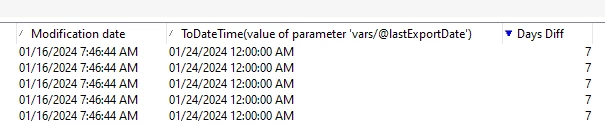
Hi, we have an option variable called lastExportDate and a field called lastModified. When we are trying to find the difference between two values using DaysDiff, we are not getting any result. Can somebody please help out with the Javascript code and the expression to use in additional data?
This post is no longer active and is closed to new replies. Need help? Start a new post to ask your question.
Best answer by ParthaSarathy

Hi @sanjana12 ,

Considering your option's Data type is 'Date+time'

In workflow, fetch the option value and store it in variable as below,


vars.lastExportDate=getOption('lastExportDate');


In Query additional data or in enrichment, add the below expression to fetch the Days difference,


DaysDiff(ToDateTime($(vars/@lastExportDate)),@lastModified )


2 replies

isahore
Community Advisor
Community Advisor
January 25, 2024

Hi @sanjana12,


Check that both the fields you are comparing are of the date or datetime data type. If not, the function might not give you correct results or no results at all.


BR,

Ishan

ParthaSarathy
Community Advisor
ParthaSarathyCommunity AdvisorAccepted solution
Community Advisor
January 25, 2024

Hi @sanjana12 ,

Considering your option's Data type is 'Date+time'

In workflow, fetch the option value and store it in variable as below,


vars.lastExportDate=getOption('lastExportDate');


In Query additional data or in enrichment, add the below expression to fetch the Days difference,


DaysDiff(ToDateTime($(vars/@lastExportDate)),@lastModified )


 ~  ParthaSarathy S~  Click here to join ADOBE CAMPAIGN USER GROUP for Quarterly In-person | Hybrid | Virtual Meetups
Sanjana12Author
January 25, 2024

Is it possible to hardcode the values instead of fetching the option variable value.If so, how to do it?

AkshayAnand
Community Advisor
Community Advisor
January 29, 2024

Hi @sanjana12 


Yes you can also hard code the value as :

DaysDiff(ToDateTime('29/02/2024'),@lastModified )

I would suggest you could keep the code dynamic with @parthasarathy suggested code.


Thanks

Akshay