Custom Report with delivery Indicators | Community
Skip to main content
Level 2
August 23, 2024
Solved

Custom Report with delivery Indicators

  • August 23, 2024
  • 3 replies
  • 885 views

Hi all,

I created a custom report that I export and send via email.

Here the metrics that I include:
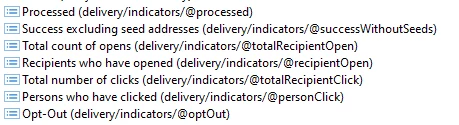
Analysing the extracted data, I noticed that the "Total number of clicks" does not include all clicks made on the newsletter but only clicks made on CTAs. It therefore does not include clicks on mirror pages and opt outs (that I can see in Opt-Out metric).

Is there a metric that includes all interactions (click on CTAs + mirror page + optout...)? If it does not exist, how can I extract the number of clicks on mirror page?


And another question: how can I find the tracking log of the delivery sent by message center?

Thanks



This post is no longer active and is closed to new replies. Need help? Start a new post to ask your question.
Best answer by n235ps

If you go after the tracking log Rcp table you can filter on the URL Type to include all three: clicks on links, opt-outs, and mirror page.


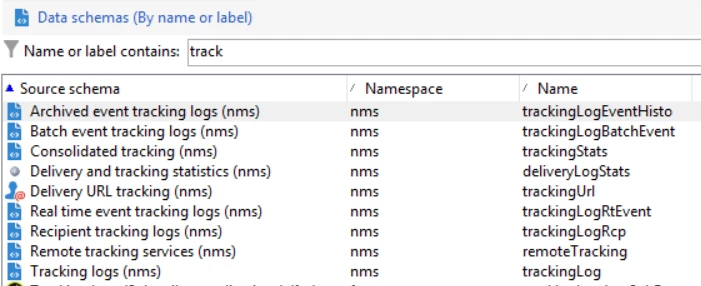
There are a few event tracking logs as seen below. If you are using real-time or batch or need both.


Matthew

3 replies

n235psAccepted solution
Level 2
August 23, 2024

If you go after the tracking log Rcp table you can filter on the URL Type to include all three: clicks on links, opt-outs, and mirror page.


There are a few event tracking logs as seen below. If you are using real-time or batch or need both.


Matthew

MeitMedia
Level 4
August 26, 2024

Hi @elisabettapi ,


It appears like the "Total number of clicks" metric you're seeing only includes clicks on CTAs and not on mirror pages or opt-outs, if so, unfortunately, there is a single metric in Adobe Campaign Classic to provide you count of clicks.


However, as @n235ps  suggested, you can incorporate all interaction click data into your report by querying the nms:trackingLogRcp schema. You can filter the data based on the url/@type attribute to include the specific types of interactions you want in your report.


For accessing tracking data related to Message Center deliveries, you can use the following methods:

>>In Message Center Execution instance (RT server):

  • For Real-Time Events: Access tracking logs for Real-time events refer to nms:trackingLogRtEvent
  • For Batch Events: Access tracking logs for Batch events refer to nms:trackingLogBatchEvent

>>In the Message Center Control instance (Marketing), all real-time data is synchronized and consolidated into a single table through a technical workflow. This table, nms:trackingLogEventHisto, includes data from both real-time and batch events.


Best regards,

MEIT MEDIA (https://www.meitmedia.com)

Find us on LinkedIn

Contact Us: infomeitmedia@gmail.com


Sukrity_Wadhwa
Community Manager
Community Manager
September 5, 2024

Hi @elisabettapi,

Were you able to resolve this query with the help of the given solutions or do you still need more help here? Do let us know. In case the given solutions were helpful, then kindly choose the one that helped you the most as the 'Correct Reply'.
Thanks!

Sukrity Wadhwa