
Curved quotes converted to ASCII code | Community
Skip to main content
Milan_Vucetic
Level 9
March 4, 2020
Solved

Curved quotes converted to ASCII code

  • March 4, 2020
  • 1 reply
  • 5062 views

Hi all,


whenever curved quotes are used from AEM templates, after synchronizing in Adobe Campaign are shown in ASCII code.
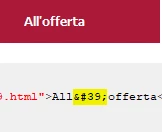
Any suggestions how to overcome this?


Regards,

Milan

This post is no longer active and is closed to new replies. Need help? Start a new post to ask your question.
Best answer by Darren_Bowers

Its probably just a normal function of the serialiser/deserialiser to HTML encode certain characters to make the HTML source validate against your source DTD. Its perfectly valid and shouldn't cause any issues in your rendered HTML content. Its the slightly more valid code for an apostrophe character in HTML. ' is the other valid encoding for an apostrophe (see link)

Is there any reason you dont want this code in your HTML source?


1 reply

Darren_Bowers
Darren_BowersAccepted solution
Level 9
March 9, 2020

Its probably just a normal function of the serialiser/deserialiser to HTML encode certain characters to make the HTML source validate against your source DTD. Its perfectly valid and shouldn't cause any issues in your rendered HTML content. Its the slightly more valid code for an apostrophe character in HTML. ' is the other valid encoding for an apostrophe (see link)

Is there any reason you dont want this code in your HTML source?


Milan_Vucetic
Level 9
March 10, 2020

Hi @DarenOrigin,


for example we have a conditional code like <%= targetData.customerSegment = "Resident" %> and if curved quotes are used instead of straight (from my example) after synchronization we got condition in Text content like this:  <%= targetData.customerSegment = &#34Resident&#34 %> and delivery fails. 


Therefore, I am looking for easy way to avoid this in Text content. 

Business user correct this when is visible but often not.


Regards,

Milan