Creating a calculated attachment where File name is computed at the time of delivery for each recipient (it can depend on the recipient) | Community
Skip to main content
Adobe Employee
July 8, 2017
Solved

Creating a calculated attachment where File name is computed at the time of delivery for each recipient (it can depend on the recipient)

  • July 8, 2017
  • 23 replies
  • 15698 views

Hi,

We are trying to attach a pdf file (from the folder placed on C:// drive for testing because, FTP is not supported) during the email delivery in the template.

  1. Specified the label  to apply to the attachment.
  2. Specified the access path of the file and its personalized name in the definition window (based on the customer name, it picks the respective file to attach).
  3. Uploaded the file to server from local drive in a different workflow as this is a mandatory step.

s_ncs_user_wizard_email_calc_attachement_010.png

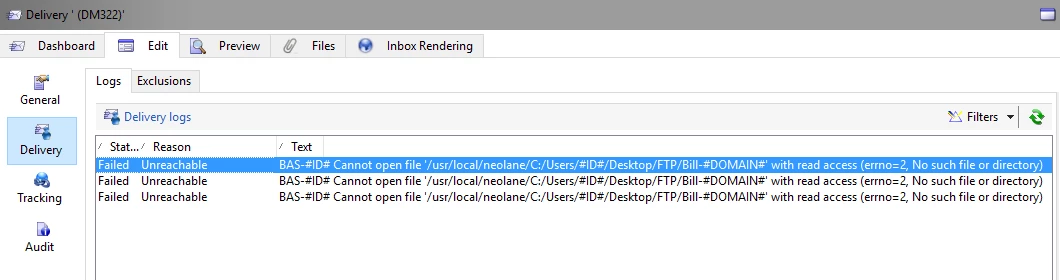
I got an error below.

Questions:

1. How to resolve this issue?

2. Post the testing of attaching the files from desktop, i would like to do the same from an FTP location. How can i do this (any SFTP/other server location Adobe provides from where i can attach the files)?

PS: We have a hosted version of Adobe Campaign v6.1

Thanks,

Rajesh
This post is no longer active and is closed to new replies. Need help? Start a new post to ask your question.
Best answer by Adhiyan

Hello Rajesh,

This is a known limitation when using calculated attachments uploaded from the local system . The reason is that when the attachment is prepared during delivery analysis , the MTA is responsible for preparing the attachment. The MTA for a hosted environment runs on a debian(linux) server and the local file being on a Windows OS causes a compatibility issue and creates the wrong path for the file by appending usr/local/neolane/ (default location of a campaign instance) ahead of the file name.

To overcome this you can :

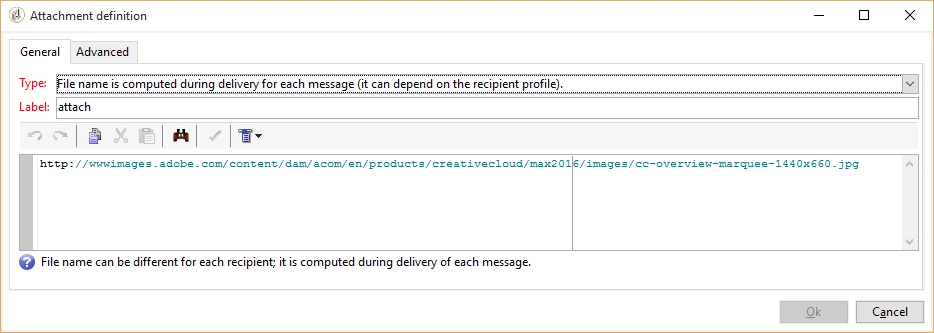
1>. Use a file from a public location like this :

2>. Else , like you have mentioned , you can have the file on a SFTP server and mention the path of the server here like :

/sftp/<user>/incoming/<file_name> in place of the public url

3>. Create a workflow to generate the file on the workflow execution and then export the file to the var/<instance_name>/export folder using the data extraction activity and then use the delivery ,attachment name should be : export/<file_name>

Hope this helps

Regards,

Adhiyan

23 replies

Adhiyan
Adobe Employee
AdhiyanAdobe EmployeeAccepted solution
Adobe Employee
July 9, 2017

Hello Rajesh,

This is a known limitation when using calculated attachments uploaded from the local system . The reason is that when the attachment is prepared during delivery analysis , the MTA is responsible for preparing the attachment. The MTA for a hosted environment runs on a debian(linux) server and the local file being on a Windows OS causes a compatibility issue and creates the wrong path for the file by appending usr/local/neolane/ (default location of a campaign instance) ahead of the file name.

To overcome this you can :

1>. Use a file from a public location like this :

2>. Else , like you have mentioned , you can have the file on a SFTP server and mention the path of the server here like :

/sftp/<user>/incoming/<file_name> in place of the public url

3>. Create a workflow to generate the file on the workflow execution and then export the file to the var/<instance_name>/export folder using the data extraction activity and then use the delivery ,attachment name should be : export/<file_name>

Hope this helps

Regards,

Adhiyan

Marcel_Szimonisz
Community Advisor
Community Advisor
November 13, 2023

Hello @adhiyan .
if you are using midsourcing server, it seems the attachment is also not found, is there any other way then above mentioned to fix it?

Marcel

ramakattAdobe EmployeeAuthor
Adobe Employee
July 9, 2017

Hi Adhiyan,

Thank you very much for your quick response. I will try this and get back to you with the concerns, if any.

Thanks,

Rajesh

ramakattAdobe EmployeeAuthor
Adobe Employee
July 10, 2017

Hi Adhiyan,

I was trying to test by using a file from a public location (yet to test the SFTP method, though). Placed the files on my google drive and extracted a shareable link to view the files and pasted the link as shown in the screenshot.

Got the below error. Not sure, if it accepts, https link from google drive instead of http. Any help?

_nkur
Level 2
July 10, 2017

Hi Rajesh,

I have done it using SFTP below screenshot of my config, hope it help.

ramakattAdobe EmployeeAuthor
Adobe Employee
July 11, 2017

Hi Adhiyan,

Http not working for me and SFTP is in the process of configuration and yet to be tested, i am trying to test the 3rd approach of creating the file in the workflow.

This works fine if we are extracting the data and then the csv file (which will be attached as a file in the attachment) of that data, as shown below.

How can i do this to attach pdf file from the local machine or an ftp account (Campaign FTP Test), in a work flow? Something like below.

ramakattAdobe EmployeeAuthor
Adobe Employee
July 11, 2017

Hi Ankur,

Is this the SFTP account configured as an external account or is this the SFTP location that sits on the Adobe server (configured by Adobe)?

_nkur
Level 2
July 12, 2017

Hi Rajesh,

This SFTP location is on Adobe Server. I doubt you can use external SFTP for this.

Regards,

Ankur A.

ramakattAdobe EmployeeAuthor
Adobe Employee
July 27, 2017

Hi Ankur/Florent,

We have got the SFTP configured on Adobe server and i used the same for reading the calculated attachment from the sftp server. It is giving me the same error. error screen below.

_nkur
Level 2
July 27, 2017

Hi Rajesh,

Is it Adobe Hosted environment or on- premise ?

If, It is Adobe Hosted then as per my experience you need to give SFTP path as /home/customer/<Client Name>/incoming/ ..... to access SFTP in Adobe Campaign application.

Otherwise, can you also make sure the SFTP path is proper and access on folder is define properly.

Regards,

Ankur A.

ramakattAdobe EmployeeAuthor
Adobe Employee
July 27, 2017

HI Ankur,

It is a hosted environment (v6.1). Please find the details below and help me in constructing the path. We do not have any password.

I tried...various combinations with the info below and nothing worked.

Access right, i will check and get back. I now have only read access as per the log.

Username: xyz

Host: sftp://xyz@43.251.125.156