Can we able to load multiple files to process them in sequence in ACC using File transfer activity from SFTP to Adobe..? | Community
Skip to main content
Level 2
July 19, 2023
Solved

Can we able to load multiple files to process them in sequence in ACC using File transfer activity from SFTP to Adobe..?

  • July 19, 2023
  • 4 replies
  • 1846 views

Hi All,


I want to load the data from SFTP to adobe schema using File Transfer but i have multiple files in folder can we able to load multiple files in sequence..?


Thank You in advance
This post is no longer active and is closed to new replies. Need help? Start a new post to ask your question.
Best answer by LakshmiPravallika

Hi @rudrapraveenkumar ,


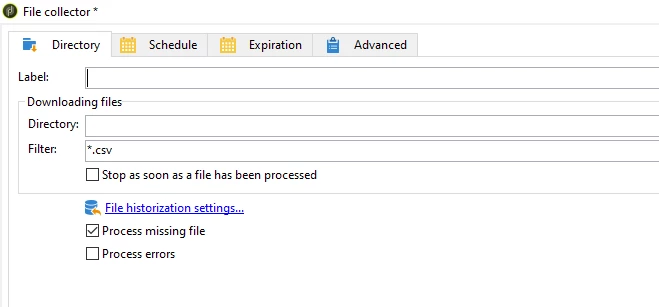
Please try using the File Collector and in the Directory Path, please give the full path of the Directory where the Input files are present.


Also, give the type of files you want to read in the Input filter (Example : .csv) as shown in Screenshot.

If you untick the Option "Stop as soon as the file has been processed", then all the files with that filter will be picked in that run.


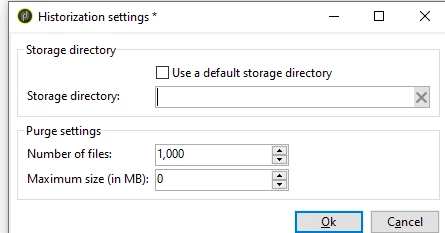
Also in the File historization Settings, Please give the Archived Folder's Full Path where you want the files to be stored after processing.


Regards,

Pravallika.

4 replies

amit_21111
July 20, 2023

Hi @rudrapraveenkumar 


You can use File Collector activity to load multiple files from SFTP and can configure directory and the filters to fetch the correct files.


Hope this helps.


Regards,

Amit

Level 2
July 20, 2023

Hi @amit_21111,


I have already tried, can you please elaborate more clearly


Thank You

Level 5
July 20, 2023

Hi @rudrapraveenkumar ,


I got your query and seems it is not so straighforward. You need to follow below approach for end to end execution. I have also done in my end in past :-


https://experienceleaguecommunities.adobe.com/t5/adobe-campaign-classic-questions/how-to-load-one-file-at-a-time-from-ftp-activity-in-adobe/m-p/303891


Regards

Abhishek

LakshmiPravallika
Community Advisor
LakshmiPravallikaCommunity AdvisorAccepted solution
Community Advisor
July 21, 2023

Hi @rudrapraveenkumar ,


Please try using the File Collector and in the Directory Path, please give the full path of the Directory where the Input files are present.


Also, give the type of files you want to read in the Input filter (Example : .csv) as shown in Screenshot.

If you untick the Option "Stop as soon as the file has been processed", then all the files with that filter will be picked in that run.


Also in the File historization Settings, Please give the Archived Folder's Full Path where you want the files to be stored after processing.


Regards,

Pravallika.

Sukrity_Wadhwa
Community Manager
Community Manager
August 24, 2023

Hi @rudraPraveenKumar,

Were you able to resolve this query with the help of the given solutions or do you still need more help here? Do let us know. In case the given solutions were helpful, then kindly choose the one that helped you the most as the 'Correct Reply'.
Thanks!

Sukrity Wadhwa