
Can I create a "view-only" access role for campaign metrics in Adobe Campaign Classic v8? | Community
Skip to main content
Sreeji_Lal
Level 2
June 9, 2025
Solved

Can I create a "view-only" access role for campaign metrics in Adobe Campaign Classic v8?

  • June 9, 2025
  • 1 reply
  • 482 views

Hi everyone.

I'm using Adobe Campaign Classic v8.5.2 and looking to provide clients with view-only access. They need to monitor campaign metrics – such as delivery performance, unsubscribes, and workflow status – but they don't necessarily need to have the access to edit, create, or delete any workflows or assets.

Is there a way to configure such restricted access – possibly through operator roles or custom permissions?

Appreciate any guidance. Thanks!
Best answer by ParthaSarathy

Hi @sreeji_lal ,

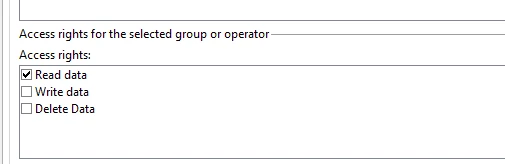
You can create a operator group for your clients; And in all the workflow / delivery / campaign folders which you want to provide read access, assign them with Read only access (example: workflow folder > Right click > property > security tab > Add your client operator group > Select 'Read data' access alone)

1 reply

ParthaSarathy
Community Advisor
ParthaSarathyCommunity AdvisorAccepted solution
Community Advisor
June 9, 2025

Hi @sreeji_lal ,

You can create a operator group for your clients; And in all the workflow / delivery / campaign folders which you want to provide read access, assign them with Read only access (example: workflow folder > Right click > property > security tab > Add your client operator group > Select 'Read data' access alone)

~  ParthaSarathy S~  Click here to join ADOBE CAMPAIGN USER GROUP for Quarterly In-person | Hybrid | Virtual Meetups
Sreeji_Lal
Level 2
June 9, 2025

Thanks @parthasarathy

They have demanded the view only access to the whole campaign tool. In this case, i'll have to restrict access folder by folder i suppose. Please could you advise if there is any easier way of user level access management?

Many thanks!

DavidKangni
Community Advisor
Community Advisor
June 9, 2025

@sreeji_lal 

the easiest way is what @parthasarathy suggest.

You can set up the read at the parent folder level and use the propagate option

Thanks,

David

David Kangni