Campaign Delete Error | Community
Skip to main content
Level 2
September 4, 2019
Solved

Campaign Delete Error

  • September 4, 2019
  • 15 replies
  • 14297 views

Hi,

I am unable to delete campaigns from the program. Whenever clicking on "delete" , its giving Attribute 'OperationId' unknown error.

Any idea why I am getting this error?
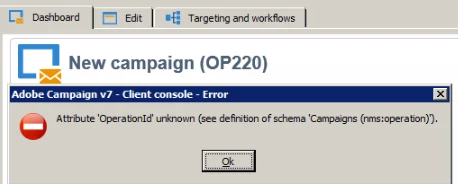
Thanks

This post is no longer active and is closed to new replies. Need help? Start a new post to ask your question.
Best answer by Milan_Vucetic

Hi,

this is not an issue, every table should have a primary key populated for every record.

If you have this problem every time when you want to erase some campaign then it is a configuration issue probably (primary key is not populated). I understood that this is a one particular case  that you have experienced (we don't know reason why this happened, we just found a way to delete it)

Regards,

Milan

15 replies

Venu_Reddy
Level 6
September 4, 2019

Hello,

Do you have access to delete the campaigns and make sure that you are having operator rights to delete if you don't have Admin access.

Regards,

Venu

ADB407207Author
Level 2
September 4, 2019

Yes, have admin rights -

Thanks

Venu_Reddy
Level 6
September 4, 2019

Can you confirm that who created this campaign ? Either you or another operator ?

Coz there may be a chance that you can't delete campaigns created by another operator

ADB407207Author
Level 2
September 4, 2019

Yes, I have created this.

Thanks

Milan_Vucetic
Level 9
September 4, 2019

Hi,

It seems as you have already deleted it but it is still visible in GUI.

Could you, please, clean local cache and try again?

Regards,

Milan

ADB407207Author
Level 2
September 4, 2019

Just now deleted local cache.. still I am able to view that campaign... Even if I just create a campaign and then delete then also unable to delete it.

Thanks

Level 3
September 4, 2019

Hi,

It's a little weird what is happening, but the first thing im thinking to do, is to go from Tools >  Generic query editor, and search that workflow if still showing using the query editor. if not then is something wrong with the display.

you can too go to administration > Production > Objects Created automatically, and delete it from there if shows.

If you have acces to the Data Base, you can too search it there directly and if you find it delete it using sql methods.

Regards,

Badr.

ADB407207Author
Level 2
September 5, 2019

Hi Badr,

Its not workflow. I am unable to delete campaign.

Thanks

ADB407207Author
Level 2
September 9, 2019

Hi,

Any help on this..

Thanks.

Milan_Vucetic
Level 9
September 9, 2019

Hi,

Please, try deleting campaign from database directly or use SQL code node.

Find Internal name of your campaign (because missing Id) with Generic query editor and set sql query inside of node:

DELETE FROM NMSOPERATION WHERE SINTERNALNAME = 'internal_name_of_your_campaign'

Maybe will work for you.

Regards,

Milan