Calling instance variable in Query’s ‘Is included in’ operator | Community
Skip to main content
Level 2
January 1, 2024
Solved

Calling instance variable in Query’s ‘Is included in’ operator

  • January 1, 2024
  • 3 replies
  • 2422 views

Hello everyone,

In Query I have to fetch @3583986 is included in '111','222','333','444'


In my workflow the above (dynamic) values are stored in an instance variable in JavaScript before the Query.

instance.vars.dynamicVariable = "'111','222','333','444'";


In Query,  I have to call this instance variable, So I have used the syntax $(instance/vars/@dynamicVariable)

@3583986 is included in $(instance/vars/@dynamicVariable)


But this $(instance/vars/@dynamicVariable) is getting converted to string (though I have opened editor and removed ‘ ‘ and saved the workflow again, still the expression is getting converted to string)
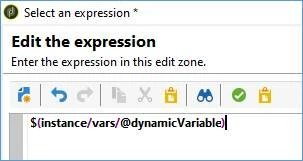
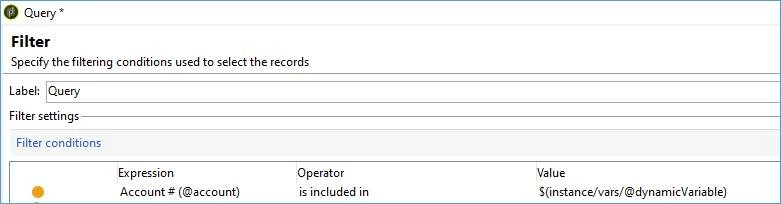


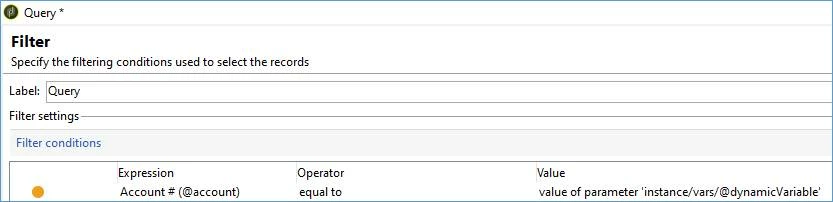
The same is working when I change the operator to ‘Equals to’ and the value can be read as ‘Value of parameter instance variable’. But my objective is to use ‘is included in’ operator and to make use of previous created instance variable.


Kindly help in fixing this. Either by making modification in instance variable or in Query!
Best answer by isahore

Hi @sd_11,


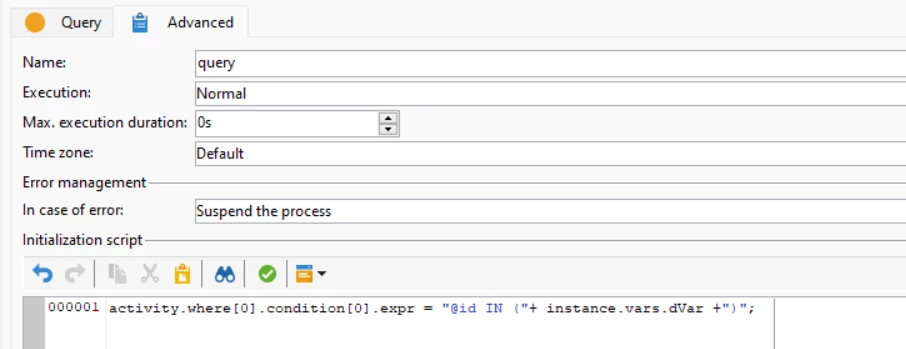
you can make it work by editing the expression in the advanced section of your query activity (initialization script), as follows:


Inside the query editor, you can have any condition which will be overwritten by this line of code.

You can basically play around with the query expression as a string to your liking, which is either completely replace the expression as in this example, or use string replacement functions to replace sections of it.


The reason why your code does not work is that the "IN" (is included in) expression tries to replace the instance variable as a single value, not as a concatenation of values.

It would work if you put all the possible values into different instance variables, and then use them in the query editor comma separated. But I guess you have already explored it and it is not what you are looking for in the first place.


Let me know if that worked for you.


Regards,

Ishan

3 replies

isahore
Community Advisor
isahoreCommunity AdvisorAccepted solution
Community Advisor
January 2, 2024

Hi @sd_11,


you can make it work by editing the expression in the advanced section of your query activity (initialization script), as follows:


Inside the query editor, you can have any condition which will be overwritten by this line of code.

You can basically play around with the query expression as a string to your liking, which is either completely replace the expression as in this example, or use string replacement functions to replace sections of it.


The reason why your code does not work is that the "IN" (is included in) expression tries to replace the instance variable as a single value, not as a concatenation of values.

It would work if you put all the possible values into different instance variables, and then use them in the query editor comma separated. But I guess you have already explored it and it is not what you are looking for in the first place.


Let me know if that worked for you.


Regards,

Ishan

Marcel_Szimonisz
Community Advisor
Community Advisor
January 2, 2024

Hello @sd_11,
comment from @amine_abedour in tech bytes 

I use it when I have a need to use the 'IN' or 'NOT IN' operator in my query. Let's say vars/@myVar = 'A','B','D'. If I do "@col IN $(vars/@myVar)" in Adobe, it translates it as "@col IN (''A','B','D'')" which doesn't work :/. With $noescaping, the quotes aren't added, and the query works just fine.

  You can add conditions directly in the query builder with use of $noescaping()

Code for it

//vars.myVar = "1,2" $noescaping(vars/@myVar)


result


You can see similar asnwers here
https://experienceleaguecommunities.adobe.com/t5/adobe-campaign-classic-questions/can-i-use-js-variable-in-query-activity/td-p/428978
https://experienceleaguecommunities.adobe.com/t5/adobe-campaign-classic-questions/how-do-we-pass-more-than-one-value-array-of-values-from-a/td-p/353515


Marcel Szimonisz


Sukrity_Wadhwa
Community Manager
Community Manager
January 17, 2024

Hi @sd_11,

Were you able to resolve this query with the help of the given solutions or do you still need more help here? Do let us know. In case the given solutions were helpful, then kindly choose the one that helped you the most as the 'Correct Reply'.
Thanks!

Sukrity Wadhwa