Blank values inserted into Date Data type Field in Adobe Campaign Classic V8 | Community
Skip to main content
Level 2
April 17, 2025
Solved

Blank values inserted into Date Data type Field in Adobe Campaign Classic V8

  • April 17, 2025
  • 2 replies
  • 802 views

Hi Team,

I have issue with Date datatype Column in Adobe campaign classic. Data inserted but with blank values, with below warning for that column.

I have values for Date column, 2022-04-29T05:02:38.000Z.

getting warning in Data loading activity

Warning : 04/17/2025 8:57:07 AM BAS-010048 The field 'Year' with value '2022-04-29T05' in '2022-04-29T05:02:38.000Z' is too long. Maximum of 4 characters.

Data Loading activity configuration for Data format,
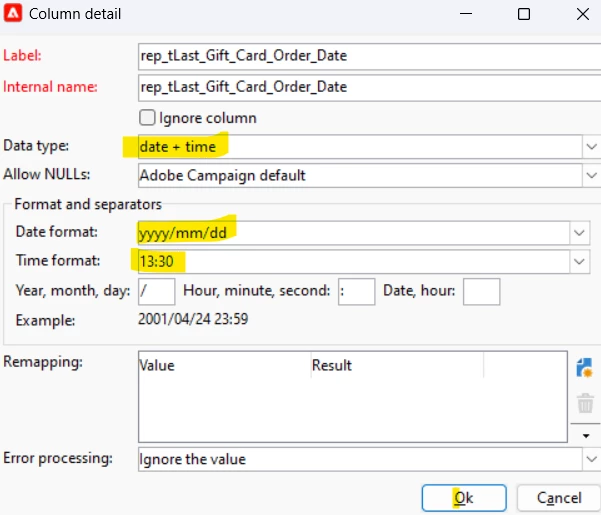
 

Please help me on this issue.


Regards,

Santosh Kumar.

Best answer by SushantTrimukheD

Hi @santoshku20,


The error you're encountering is due to the date column in your input file being in ISO 8601 format with a UTC timezone (e.g., 2022-04-29T05:02:38.000Z).

To successfully insert dates into Adobe Campaign, you’ll need to convert them into the preferred format for import:

YYYY-MM-DD HH:mm:ss (e.g., 2022-04-29 05:02:38)

You can achieve this by using an Enrichment activity after the Data Loading step, or a JavaScript activity, to transform the ISO date into a format that Adobe Campaign can recognize and properly map into the schema.

Thanks
Sushant Trimukhe

2 replies

SushantTrimukheD
SushantTrimukheDAccepted solution
Level 4
April 17, 2025

Hi @santoshku20,


The error you're encountering is due to the date column in your input file being in ISO 8601 format with a UTC timezone (e.g., 2022-04-29T05:02:38.000Z).

To successfully insert dates into Adobe Campaign, you’ll need to convert them into the preferred format for import:

YYYY-MM-DD HH:mm:ss (e.g., 2022-04-29 05:02:38)

You can achieve this by using an Enrichment activity after the Data Loading step, or a JavaScript activity, to transform the ISO date into a format that Adobe Campaign can recognize and properly map into the schema.

Thanks
Sushant Trimukhe

Level 2
April 17, 2025

Hi @sushanttrimukhed ,


Thanks for your response.

Its worked. But If I have more Date columns, I have to make this update to all the columns.

Instead, I tried another Option in the Data Loading Activity Data Type change to XM(ex:aaaa-mm-jjThh:mm:ss:sssZ).


My Date columns are update with below formatted Date.


Hope this will workflow for us.


Thank you.

ParthaSarathy
Community Advisor
Community Advisor
April 17, 2025

Hi @santoshku20 ,

In data loading activity select the data type as string for this attribute, and have an enrichment next to data loading and create a output column with this expression,

ToDateTime(date_field_from_file)

 ~  ParthaSarathy S~  Click here to join ADOBE CAMPAIGN USER GROUP for Quarterly In-person | Hybrid | Virtual Meetups
Level 2
April 17, 2025

Hi @parthasarathy ,

Thanks for your response.

Its worked. But If I have more Date columns, I have to make this update to all the columns.

Instead, I tried another Option in the Data Loading Activity Data Type change to XML(ex:aaaa-mm-jjThh:mm:ss:sssZ).

I have shared screenshots in above my reply.


Thank you,

Santosh.