Best method to setup UTM parameters | Community
Skip to main content
Level 5
June 20, 2022
Question

Best method to setup UTM parameters

  • June 20, 2022
  • 1 reply
  • 2847 views

Hello All,


I am looking for options to setup UTM parameters for all the links, within an email in ACC.

If we can centralize the method, so that the links can be dynamically appended, it will be great.


Please suggest some options for the same. The UTM parameters that we need to capture are Campaign ID

Campaign_label, Delivery Label 


Regards,

DG

This post is no longer active and is closed to new replies. Need help? Start a new post to ask your question.

1 reply

Amine_Abedour
Community Advisor
Community Advisor
June 20, 2022

Hello @dipendu_g,

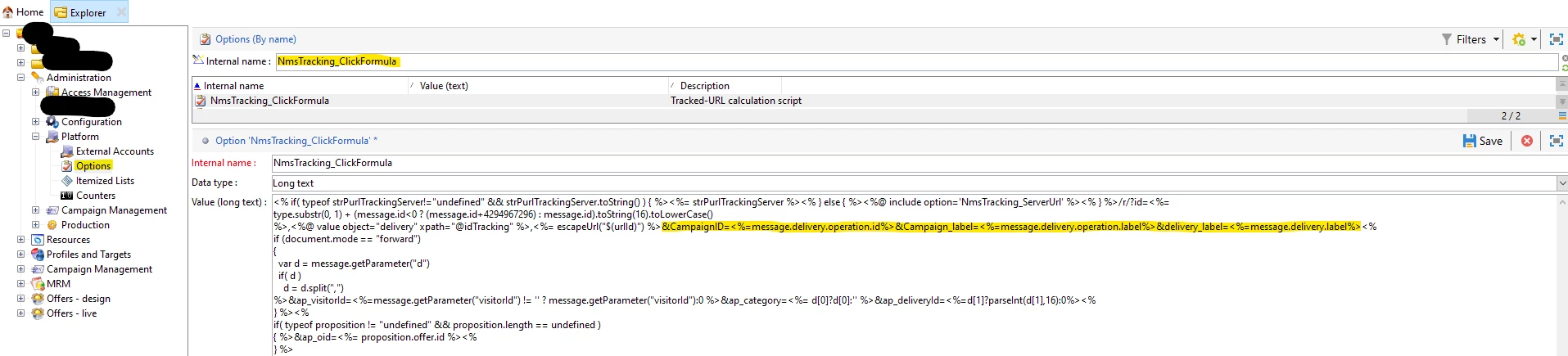
You can do what you want to do by modifiying the ''NmsTracking_ClickFormula'' option.

It should look be something like this : 


Br,


Amine

Amine ABEDOUR
dipendu_gAuthor
Level 5
June 21, 2022

Hi Amine,


I added the code and verified. The id is coming as 0, while the label is blank. I am executing this via a workflow from a campaign


Can you please help me here.


Regards,

Dipendu

dipendu_gAuthor
Level 5
June 23, 2022

hello,

The deliveries created by the delivery activity from the action tab does not get automaticaly linked to the operation, hence the lack of the operation info.

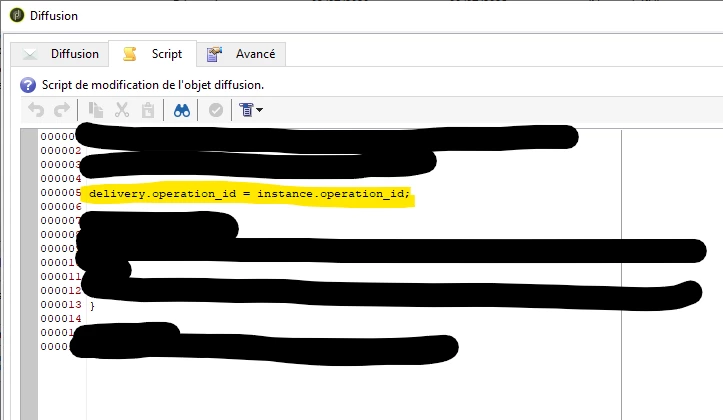
in the script Tab of the delivery activity add this to force the created deliveries to be linked to your operation

delivery.operation_id = instance.operation_id;


Br,

Amine


Hi @amine_abedour,


The operation id is still coming blank. I had also tried with recurring and Email Delivery under the Delivery Tab. But still I don't see the Operation Id / Campaign Id.


When I log that Info in the JS Script, I see that Operation ID, but it seems its not getting retrieved in the Email. Can you tell me what is the right way to retrieve this value in the Email

I am using the <%= message.delivery.operation.id %>


Regards,

Dipendu