Assistance Needed for Sending Test Email via Delivery API Method | Community
Skip to main content
November 8, 2024
Solved

Assistance Needed for Sending Test Email via Delivery API Method

  • November 8, 2024
  • 2 replies
  • 1611 views

Hi All,

I have a requirement to send a test email to a user using the delivery API method (submit delivery).

Adobe Campaign will receive all campaign and recipient email information from the upstream part of the SOAP implementation. We (AC) just need to receive that data and deliver the test email to the recipient's email address within a few minutes.

Any leads or suggestions on how to achieve this would be appreciated.

Thanks in advance!

@ccg1706 @parthasarathy @_manoj_kumar_ @craig_thonis @davidkangni 

This post is no longer active and is closed to new replies. Need help? Start a new post to ask your question.
Best answer by ccg1706

Hi @ccg1706 ,

I tried with submitDelivery API method and able to send email using this method . problem i am facing when replacing targetData.attribute using PB .
I am using custom table and adding the PB in delivery Template to replace the firstName (firstname being passed as additional data in the wk).
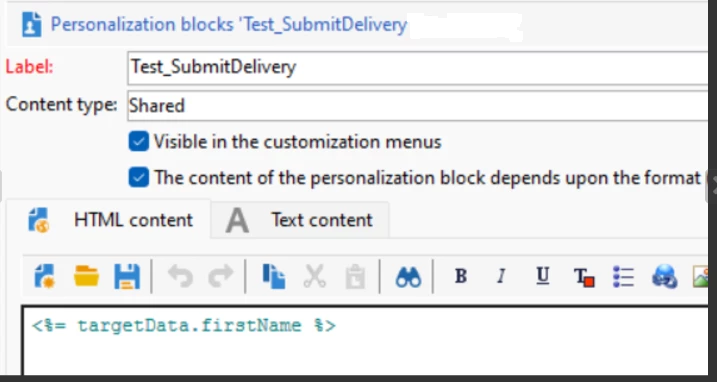
 

Same thing working fine when using <%= recipient.firstName %> at PB level.
is there any limitation with submitDelivery Method which blocking to use targetData.attribute.

This is the delivery error i am getting:



Hi @psne,


The issue appears to be related to how targetData attributes are managed in the submitDelivery API. 

I share with you some possible solutions:

*Check that the targetData includes the correct and required attributes.

*Check that the personalization block is configured to handle the targeData attribute.

    ** Whereas using <%= targetData.firstName %> replace it with <%targetData['firstName'] || ''%> This will evict error if the firstName attribute is null or undefined.

Other solutions that you can try are to include the targetData inside the payload or also take into consideration mapping  the targetData attributes to the recipient fields.

An example of a payload modified is:

{ "messageType": "email", "targetData": { "firstName": "John" }, "recipients": [ { "email": "example@example.com" } ]

 If here targetData doesn't work correctly, you can move its values inside the recipient object.


Hope it helps.


Regards, 

Celia

2 replies

Amine_Abedour
Community Advisor
Community Advisor
November 8, 2024

Hello @psne,


You can use SubmitNotification method of delivery schema to do so. 

Here is documentation of the method : click here 


Br

Amine ABEDOUR
PSNeAuthor
November 10, 2024

Hi @amine_abedour  / @ccg1706 ,

Thanks for your response. How can I replace the dynamic personalization values in the email content during delivery before calling the submitDelivery function? Using submitDelivery, I can send out the delivery, but I have a use case where I receive the HTML from an API and need to personalize it based on target attributes.


Thanks!!!!

ccg1706
Community Advisor
ccg1706Community AdvisorAccepted solution
Community Advisor
January 18, 2025

Hi @ccg1706 ,

I tried with submitDelivery API method and able to send email using this method . problem i am facing when replacing targetData.attribute using PB .
I am using custom table and adding the PB in delivery Template to replace the firstName (firstname being passed as additional data in the wk).


Same thing working fine when using <%= recipient.firstName %> at PB level.
is there any limitation with submitDelivery Method which blocking to use targetData.attribute.

This is the delivery error i am getting:


Hi @psne,


The issue appears to be related to how targetData attributes are managed in the submitDelivery API. 

I share with you some possible solutions:

*Check that the targetData includes the correct and required attributes.

*Check that the personalization block is configured to handle the targeData attribute.

    ** Whereas using <%= targetData.firstName %> replace it with <%targetData['firstName'] || ''%> This will evict error if the firstName attribute is null or undefined.

Other solutions that you can try are to include the targetData inside the payload or also take into consideration mapping  the targetData attributes to the recipient fields.

An example of a payload modified is:

{ "messageType": "email", "targetData": { "firstName": "John" }, "recipients": [ { "email": "example@example.com" } ]

 If here targetData doesn't work correctly, you can move its values inside the recipient object.


Hope it helps.


Regards, 

Celia

ccg1706
Community Advisor
Community Advisor
November 9, 2024

Hi @psne


You can follow @amine_abedour approach.


Additionally you can use SubmitDelivery Method .


Take into account that you need to be sure when you are doing the SOAP request to pass the correct information via the API.


Kind regards, 

Celia