AES CBC encryption | Community
Skip to main content
Level 2
November 16, 2021
Solved

AES CBC encryption

  • November 16, 2021
  • 1 reply
  • 4162 views

Hi


I need to implement a crypting function which will use "encryption_aescbcEncrypt" 

It's the first time I implement it so i'm a bite lost of how to done it in the console.

Could you please help me with the code i need to use ? I've already the Key but i don't know if i must create a JS Code and call the parameter in the delivery in order to encrypt the information I want.


Any help would be appreciated


Thanks
This post is no longer active and is closed to new replies. Need help? Start a new post to ask your question.
Best answer by costa_n11

Hi Lise,


The crypt function is the one to go in ACC and the documentaiton provided is correct

https://experienceleague.adobe.com/developer/campaign-api/api/f-cryptString.html

Calling JS in the HTML has its own syntax and I suspect that's what you're facing. Could you do the following test if not alredy done

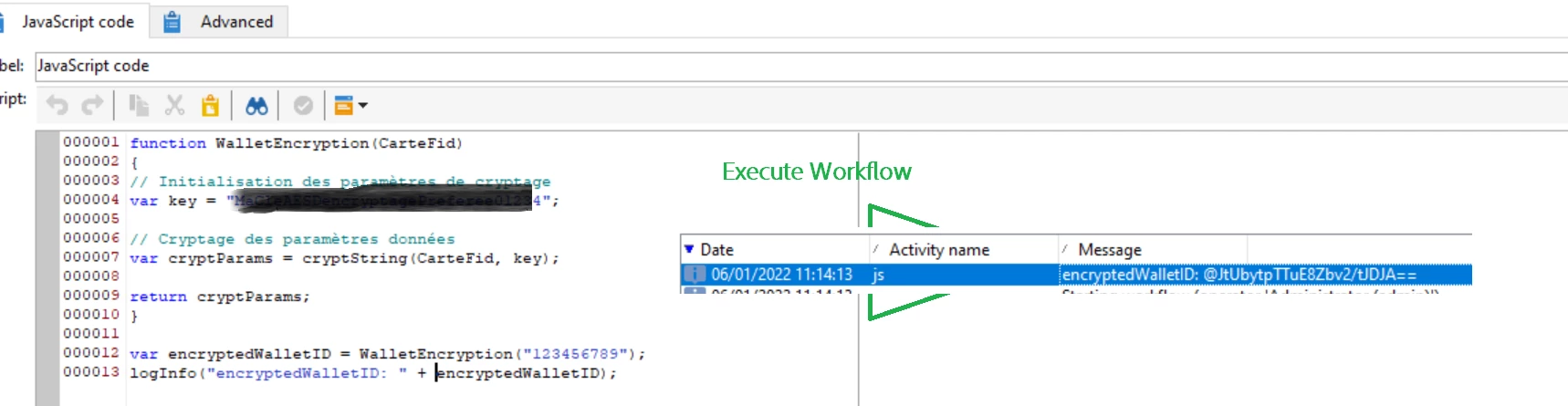
If a workflow: use a JS Code activity and place the following code and you'll have a result


Then in the HTML the way to call a JS function is Adobe specific using <% %> element

At the top of the delivery, put the following


<% include(put the JS library internal name where you have created the wallet function);
var cryptParams = WalletEncryption(targetData.LOYALTYCARDNUMBER)
%>
Then you will have yout HTML body as expected and if you want to print the value of the variable cryptParams you use the following
<%= cryptParams %>

That should work.

Thanks

Denis

1 reply

Level 2
November 22, 2021

hi David,


Your document are related to ACS not ACC .

So is there any people who could help me or who have already implemented an AEC CBC encryption ?


Rgds

costa_n11Adobe EmployeeAccepted solution
Adobe Employee
January 6, 2022

Hi Lise,


The crypt function is the one to go in ACC and the documentaiton provided is correct

https://experienceleague.adobe.com/developer/campaign-api/api/f-cryptString.html

Calling JS in the HTML has its own syntax and I suspect that's what you're facing. Could you do the following test if not alredy done

If a workflow: use a JS Code activity and place the following code and you'll have a result


Then in the HTML the way to call a JS function is Adobe specific using <% %> element

At the top of the delivery, put the following


<% include(put the JS library internal name where you have created the wallet function);
var cryptParams = WalletEncryption(targetData.LOYALTYCARDNUMBER)
%>
Then you will have yout HTML body as expected and if you want to print the value of the variable cryptParams you use the following
<%= cryptParams %>

That should work.

Thanks

Denis