Adobe Campaign v8 - Database Structure Update - Not Updating Schema Structure | Community
Skip to main content
December 15, 2022
Question

Adobe Campaign v8 - Database Structure Update - Not Updating Schema Structure

  • December 15, 2022
  • 1 reply
  • 1530 views

Hello!

Hoping someone can help. 😊


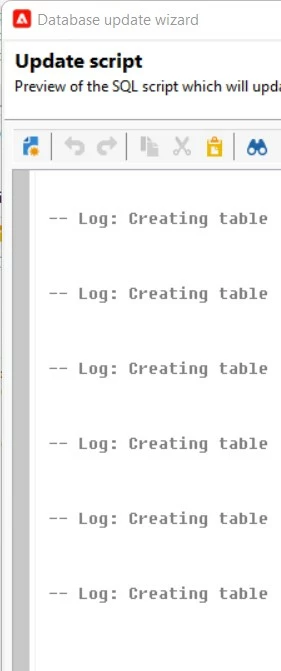
When I run the Database Update Wizard none of the schemas that I have created or have made updates to are being updated. The update script shows me every schema I've built with the "Synchronize" checkbox checked, but the SQL script shows every line of code commented out (see screenshot). 


I noticed this occurred after I created an extension of the nms:recipients schema using the "cus" namespace, but then created a new extension of the nms:recipients schema using a different namespace (let's call the new namespace "xyz"). I subsequently deleted the extension with the "cus" namespace thinking the database structure update was affected due to having two extensions of the nms:recipients schema with different namespaces.


Summary of Steps Taken:

1. Created "cus" extension of nms:recipients schema

2. Added attributes to cus:recipients schema and updated the database structure successfully. (Verified new attributes were showing as part of the structure)

3. Created "xyz" extension of nms:recipients schema and copied over the working xml from cus:recipients for the attributes I needed in xyz:recipients

4. Updated the database structure. Result: No update

5. Deleted cus:recipients schema and updated the database structure. Result: cus:recipients no longer existed as a schema, but xyz:recipients was still not showing up in the schema structure, nor was it triggering an update in the Database Update Wizard.
 

Thank you!

Natali

This post is no longer active and is closed to new replies. Need help? Start a new post to ask your question.

1 reply

Manoj_Kumar
Community Advisor
Community Advisor
December 15, 2022

Hello @natalir 


Extend the schema only once and add the new columns/attributes to the same extended schema. Don't create another extension of same schema


Manoj     Find me on LinkedIn
NataliRAuthor
December 15, 2022

Hi @_manoj_kumar_, thank you for your response.


I had to update the namespace for the client (xyz company), so unfortunately the schema has already been extended twice.


I'm hoping someone else has encountered this issue and has found a solution/workaround.


Thank you,

Natali

NataliRAuthor
December 15, 2022

Hi @natalir 

What you observed is normal, the Upgrade database process is detected new / removed elements by comparing the table in the database with the whole nms:recipient entity, since you've got the columns already defined via the cus extension, defining the same columns in a different extension won't change the table structure in the database: hence it does not detect any changes on the table structure,

You can see the table structure in the Documentation tab of Data Schema, you will find out the columns added via the cus namespace entity...

So what you see is normal, nothing wrong here...the namespace doe snot intervene in the table structure

Thanks

Denis.


Hi @costa_n11, thank you for your response. 


My explanation may not be completely clear.

What I’m saying is that none of the fields appear in the structure. Not from cus:recipients or xyz:recipients. Not only is the recipients schema not being updated, but none of the new schemas (not extensions) are being updated with the wizard.


Thank you!

Natali