Adobe Campaign Classic - Folder Structure Creation Using Database Script | Community
Skip to main content
Adobe Employee
June 29, 2019
Solved

Adobe Campaign Classic - Folder Structure Creation Using Database Script

  • June 29, 2019
  • 12 replies
  • 10647 views

Hi Experts,

There is a requirement from one of the client in Hybrid (on-prem) where any new user will be onboarded,the Admin will run a "Database Script" to create folder structure. Fo example, input parameter of the "DB script" can be a name of a Bank or any Organization_Name. The sub-folder structure will be fixed for all other users. Please see the below example and it would be great if any one can help me with the "Database Script".

  • Wells Fargo -- > (This name will change everytime and it will be taken as param for example to create the folder structure)
    • Administration
      • Access Management
        • Operators
        • Operator Group
        • Named Rights
      • Configuration
    • Campaign Management
      • Deliveries
      • Typology Management
        • Typologies
        • Typology Rules
      • Campaigns
      • Campaign Workflow
    • Profiles and Target
      • Seed Addresses
      • Recipients
      • Lists
    • Resources
      • Campaign Templates
      • XSL Stylesheets
      • Files Resources
      • Web Apps
      • Delivery Templates

Thanks and regards,

Kaustav

This post is no longer active and is closed to new replies. Need help? Start a new post to ask your question.
Best answer by Florian_Courgey

Hi,

You can use this code:

var rootLabel = 'Wells Fargo';

var prefix = 'wellsFargo';

var root = NLWS.xtkFolder.create({x:{model: 'xtkFolder', label: rootLabel, name: prefix+'Root', 'parent-id': 162522790}});

root.save();

logInfo('Root id', root.id);

// Admin

var admin = NLWS.xtkFolder.create({x:{model: 'xtkFolder', label: 'Administration', name: prefix+'Administration', 'parent-id': root.id}});

admin.save();

// Campaign

var campaign = NLWS.xtkFolder.create({x:{model: 'xtkFolder', label: 'Campaign Management', name: prefix+'CampaignMgt', 'parent-id': root.id}});

campaign.save();

(NLWS.xtkFolder.create({x:{model: 'nmsDelivery', label: 'Deliveries', name: prefix+'Deliveries', 'parent-id': campaign.id}})).save();

var typo = NLWS.xtkFolder.create({x:{model: 'xtkFolder', label: 'Typology Management', name: prefix+'TypologyMgt', 'parent-id': campaign.id}});

typo.save();

(NLWS.xtkFolder.create({x:{model: 'nmsTypology', label: 'Typology', name: prefix+'Typology', 'parent-id': typo.id}})).save();

(NLWS.xtkFolder.create({x:{model: 'nmsTypologyRule', label: 'Typology Rules', name: prefix+'TypologyRules', 'parent-id': typo.id}})).save();

// Profiles

var profiles = NLWS.xtkFolder.create({x:{model: 'xtkFolder', label: 'Profiles and Targets', name: prefix+'Profiles', 'parent-id': root.id}});

profiles.save();

(NLWS.xtkFolder.create({x:{model: 'nmsRecipient', label: 'Recipients', name: prefix+'Recipients', 'parent-id': profiles.id}})).save();

(NLWS.xtkFolder.create({x:{model: 'nmsSeedList', label: 'Seed addresses', name: prefix+'Seeds', 'parent-id': profiles.id}})).save();

(NLWS.xtkFolder.create({x:{model: 'nmsGroup', label: 'Lists', name: prefix+'Lists', 'parent-id': profiles.id}})).save();

// Resources

var res = NLWS.xtkFolder.create({x:{model: 'xtkFolder', label: 'Resources', name: prefix+'Resources', 'parent-id': root.id}});

res.save();

(NLWS.xtkFolder.create({x:{model: 'xtkXslt', label: 'XSL Stylesheets', name: prefix+'Xsl', 'parent-id': res.id}})).save();

Replace XXX with the id of your desired parent folder. It's an int and it can be found in the folder advanced properties.

To dynamically generate the following structure:
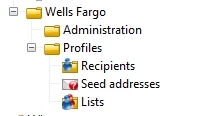
Note: the "model" key in the JSON is used to automatically set all the default parameters. You may find the values for model in \datakit\nms\eng\package\folder.xml and core.xml (look for <entities schema="xtk:folder"> node)

Note 2: the "save()" method is intelligent, it will update the folders if they already exist, no need to delete them

Note 3: some schemas don't have a folder-id, such as XSL stylesheets, so every brand will be able to see other brands XSL. You may have to hardcode a filter in the advanced parameters > restriction.

Kind regards

12 replies

Florian_Courgey
Florian_CourgeyAccepted solution
Level 4
July 1, 2019

Hi,

You can use this code:

var rootLabel = 'Wells Fargo';

var prefix = 'wellsFargo';

var root = NLWS.xtkFolder.create({x:{model: 'xtkFolder', label: rootLabel, name: prefix+'Root', 'parent-id': 162522790}});

root.save();

logInfo('Root id', root.id);

// Admin

var admin = NLWS.xtkFolder.create({x:{model: 'xtkFolder', label: 'Administration', name: prefix+'Administration', 'parent-id': root.id}});

admin.save();

// Campaign

var campaign = NLWS.xtkFolder.create({x:{model: 'xtkFolder', label: 'Campaign Management', name: prefix+'CampaignMgt', 'parent-id': root.id}});

campaign.save();

(NLWS.xtkFolder.create({x:{model: 'nmsDelivery', label: 'Deliveries', name: prefix+'Deliveries', 'parent-id': campaign.id}})).save();

var typo = NLWS.xtkFolder.create({x:{model: 'xtkFolder', label: 'Typology Management', name: prefix+'TypologyMgt', 'parent-id': campaign.id}});

typo.save();

(NLWS.xtkFolder.create({x:{model: 'nmsTypology', label: 'Typology', name: prefix+'Typology', 'parent-id': typo.id}})).save();

(NLWS.xtkFolder.create({x:{model: 'nmsTypologyRule', label: 'Typology Rules', name: prefix+'TypologyRules', 'parent-id': typo.id}})).save();

// Profiles

var profiles = NLWS.xtkFolder.create({x:{model: 'xtkFolder', label: 'Profiles and Targets', name: prefix+'Profiles', 'parent-id': root.id}});

profiles.save();

(NLWS.xtkFolder.create({x:{model: 'nmsRecipient', label: 'Recipients', name: prefix+'Recipients', 'parent-id': profiles.id}})).save();

(NLWS.xtkFolder.create({x:{model: 'nmsSeedList', label: 'Seed addresses', name: prefix+'Seeds', 'parent-id': profiles.id}})).save();

(NLWS.xtkFolder.create({x:{model: 'nmsGroup', label: 'Lists', name: prefix+'Lists', 'parent-id': profiles.id}})).save();

// Resources

var res = NLWS.xtkFolder.create({x:{model: 'xtkFolder', label: 'Resources', name: prefix+'Resources', 'parent-id': root.id}});

res.save();

(NLWS.xtkFolder.create({x:{model: 'xtkXslt', label: 'XSL Stylesheets', name: prefix+'Xsl', 'parent-id': res.id}})).save();

Replace XXX with the id of your desired parent folder. It's an int and it can be found in the folder advanced properties.

To dynamically generate the following structure:

Note: the "model" key in the JSON is used to automatically set all the default parameters. You may find the values for model in \datakit\nms\eng\package\folder.xml and core.xml (look for <entities schema="xtk:folder"> node)

Note 2: the "save()" method is intelligent, it will update the folders if they already exist, no need to delete them

Note 3: some schemas don't have a folder-id, such as XSL stylesheets, so every brand will be able to see other brands XSL. You may have to hardcode a filter in the advanced parameters > restriction.

Kind regards

ghoshdasAdobe EmployeeAuthor
Adobe Employee
July 3, 2019

Thanks Florian for you quick help..!!

I will check the code and will let you know in case of any issues.

Florian_Courgey
Level 4
July 5, 2019

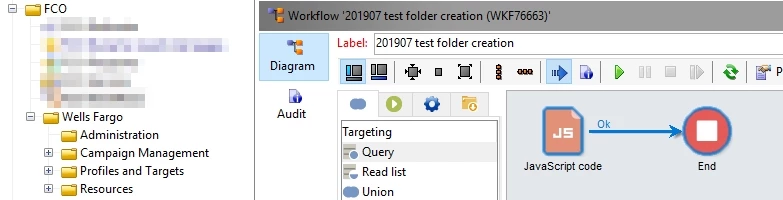
Hi asariaaara​, per your email, you have to use this code in a JS activity in a workflow:

Regards

Level 3
July 7, 2019

Hi floriancourgey

Really appreciate your help.

Just wanted to know if workflow should be initiated by current account(mentioned in script) or can be done with any other account.

I ran with different account and there was no difference in folder structure of account mentioned in script.

@kaustavg32220862,

were you able to achieve this.

Regards

ghoshdasAdobe EmployeeAuthor
Adobe Employee
July 7, 2019

Hi Assariarra,

I think we can execute this code using normal “admin” account.

iI didn’t get a chance since I am on leave.

@floriancourgey - correct me if I am wrong.

Regards,

Kaustav

ghoshdasAdobe EmployeeAuthor
Adobe Employee
July 9, 2019

Hi Floriancourgey,

Can you please let me know how to get the [folder-id] of the main "Root" folder?

I am checking into xtk:folder schema but I am not able to get the same.

And when I am trying to see the details by checking the properties of the folder I am only getting the "List of subfolders".

Regards,

Kaustav

Florian_Courgey
Level 4
July 9, 2019

Hi,

It's 0:

Best regards

ghoshdasAdobe EmployeeAuthor
Adobe Employee
July 9, 2019

Thanks Florian, but I have one more question. Is your code going to cover the permission also?

ghoshdasAdobe EmployeeAuthor
Adobe Employee
July 9, 2019

And also, I need to put "0" as the parent_id if I have to create the tree structure under main root folder correct?

ghoshdasAdobe EmployeeAuthor
Adobe Employee
July 10, 2019

Hi Floriancourgey,

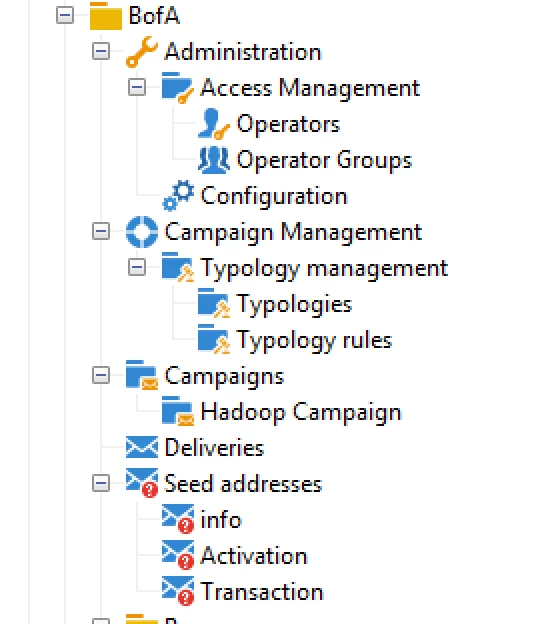
I have executed the code but it created all the generic folders.Meaning "Administration" is not having proper "Admin" process folder. "Campaign Management" is also not having proper "process" folder.

Ideally it should create the proper process folder. Please refer the screenshot below: Is that something you can help along with proper access rights?