Access current delivery id from the workflow. | Community
Skip to main content
September 9, 2020
Solved

Access current delivery id from the workflow.

  • September 9, 2020
  • 5 replies
  • 3453 views

I am using a delivery in a workflow. Post the delivery has completed I require the delivery id of the delivery and store it in a custom schema. Is it possible to obtain the delivery id, once the delivery has been completed, in the current workflow. 
This post is no longer active and is closed to new replies. Need help? Start a new post to ask your question.
Best answer by Florian_Courgey

Hi,

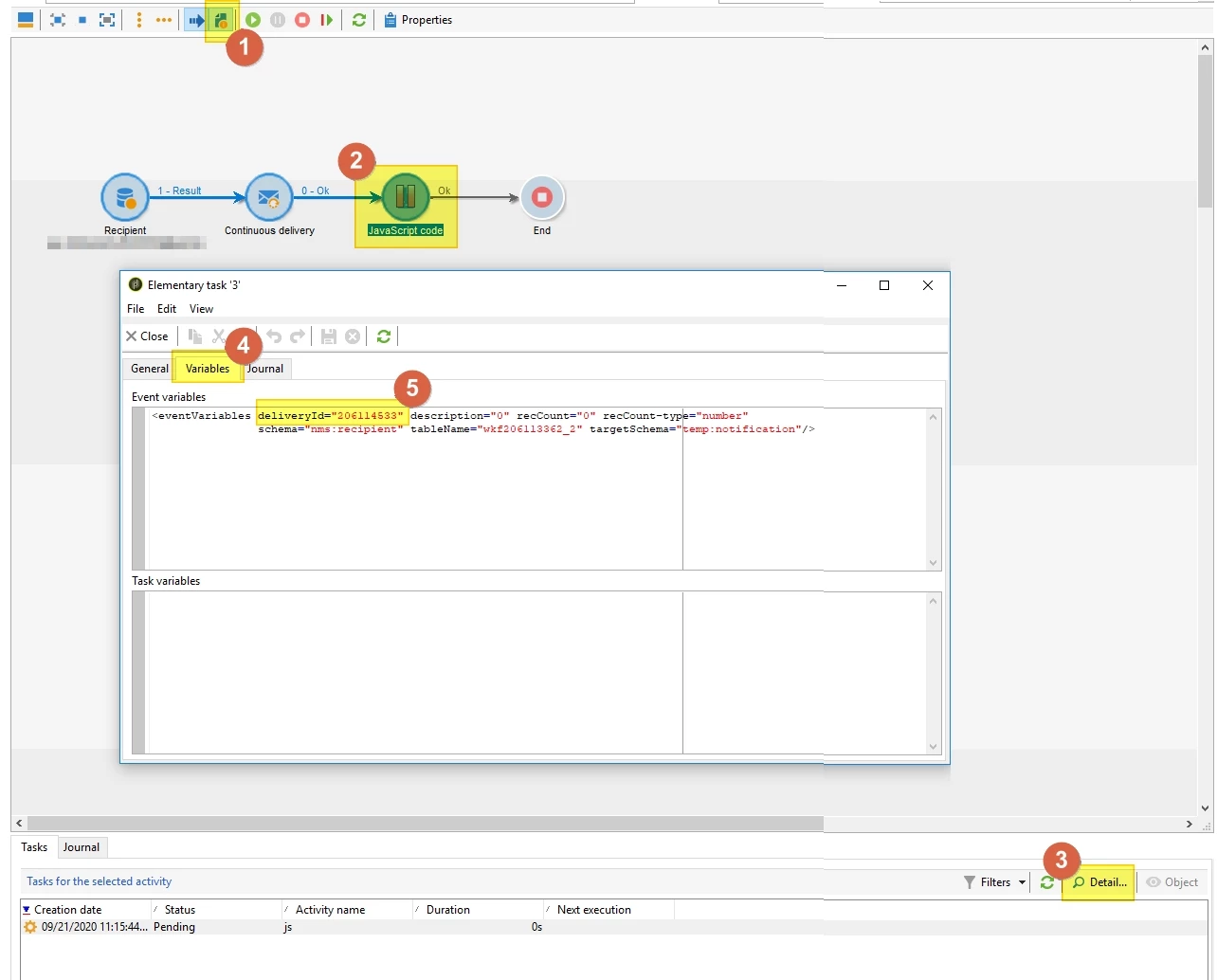
You can use vars.deliveryId in a JS activity right after a delivery.

To debug workflow variables:

  1. Activate workflow menu "Display the tasks and the log"
  2. Select the JS paused activity
  3. "Details" button
  4. "Variables" tab
  5. Find all the current variables, available with vars.XXX


Best

Florian


PS: source and details in this blog post.

5 replies

SheetalAgrawalSoni
Level 2
September 9, 2020

By default, the report shows all offers in all deliveries across all platforms. to narrow the data set, select your delivery from the delivery field or filter the report data by the start and the end dates. Refresh the report to see the most recent data through the applied filters.

DavidKangni
Community Advisor
Community Advisor
September 10, 2020

Yes, add a transition from your delivery and then you can get it in the output transition using an enrichment or a js activity.

Thanks,

David

David Kangni
Jonathon_wodnicki
Community Advisor
Community Advisor
September 14, 2020

Hi,


If this is something you're doing on many deliveries, you may be better served using a post-processing workflow, service provider workflow template, or offline workflow to record the ID's.


Thanks,

-Jon

Sukrity_Wadhwa
Community Manager
Community Manager
September 21, 2020

Hi @amrutac89145301,

Were you able to resolve this query with any of the given solution? Please let us know.

Thanks!

Sukrity Wadhwa
Florian_Courgey
Florian_CourgeyAccepted solution
Level 4
September 21, 2020

Hi,

You can use vars.deliveryId in a JS activity right after a delivery.

To debug workflow variables:

  1. Activate workflow menu "Display the tasks and the log"
  2. Select the JS paused activity
  3. "Details" button
  4. "Variables" tab
  5. Find all the current variables, available with vars.XXX


Best

Florian


PS: source and details in this blog post.