Why Page is not responding error found 404 | Community
Skip to main content
April 28, 2022
Solved

Why Page is not responding error found 404

  • April 28, 2022
  • 6 replies
  • 6583 views

Can we create alert in Adobe Analytics for page not found (404) based on specific page. For example: lets say we want to create a alert for homepage 404, if instances are more than 50, can we do that?

This post is no longer active and is closed to new replies. Need help? Start a new post to ask your question.
Best answer by Jennifer_Dungan

There was an identical question posted a few weeks ago with multiple solutions posted:


https://experienceleaguecommunities.adobe.com/t5/adobe-analytics-questions/page-not-found-specific-page/td-p/448688 

6 replies

Jennifer_Dungan
Community Advisor and Adobe Champion
Jennifer_DunganCommunity Advisor and Adobe ChampionAccepted solution
Community Advisor and Adobe Champion
April 28, 2022

There was an identical question posted a few weeks ago with multiple solutions posted:


https://experienceleaguecommunities.adobe.com/t5/adobe-analytics-questions/page-not-found-specific-page/td-p/448688 

January 7, 2023

Hi, this should be possible. You would need to create a specific segment for this.


Without knowing how your tagging is, I can really give you a full answer, but I can give an example with our tagging:


For ALL 404 error pages, our "Pages Not Found" dimension will pass a generic name like "404-error", we also track eVars for both "Current URL" (which includes querystring parameters) and "Canonical URL" and a "Page Type". So in my case, I could create a segment where the "Pages Not Found" (or Pages - since these values are the same) is "404-error" AND my canonical URL is my home page url the example for my own website the same things its happened with me at https://mynstromy.com/ (if you don't have that, you might have do use your full url with some rules to try and capture the variations), or where my page type is "home" (some combination that gets me my home page where it's also a 404) -You should test your segment in Workspace to be sure it returns the exact pages you want. 

https://experienceleaguecommunities.adobe.com/t5/adobe-analytics-questions/page-not-found-specific-p... 

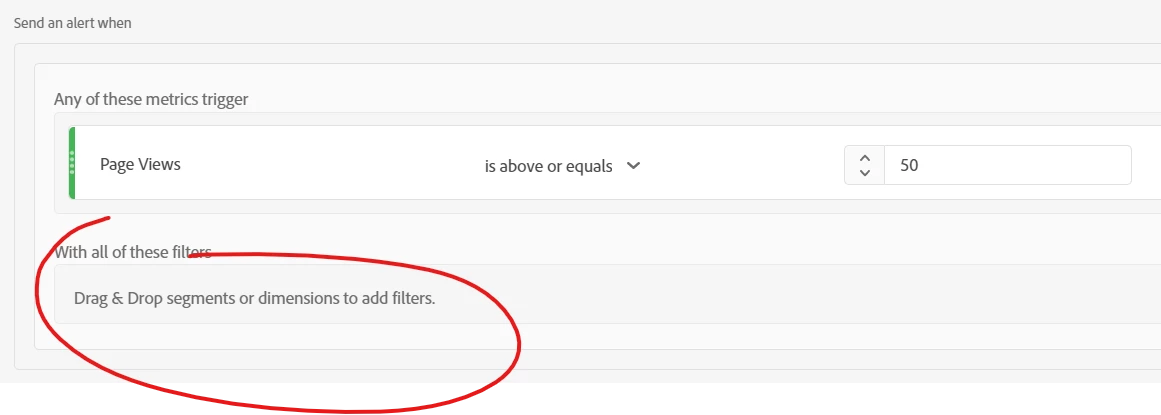
Then when you create your alert, you can set your metric threshold and drag your newly created segment into the filter 
April 2, 2023

You should test your segment in Workspace to be sure it returns the exact pages you want. 

April 24, 2023

If your workspace is working fine then it should be good however you can research more on other forums too.

April 30, 2024

Why might I be seeing a 'Page not responding' error along with a 404 status code at @alesaevon https://ehallpass.vip when trying to access a webpage? 


I have seen the solutions; will they work or not?


  • Check the URL: Ensure the URL is typed correctly without any typos or errors.
  • Refresh the page: Sometimes, simply refreshing the browser can resolve temporary issues.
  • Clear browser cache: Outdated or corrupted cache can cause this error, so clearing your browser's cache might help.
  • Check with the website directly: Sometimes the error is on the server's side. Visiting the main website or a different page on the same domain can help determine if the issue is widespread.
  • Contact the website: If none of the above steps work, it might be helpful to contact the website’s support team for assistance.


Jennifer_Dungan
Community Advisor and Adobe Champion
April 30, 2024

@anniedr it really depends on your implementation... The 404 page that loads must contain tracking code and have enough information to determine that it's a 404.


Usually sites will have a custom 404 page, one that is branded and often has the site's key navigation integrated into it... this type of 404 is easy to make sure your analytics is included and tracking.


However, if the 404 is at the DNS side (i.e. the website itself can't be found, then you won't be able to track that since that page won't belong to you),

May 1, 2024

Yes, it is possible to create an alert in Adobe Analytics for page not found (404) errors based on a specific page, such as the homepage. Here's how you can set up this alert:

  1. Log in to your Adobe Analytics account and navigate to the "Components" section.
  2. Click on "Alerts" and then click on "Add Alert".
  3. In the "Alert Name" field, enter a descriptive name for your alert, such as "Homepage 404 Error Alert".
  4. In the "Report Suite" dropdown, select the report suite where you want to apply the alert.
  5. In the "Metric" dropdown, select "Pages Not Found" or a similar metric that tracks 404 errors.
  6. In the "Granularity" section, choose the time period for which you want to check the metric (e.g., hourly, daily, weekly).
  7. In the "Comparisons" section, set the condition for triggering the alert. For your example, you would select "is greater than" and enter "50" as the threshold value.
  8. In the "Additional Filters" section, click on "Add a Filter". Here, you'll specify the page for which you want to track 404 errors. Set the dimension to "Page URL" or a similar dimension that captures the page path, and then specify the homepage URL (e.g., "https://www.example.com/index.html") as the filter value.
  9. Configure the "Notification Settings" to specify how you want to be notified when the alert is triggered (e.g., email, SMS, or in-product notification).
  10. Review your alert settings and click "Save" to create the alert.

With this setup, Adobe Analytics will monitor the specified page (homepage) for 404 errors and trigger an alert whenever the number of instances exceeds 50 within the chosen time period.

Keep in mind that the exact steps and options may vary slightly depending on your Adobe Analytics version and configuration. If you encounter any difficulties or have specific requirements, it's recommended to consult Adobe Analytics documentation or reach out to their support team for further assistance. win32diskimager

May 24, 2024

Yes, you can create alerts in Adobe Analytics for specific page not found errors (404 errors) based on criteria such as the number of instances exceeding a certain threshold. Here's a general guideline on how you might accomplish this:

  1. Define a Segment: Start by creating a segment that filters data for the specific page you're interested in, in this case, the homepage.

  2. Set up an Alert: Once you've created the segment, you can set up an alert within Adobe Analytics. This involves defining the conditions that trigger the alert, such as the number of instances of 404 errors exceeding 50.

  3. Configure Alert Conditions: Configure the alert conditions to monitor the 404 errors specifically for the homepage. You'll set the condition to trigger the alert when the count of instances for this specific page reaches or exceeds 50.

  4. Choose Alert Delivery: Select how you want to receive the alert notifications. This could be via email, SMS, or other preferred channels.

  5. Test and Activate: Before activating the alert, it's a good practice to test it to ensure it's working as expected. Once you're satisfied with the configuration, activate the alert.

By following these steps, you can effectively create an alert in Adobe Analytics that notifies you when the number of 404 errors for the homepage exceeds your specified threshold. This helps in promptly addressing any issues related to missing pages or broken links on your website.

ireceiptify
