Why do I see a difference in Entries metric, when using Sub Section(eVar4 or sProp4) dimension and Entry Page as the dimension? | Community
Skip to main content
hyejik65885166
Level 2
April 22, 2021
Solved

Why do I see a difference in Entries metric, when using Sub Section(eVar4 or sProp4) dimension and Entry Page as the dimension?

  • April 22, 2021
  • 2 replies
  • 4821 views

Why do I see a difference in Entries metric, when using Sub Section(eVar4 or sProp4) dimension and Entry Page as the dimension?


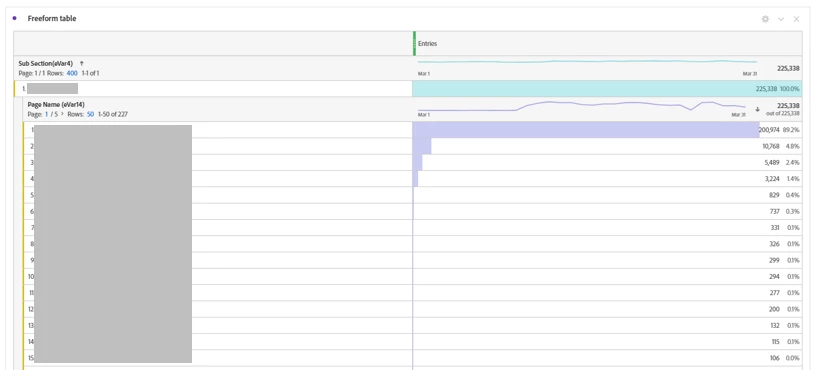
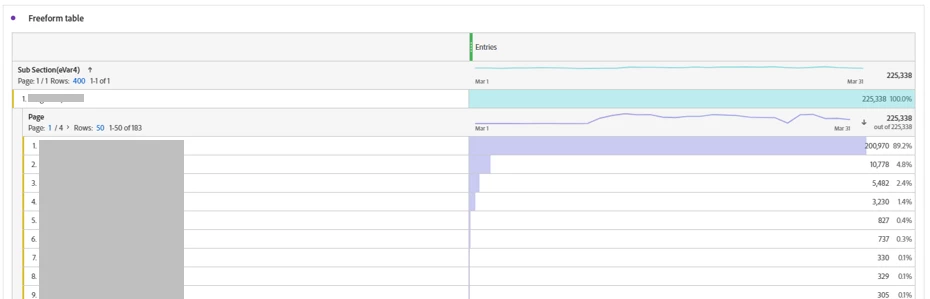
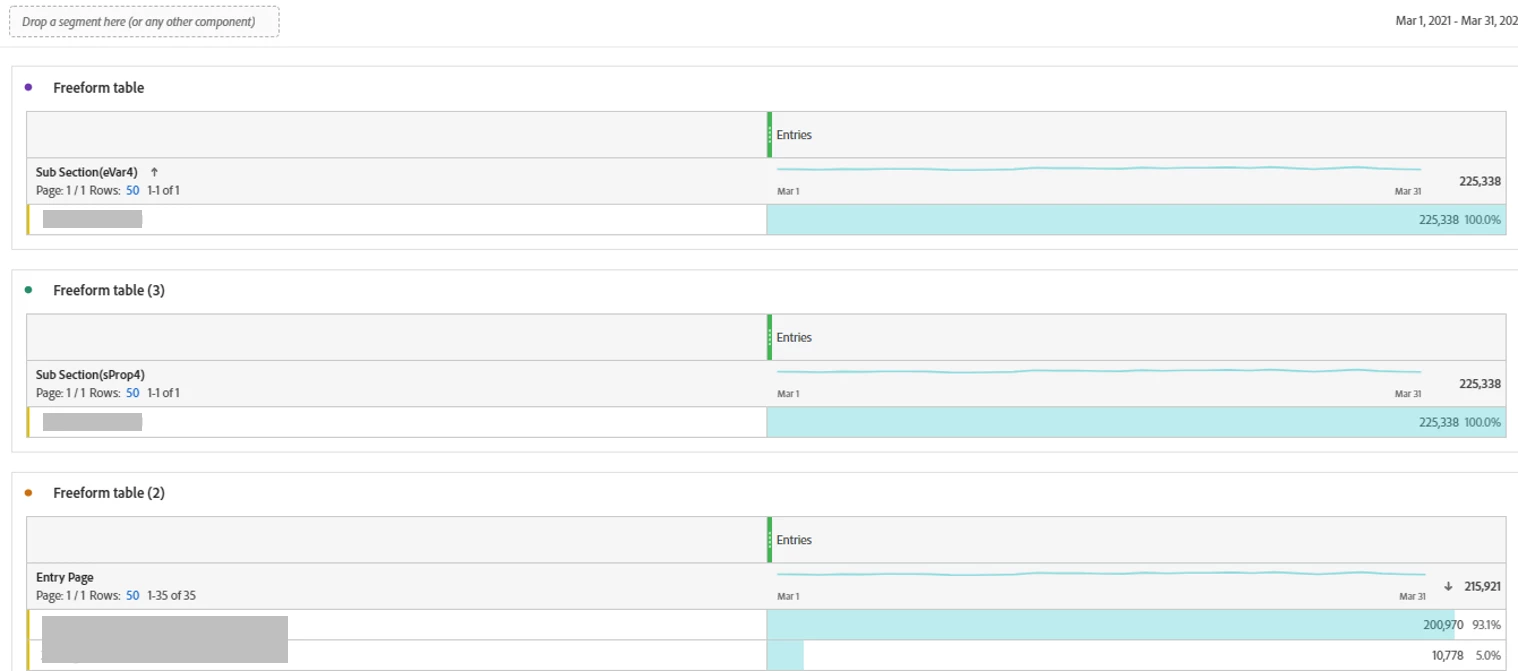
I've specifically put all the Entry pages that have the exact same Sub Section value.

And there are no other pages that have the same Sub Section value other than that I've put in the dimension column.


Thanks in advance!


--additional image for follow up questions.


add_2:


add 3:


final addition:


This post is no longer active and is closed to new replies. Need help? Start a new post to ask your question.
Best answer by PratheepArunRaj

Dear hyejik65885166,

All the first I want to say is, Entries by a Prop or an eVar can be more than the Page Entries.

Consider this scenario, a visitor has loaded a page where Page Name is 'Home' and Site Section is 'Business' in a Page View Call. Entries will be captured for both Page and Site Section. He didn't do any activity for 30 minutes and thus the visit will expire. Now, if he clicks on the Home Page Banner where all the variables including Site Section (Here, Business) are passed, but this time it is a Non-Page View Call. Now, 'Business' will get one entry but the page won't because you cannot set Page Name in the Non-Page View Call. 

We already know, 'Entries' or 'Entry Page' is not based on the first Server Call but based on the first-dimensional item. Here page didn't capture after the session expiration and thus entry will not be attributed.

That's the reason when you break down by Page Name (eVar14), the value is there because we can set the eVar in a Non-Page View Call.

So, the conclusion here is, the scenario is because of Custom Links i.e. Non-Page View Calls.

If you still need to understand about entries attribution with examples, here you go with some of my blog links.

Adobe Analytics: Entries in Segmentation & Adobe Analytics: Entry Dimension and ‘Entries’ Metric

Thank You, Pratheep Arun Raj B | Xerago | Terryn Winter Analytics

2 replies

yuhuisg
Community Advisor
Community Advisor
April 22, 2021

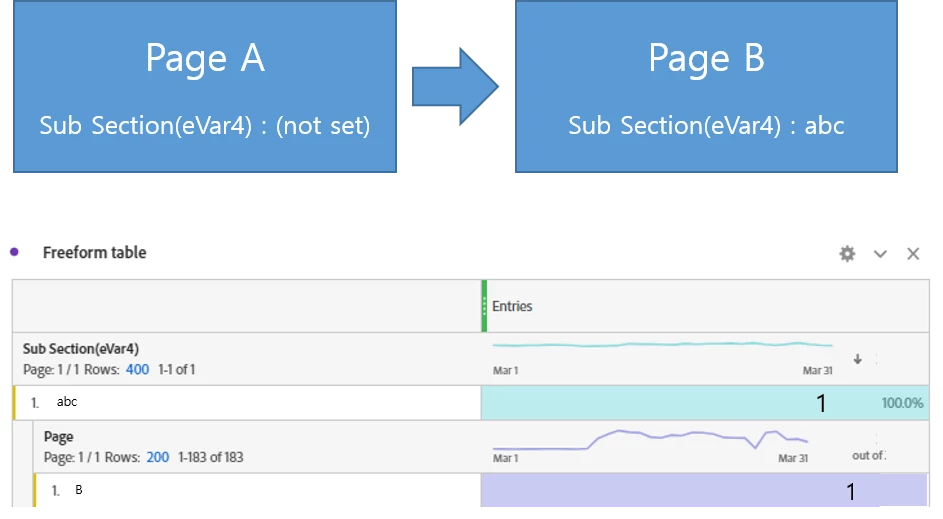
The most common reason is that some of your pages don't have eVar4 nor prop4 being set.

hyejik65885166
Level 2
April 22, 2021
Thanks for the reply. I have a following question. As you've said, as I brokedown Sub Section XXX into pages, I've found that many of them didn't have eVar4 nor prop4 correctly set. This being the case, why are they even included in the data table?
PratheepArunRaj
Community Advisor and Adobe Champion
PratheepArunRajCommunity Advisor and Adobe ChampionAccepted solution
Community Advisor and Adobe Champion
April 22, 2021

Dear hyejik65885166,

All the first I want to say is, Entries by a Prop or an eVar can be more than the Page Entries.

Consider this scenario, a visitor has loaded a page where Page Name is 'Home' and Site Section is 'Business' in a Page View Call. Entries will be captured for both Page and Site Section. He didn't do any activity for 30 minutes and thus the visit will expire. Now, if he clicks on the Home Page Banner where all the variables including Site Section (Here, Business) are passed, but this time it is a Non-Page View Call. Now, 'Business' will get one entry but the page won't because you cannot set Page Name in the Non-Page View Call. 

We already know, 'Entries' or 'Entry Page' is not based on the first Server Call but based on the first-dimensional item. Here page didn't capture after the session expiration and thus entry will not be attributed.

That's the reason when you break down by Page Name (eVar14), the value is there because we can set the eVar in a Non-Page View Call.

So, the conclusion here is, the scenario is because of Custom Links i.e. Non-Page View Calls.

If you still need to understand about entries attribution with examples, here you go with some of my blog links.

Adobe Analytics: Entries in Segmentation & Adobe Analytics: Entry Dimension and ‘Entries’ Metric

Thank You, Pratheep Arun Raj B | Xerago | Terryn Winter Analytics
Thank You, Pratheep Arun Raj B (Arun) | Xerago | Terryn Winter Analytics
hyejik65885166
Level 2
April 23, 2021

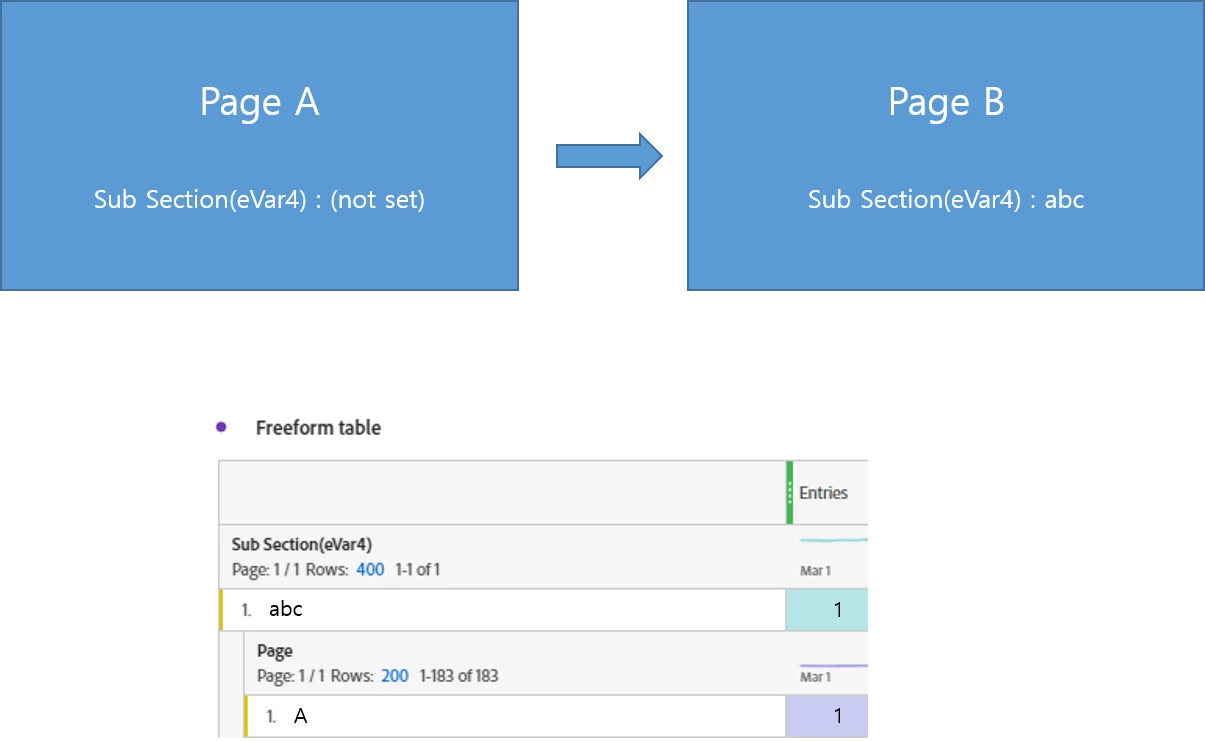
Thank you for the reply! Could you check if I understood it right? I've added a new image in the article(add3 image). So if a visit as shown in blue boxes were made, I would get the result like the below, am I right?