How to calculate Hit Depth in Adobe Data Feeds
Dear all.
I was trying to replicate the following Adobe Analytics segment in Adobe Data Feeds Extraction:
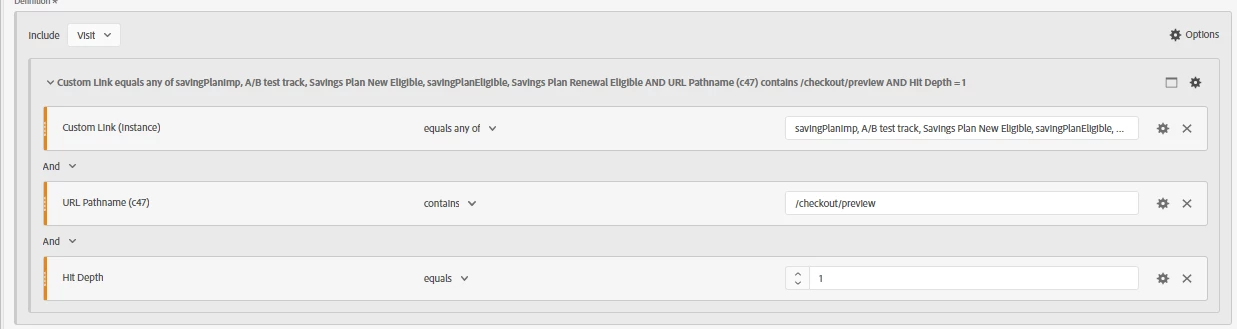
This is how I wrote in SQL to return the visits in for example, august-2022:
	select distinct post_visid_high||post_visid_low||visit_num||visit_start_time_gmt as visit_id
	from daci_privatespace.adobe_datafeeds
	where
	    exclude_hit = '0'
	   	and hit_source not in (5,7,8,9)
		and "_corrupt_record" is null
	    and upper(page_event_var2) in ('SAVINGPLANIMP','A/B TEST TRACK','SAVINGS PLAN NEW ELIGIBLE', 'SAVINGPLANELIGIBLE', 'SAVINGS PLAN RENEWAL ELIGIBLE')
	   	and visit_page_num =1 -- Hit Depth
	    and upper(post_prop47) like '%/CHECKOUT/PREVIEW%'
	    and reference_date >= date('2022-08-01') and reference_date <= date('2022-08-31') --Test
The thing is that I see a big discrepancy in Adobe Visits vs. Adobe Data Feeds Visits. (around 4% of discrepancy) and I realized that it is because I'm replicating fine the Hit Depth in Adobe (I removed this filter in both places and discrepancy reduced to 0,2%).
So my question is, how could I replicate exactly the Hit Depth Behaviour in Adobe Data Feeds extraction. I checked the Data Columns Data feeds info from Adobe Support and I read that I was using the right field, but maybe I'm missing something (https://experienceleague.adobe.com/docs/analytics/export/analytics-data-feed/data-feed-contents/datafeeds-reference.html?lang=en#)
Thanks in advance. Regards
Update: I can't reply (I don´t know why). Sorry @jennifer_dungan but I don't see your point. I'm bringing the Visits that matches in one hit these three conditions. In my SQL I'm doing the same thing. In fact, I've tested without Hit Depth condition (neither SQL nor Adobe Segment) and the results are the sames
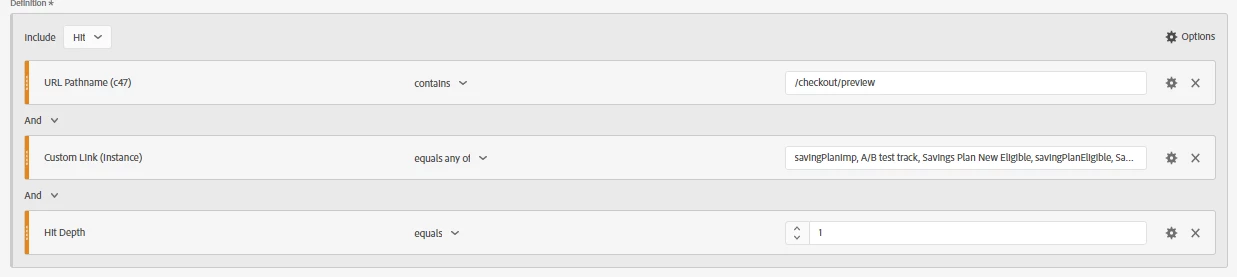
Anyway, just to avoid anything. I've modified the Segment to a Hit Level and also the SQL to a Hit Level and happens the same thing (big discrepancy)
	select count(cast(hitid_high as varchar)||cast(hitid_low as varchar)) as hit_id
	from daci_privatespace.adobe_datafeeds
	where
	    exclude_hit = '0'
	   	and hit_source not in (5,7,8,9)
		and "_corrupt_record" is null
	    and upper(page_event_var2) in ('SAVINGPLANIMP','A/B TEST TRACK','SAVINGS PLAN NEW ELIGIBLE', 'SAVINGPLANELIGIBLE', 'SAVINGS PLAN RENEWAL ELIGIBLE')
	   	and visit_page_num =1 -- Hit Depth
	    and upper(post_prop47) like '%/CHECKOUT/PREVIEW%'
	    and reference_date >= date('2022-07-01') and reference_date <= date('2022-08-31') --Test
Edit 2: Sorry again for mention you @jennifer_dungan . If you see my second example, you can see that I'm trying to extract the Hit, and the same error arrises (discrepancy due to visit_page_num=1 is not equivalent to Hit Depth = 1).
I've tried an alternative way which is take the first hit of the visit (not necessary where visit_page_num=1) and the results are better, but still with big discrepancy.
Do you know if there is any way to replicate Hit Depth=1 in Adobe Data Feeds?
Thanks and sorry again
Edit 3: Sorry again for mention you @jennifer_dungan, The Hit Depth gets increase in every Hit, even with there is in some of the hit any Page Load. The question is, like you can see in my second example, I'm extracting the first Hit (hit_depth=1) and check the conditions other conditions, but like I see that Hit_depth=1 is not the same that visit_page_num=1 (like Adobe mentions in the reference columns https://experienceleague.adobe.com/docs/analytics/export/analytics-data-feed/data-feed-contents/datafeeds-reference.html?lang=en#)
Additionaly, (and also opened another questions in the community) I also check that some of the behaviour metrics are not working in Adobe Data Feeds like it is explained in the documentation (for example: https://experienceleaguecommunities.adobe.com/t5/adobe-analytics-questions/entry-page-type-wrong-calculation-in-adobe-analytics/m-p/582190#M42445)