Deleting Classification Data | Community
Skip to main content
Level 2
July 27, 2021
Solved

Deleting Classification Data

  • July 27, 2021
  • 4 replies
  • 3455 views

I want to use the ~empty~ or ~delete~ values on the classification file I exported on certain columns. When I re-upload this file will the latest classification rules apply or will the rows tend to be empty? 

Assuming they will get reclassified based on latest rule builder changes, but please can you confirm?

Much appreciated, thanks!

This post is no longer active and is closed to new replies. Need help? Start a new post to ask your question.
Best answer by hjoshi

@ssharanya29 


Please refer the below document for deleting classification data.

https://experienceleague.adobe.com/docs/analytics/components/classifications/classifications-importer/t-delete-classification-data.html?lang=en

Multiple classifications can belong to the same variable. For example, you can have 2 different classifications of product . If you would like to only remove a single classified value, replace the classification value with ~empty~ . For example:
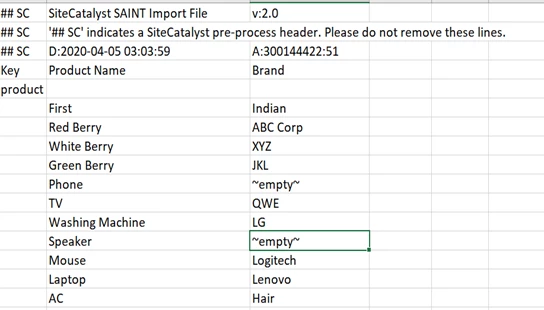
 

Using ~empty~ under the Brand Category classification still preserves data for the Product Name classification. The ~empty~ value only deletes classification data for that cell.


Use ~deletekey~ in any column to delete the entire classification row

For example:
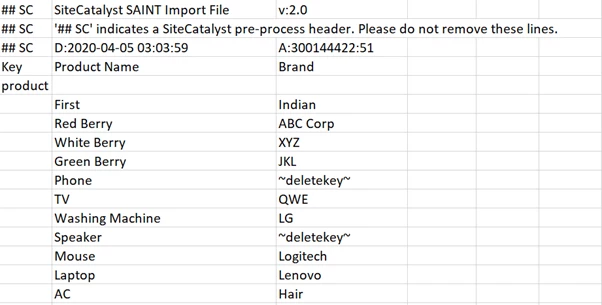
Using ~empty~ under the Brand Category classification still preserves data for the Product Name classification. The ~empty~ value only deletes classification data for that cell.


4 replies

Level 7
July 27, 2021

@ssharanya29 If checkbox of 'Overwrite data on conflict' is checked in classification UI than any row in which value is changed will overwrite the existing value in report. 

Level 2
July 27, 2021
That is correct, but I am wondering if the keys get reclassified again or they end up empty if I write ~empty~
hjoshiAccepted solution
Level 2
July 27, 2021

@ssharanya29 


Please refer the below document for deleting classification data.

https://experienceleague.adobe.com/docs/analytics/components/classifications/classifications-importer/t-delete-classification-data.html?lang=en

Multiple classifications can belong to the same variable. For example, you can have 2 different classifications of product . If you would like to only remove a single classified value, replace the classification value with ~empty~ . For example:


Using ~empty~ under the Brand Category classification still preserves data for the Product Name classification. The ~empty~ value only deletes classification data for that cell.


Use ~deletekey~ in any column to delete the entire classification row

For example:

Using ~empty~ under the Brand Category classification still preserves data for the Product Name classification. The ~empty~ value only deletes classification data for that cell.


Level 2
July 27, 2021

That sounds right, thank you. I have an issue of jumbled classification values and so I am trying to empty the wrong values and to reclassify them again acc to latest rule changes. I don't think the ~empty~ value will help me reclassify, would it?

khurshid
Adobe Employee
Adobe Employee
July 27, 2021

Rule Builder runs every four hours. If the classification files are found empty (after you upload the file) and it falls within the "overwrite window", the Rules Builder will update new value as per the rules. 

Level 2
August 5, 2021
Thank you! It did update, but I could not see "successfully uploaded n rows" message on the importer on multiple occasions. Is this something to do with data rows or an Adobe error?
jantzen_b
Adobe Employee
Adobe Employee
July 30, 2021
Do any of the answers below answer your initial question? If so, can you select one of them as the correct answer? If none of the answers already provided answer your question, can you provide additional information to better help the community solve your question?