Can Workspaces and any scheduled PDFs automatically word wrap long dimension content? | Community
Skip to main content
Biggsy50
Level 3
October 31, 2022
Solved

Can Workspaces and any scheduled PDFs automatically word wrap long dimension content?

  • October 31, 2022
  • 1 reply
  • 1085 views

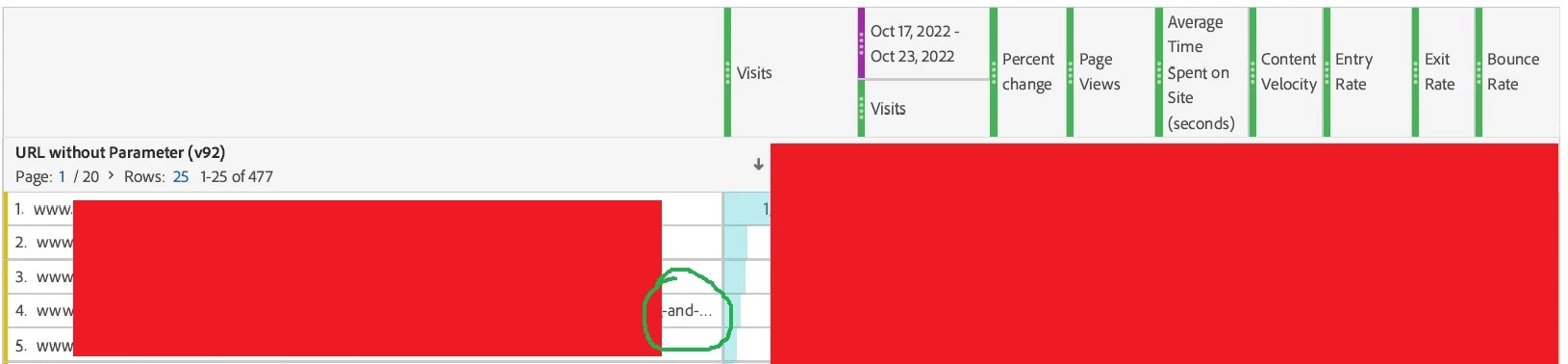
We create scheduled reports that email out PDF files to our stakeholders. However if the dimension contains a long URL, rather than word-wrapping it, it instead truncates it and adds "..." to the end. When the recipient clicks on one of the PDF's truncated links to confirm what it is, it then loads up a truncated URL 404 page, still with the "..." at the end (this is less of an issue when you are actually in Adobe Analytics of course as you can just hover over the dimension to see its full length)


As a workaround we're going to duplicate the table and have it contain just one single metric so the dimension column has much more horizontal space.


  1. Can there be an improvement made to word-wrap all long dimensions in the Workspace UI please?

I've over zealously blanked out my client's data in the image but check out row 4 which shows the truncated dimension; in this case it's a truncated URL.
This post is no longer active and is closed to new replies. Need help? Start a new post to ask your question.
Best answer by Biggsy50

I posted this as an idea: https://experienceleaguecommunities.adobe.com/t5/adobe-analytics-ideas/add-functionality-to-wrap-long-values-in-rows-in-freeform-tables/idi-p/555450 


@jennifer_dungan Interestingly, and further to the above I've now realised that the look 'n' feel of our scheduled Adobe Analytics PDFs are based on the device I first created/scheduled them on!

So I've been creating some Workspace dashboards on a 14" screen resolution laptop. Its scheduled PDFs are then quite narrow and in portrait orientation. These ones have the issue of long URLs in the dimension column being truncated.

However, when I instead create a Workspace dashboard on my 32.5" monitor, then the scheduled PDFs come out wide and in landscape orientation. These display the long URLs in full as there's a lot more space.

I will bear this in mind going forwards. 

1 reply

Jennifer_Dungan
Community Advisor and Adobe Champion
October 31, 2022

I don't believe such an option currently exists, this might be better to post as an idea so it can be added as a feature.


Also, one current workaround, if you aren't using any fancy visualizations is to send the report as CSV (which won't truncate the data) - but it's not the best presentation for your stakeholders, so I would understand how this wouldn't be a valid option.


Have you considered making your report as a mobile app dashboard? Something that your stakeholders can access via an app on their phone, rather than sending out PDFs? I was part of a webinar on the Mobile Dashboards last week, we will be posting the recording soon (I will share here when it's posted)


UPDATE: Mobile App Dashboards User Group Session Recording: https://www.youtube.com/watch?v=zSdOb_Jw0wg 

Biggsy50
Biggsy50Author
Level 3
October 31, 2022

Thanks Jennifer,


Yes - I suggested this as an improvement hoping that somebody might point our an existing bit of functionality that  would solve it. Thanks for your suggestions though. Our clients wouldn't get on so well with a CSV attachment and would want the existing PDF to work better for them. I might stick with my workaround of duplicating the table with the long URLs but limiting its number of metrics to just one (visits) to show the dimension in full.

I like the mobile dashboard idea though and could pursue that. Would they need to be signed up with an Adobe Analytics account for the data? If so we'd need to get over that hurdle first as many stakeholders are set up to receive scheduled emails only.


Thanks again,
Steve Biggs 

Biggsy50
Biggsy50AuthorAccepted solution
Level 3
November 1, 2022

I posted this as an idea: https://experienceleaguecommunities.adobe.com/t5/adobe-analytics-ideas/add-functionality-to-wrap-long-values-in-rows-in-freeform-tables/idi-p/555450 


@jennifer_dungan Interestingly, and further to the above I've now realised that the look 'n' feel of our scheduled Adobe Analytics PDFs are based on the device I first created/scheduled them on!

So I've been creating some Workspace dashboards on a 14" screen resolution laptop. Its scheduled PDFs are then quite narrow and in portrait orientation. These ones have the issue of long URLs in the dimension column being truncated.

However, when I instead create a Workspace dashboard on my 32.5" monitor, then the scheduled PDFs come out wide and in landscape orientation. These display the long URLs in full as there's a lot more space.

I will bear this in mind going forwards.