
Adobe Analytics Segment Matches Operator | Community
Skip to main content
Alexis_Cazes_
Level 10
November 8, 2021
Solved

Adobe Analytics Segment Matches Operator

  • November 8, 2021
  • 1 reply
  • 3587 views

I was wondering if someone knows the exact regex capabilities support by the "matches" operator from the segment builder.


Per documentation:

Comparison Operators for Segments | Adobe Analytics

matchesReturns items that match exactly based on a given numeric or string value. The “matches” clause is case sensitive in Adobe Analytics and in Customer Journey Analytics. Note: Use this operator when using wildcard (globbing) features. Examples of “globbing”:
  • a*e would match ae, abcde, adobe, and a whole sentence
  • adob* would match adobe, adobe analytics, and adobo recipe
  • *dobe would match dobe, adobe, and cute little dobe


At the moment I am using Adobe Classification Rule Builder to create Buckets of value for specific dimensions that contains numeric values. I would like to use the same regex functionality as in Classification Rule Builder to create segments based on same regex formulas.

Per the documentation is seems to support regex wildcard character only.


This is the kind of regex I would like to use:


^.*rFundA=((?!20000)(2\d\d\d\d)|30000)\.?[0-9]*\|.*$


This post is no longer active and is closed to new replies. Need help? Start a new post to ask your question.
Best answer by Garretth

The matches operator does not use a full range of regex, it simply allows you to use the * wildcard as the documentation suggests. 

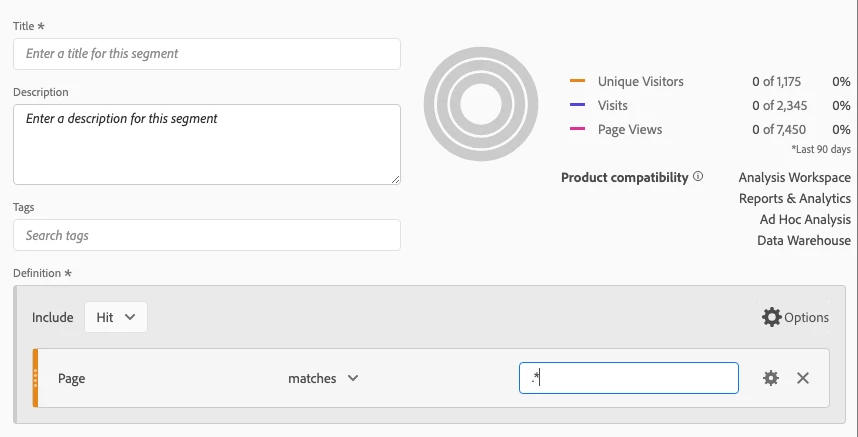
the regex '.*' should translate to all strings.  This provides no results however, showing that matches is not a regex operator. It is essentially an equals operator that also handles string values and allows you to use the * wildcard. 


In the scenario you've described however you are very close to doing the recommended approach which is to build your segments using the classified values that are the result of your classification rule builder rules. This will improve run times on your reports that use this segment, because the segment can make a simple lookup with an equals operator instead of the complicated logic represented by the regex in the rule builder. 


This concept is documented here: https://experienceleague.adobe.com/docs/analytics/components/segmentation/best-practices.html?lang=en

1 reply

GarretthAdobe EmployeeAccepted solution
Adobe Employee
November 8, 2021

The matches operator does not use a full range of regex, it simply allows you to use the * wildcard as the documentation suggests. 

the regex '.*' should translate to all strings.  This provides no results however, showing that matches is not a regex operator. It is essentially an equals operator that also handles string values and allows you to use the * wildcard. 


In the scenario you've described however you are very close to doing the recommended approach which is to build your segments using the classified values that are the result of your classification rule builder rules. This will improve run times on your reports that use this segment, because the segment can make a simple lookup with an equals operator instead of the complicated logic represented by the regex in the rule builder. 


This concept is documented here: https://experienceleague.adobe.com/docs/analytics/components/segmentation/best-practices.html?lang=en

Alexis_Cazes_
Level 10
November 9, 2021

Thanks for the confirmation. I thought that regex formula were not supported by matches.


Having said that I think a "Match Regex" rule would be great to have in the segment builder. While my use case is a long standing reporting need, in some instances a one off report or for data deep dive analysis, using a regex would be quicker than trying to stack several segment containers to achieve what you need.


Adobe Employee
November 9, 2021

Hi, I agree having a regex formula option would be very powerful. After some more digging I found that it has been suggested before in the Ideas section of the forums. It looks like engineering tried a proof of concept but found that the regex engines were to slow for providing workspace reports in a timely manner, see trevorpaulsen's comment: 
https://experienceleaguecommunities.adobe.com/t5/adobe-analytics-ideas/add-regex-to-comparison-operators-for-segments/idi-p/337045 

For now the recommended approach I suggested before where you apply the regex in creating classifications and then using the classified values with an equals operator will give you the benefit of a clean strait forward segment without sacrificing processing times in reporting, as the 'processing' and evaluation of the regex will have been done once in the classification process.