

OpenAI Atlas and Customer Journey Analytics: Navigating the New Era of AI-Driven Traffic
Introduction
Following my blog post on tracking AI and Gen AI-generated traffic in Customer Journey Analytics (CJA), I want to share an update on OpenAI's Atlas browser and explain what this emerging technology means for your CJA implementation and analytics strategy.
We're at a turning point in web browsing history. Atlas joins a growing ecosystem that includes Perplexity's Comet and The Browser Company's Dia, each offering AI-native browsing experiences that reimagine how we interact with the web. These tools represent a shift from passive browsing to active AI assistance, where agents work to understand context, execute tasks, and navigate digital experiences on our behalf.
However, Atlas faces significant adoption barriers. Browser switching costs remain substantial. Users have years of accumulated preferences, bookmarks, extensions, and muscle memory invested in their current browsers. Chrome alone commands over 65% market share, with deeply entrenched user habits. Convincing users to abandon their familiar browser requires compelling differentiation.
Atlas also relies on Bing as its built-in search provider, which may limit appeal among users who prefer Google's search results and ecosystem integration. Google's search dominance and integration with services like Gmail, Drive, and Calendar creates substantial lock-in effects that Atlas must overcome. Additionally, Google's own AI initiatives, including Gemini integration in Chrome and AI-powered search features, give Google an advantage in retaining users within their ecosystem rather than switching to AI-native browsers like Atlas.
Many users remain uncomfortable with autonomous agent mode. The idea of AI independently navigating websites, filling forms, and making decisions raises privacy concerns, trust issues, and questions about accountability when things go wrong. Early adopters may embrace agent capabilities, but mainstream users need time to develop comfort with AI autonomy, especially for sensitive tasks like financial transactions or personal data entry.
Understanding how Atlas operates today, including its three distinct usage modes, technical implementation details, and behavioral patterns, prepares analytics teams for a broader shift in how web traffic will behave as AI-powered browsers become increasingly mainstream and autonomous agents play a larger role in digital interactions.
NOTE: This post provides practical guidance based on current observations and documented behavior of OpenAI Atlas as of October 2025. As AI browsing technologies continue to evolve and mature, tracking methods, detection strategies, and best practices will inevitably need to adapt and be updated accordingly.
What is OpenAI Atlas?
OpenAI Atlas is a specialized Chromium-based browser designed to enable AI agents to interact with websites autonomously. Launched on October 21, 2025, and currently available on macOS with planned Windows, iOS, and Android versions, Atlas functions as a full-featured browser that renders complete web pages and executes JavaScript, just as a human visitor using a standard web browser would.
Three Distinct Usage Modes to Track
Understanding how Atlas operates is crucial for accurate analytics tracking. There are three distinct modes that generate different types of traffic patterns:
1. Standard Browsing Mode
Human users browse with Atlas as their primary browser without AI assistance. This generates normal CJA traffic that's currently indistinguishable from other Chromium-based browsers based on user agent alone. JavaScript execution occurs normally as your analytics library loads and executes as expected, all tags fire properly (page view tags, click events, and custom events), the browser accesses data layer objects and page metadata, cookies function normally (both first-party and third-party), and localStorage/sessionStorage are available.
Analytics Impact:
- Standard page views and session metrics
- Human-driven navigation patterns
- Normal engagement metrics (time on page, scroll depth)
- Typical conversion funnel progression
2. Sidebar Chat Mode
In Sidebar Chat Mode, users browse with AI assistance. They stay in control of where they go, but ChatGPT can answer questions about what's on the page, summarize content, or provide guidance. This bridges standard browsing and full agent control.
ChatGPT reads the page you're currently viewing. It can answer questions, summarize information, or help you understand complex material. However, the sidebar conversations themselves aren't tracked in CJA. Only your actual page interactions like clicks, navigation, and form submissions generate analytics data.
This creates an interesting pattern: browsing stays human-driven but may be influenced by AI suggestions. Users might spend more time on pages while asking questions, revisit pages for clarification, or show more methodical information-gathering as they follow AI recommendations.
Analytics Impact:
- Still human-driven navigation, but may show:
- Longer session durations (users asking questions)
- Increased page revisits (users seeking clarification)
- More systematic information gathering patterns
- Potential for screenshot sharing or content extraction via sidebar
3. Agent Mode
The AI autonomously opens tabs, clicks elements, fills forms, and completes tasks like booking reservations, ordering groceries, or researching products. This is where the most significant analytics implications occur. Even in Agent mode, when actions are executed on the page, JavaScript runs normally, data collection continues in Adobe Analytics (AA) and CJA, and pages remain personalized using Adobe Digital Experience products like Adobe Journey Optimizer (AJO), Real-Time CDP, and Target.
Analytics Impact:
- Rapid multi-page navigation sequences
- Multiple simultaneous tab openings
- Systematic, non-human browsing patterns
- Faster page-to-page transitions
- Distinctive pause patterns on sensitive sites
- Partial funnel completion and potential abandoned transactions
- Unusual form submission patterns or errors
- Agent mode cannot run code, download files, or access other apps
Important Limitations:
- Early testing shows agents work well for simple tasks but struggle with complex workflows
- Agent mode pauses on sensitive sites requiring extra user confirmation
- Permission requests before opening new tabs create distinctive interaction patterns
Key Tracking Considerations for Atlas
Understanding When CJA Tracking Occurs
The most critical question for analytics teams is: "When will Atlas browser traffic appear in my CJA data?" Atlas data is likely already in your reports, potentially affecting metrics like content consumption and time spent. Let's break down when Atlas activity generates CJA data and when it doesn't:
Atlas Browser Activity (Appears in CJA)
Atlas is a full Chromium-based browser, meaning all the following scenarios will execute your AA/CJA implementation and generate trackable server calls. When Atlas refers from ChatGPT, the referring domain remains chatgpt.com as that's the base starting default domain for Atlas. When Atlas renders a page in the browser window, your CJA implementation executes. It processes JavaScript, fires tracking tags, and generates server calls just like Chrome, Safari, or any other browser.
| Usage Mode | User Actions | CJA Impact |
| 1. Standard Browsing Mode | -User types a URL directly into Atlas browser -User clicks links and navigates between pages - User interacts with site elements (buttons, forms, videos) |
Identical to standard Chrome browser traffic—executed page views, events, conversions all recorded |
| 2. Sidebar Chat Mode | -User browses your site with the Atlas sidebar open -User asks ChatGPT questions about page content while on your site -ChatGPT analyzes the current page the user is viewing |
All executed page loads and page interactions are tracked; the AI is reading the rendered page but the user is still browsing normally. NOTE: CJA does not collect data about sidebar ChatGPT conversations. The sidebar chat is isolated from analytics tracking. Only the user's actual page interactions generate analytics calls. |
| 3. Agent Mode | -AI agent autonomously navigates your site -Agent opens tabs, clicks buttons, fills forms, adds items to cart -Agent follows multi-step processes on behalf of the user |
Every executed page load, click event, and form submission generates analytics calls—this is where you'll see the most significant impact on your data volume and behavioral metrics. |
ChatGPT Search/Preview (Does Not Appear in CJA)
The following scenarios occur outside of the Atlas browser and do not execute your analytics implementation:
| Scenario | User Actions | CJA Impact |
| 1. ChatGPT Web Search (chat.openai.com) | ·User asks ChatGPT a question and sees "Searching the web..." message ChatGPT retrieves search results and summarizes information |
NONE—this uses OpenAI's search infrastructure, not the Atlas browser |
| 2. ChatGPT Site Previews | ·User sees messages like "Opening..." in ChatGPT ChatGPT fetches content to answer a question |
NONE—this is a backend API call or crawl, not a browser session |
| 3. ChatGPT Training Crawlers (GPTBot) | ·OpenAI's web crawler indexes your site for training data | NONE—unless you specifically track bot traffic via server side tracking, these crawls don't fire analytics tags |
Technical Implementation Details
User-Agent String: The Identification Challenge
As of October 2025, Atlas presents itself with a standard Chrome user-agent string similar to:
Mozilla/5.0 (Macintosh; Intel Mac OS X 10_15_7) AppleWebKit/537.36 (KHTML, like Gecko) Chrome/141.0.0.0 Safari/537.36
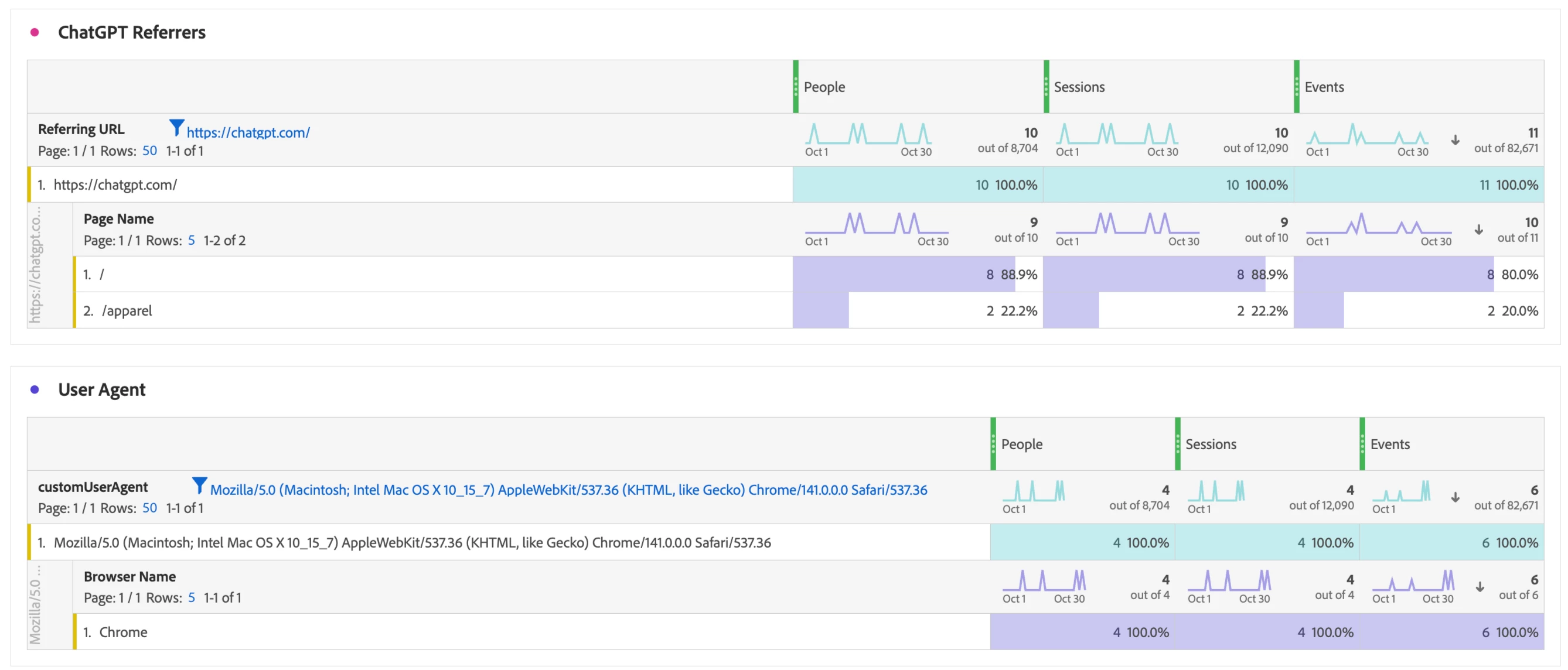
Critical Implication: This user-agent is identical to the latest version of Google Chrome on macOS. You cannot reliably distinguish Atlas traffic from legitimate human Chrome visitors using user-agent detection alone. However, some members of the analytics community are experimenting with JavaScript-based detection methods that analyze additional browser properties and behaviors beyond the user-agent string. While these approaches are still being tested and refined, they show promise for identifying Atlas sessions more accurately.
Additionally, Adobe is actively investigating ways to add Atlas detection capabilities to our products. Once we can reliably identify Atlas traffic through native functionality, we'll incorporate this into AA and CJA to provide out-of-the-box visibility into AI browser traffic.
What This Means for Your CJA Implementation:
- Standard bot filtering won't catch Atlas traffic
- Your current "browser" dimension will show Atlas as "Chrome"
- You must use additional signals and behavioral analysis to identify likely Atlas agent mode traffic
- There is currently no "Atlas" or "OpenAI" identifier in the user-agent string
Technical Behavior:
- JavaScript execution: Your analytics library (AppMeasurement, Web SDK, alloy.js) loads and executes normally
- Tag firing: Page view tags, click events, and custom events all fire as expected
- Data layer access: Atlas can read dataLayer objects, custom variables, and page metadata
- Cookie handling: First-party and third-party cookies function as they do in Chrome
- Local storage: localStorage and sessionStorage are available and accessible
CJA Impact: From a tracking perspective, Atlas behaves identically to Chrome. The AI features don't interfere with or modify your analytics implementation's execution.
Implications for Your CJA Implementation
Traffic Volume: As AI agents become more prevalent, you may see increased traffic volumes that don't correspond to actual human visitors. This can impact your analytics metrics, reporting accuracy, and potentially your data volumes in CJA.
Behavioral Patterns: Atlas traffic, especially when operating in autonomous agent mode, may demonstrate and exhibit distinctly different and unique behavioral patterns when compared to traditional human visitors interacting with your website, such as:
- Faster page-to-page navigation
- More systematic browsing patterns
- Different engagement metrics (time on page, scroll depth, etc.)
- Unusual conversion funnel progression
- Rapid multi-tab opening sequences
- Distinctive pause-then-proceed patterns
Conclusion
OpenAI Atlas and similar AI browsing technologies represent more than just another browser to track. They signal a fundamental shift in how traffic interacts with websites and how we approach digital analytics. This isn't simply about tracking one new browser. OpenAI envisions a future where agentic systems power most web use, fundamentally changing website interactions, customer journeys, and digital measurement. The three distinct usage modes (standard browsing, sidebar chat, and autonomous agent mode) each create different analytics patterns and business implications that require sophisticated tracking strategies.
As these tools evolve, expect changes in how they identify themselves, interact with analytics implementations, and navigate digital properties. The current Chromium-based user-agent string makes Atlas difficult to distinguish from standard Chrome browsers. This may change as OpenAI expands to additional platforms and responds to market demand for transparency.
The best approach is to remain vigilant, develop multi-layered detection strategies, establish cross-functional governance frameworks, and maintain flexibility as the AI browsing landscape evolves. Organizations that prepare now for this fundamental shift in web traffic composition will be better positioned to maintain accurate customer journey insights and make informed business decisions in an AI-augmented digital world.