Personalisation string containing float output differently | Community
Skip to main content
January 31, 2023
Solved

Personalisation string containing float output differently

  • January 31, 2023
  • 1 reply
  • 727 views

I've been testing some deliveries that use fully personalised subject lines. This subject line is derived from targetData in the workflow (enrichment) so there's calculated field to obtain the data from. For example, our field may show as 'New offers from £1.99' for instance as string in the workflow. When this gets outputted in the delivery however, the .99 undergoes a change and it includes extra numbers on the end. For example. It may be 'New offers from £1.991' or even 'New offers from £1.9999'
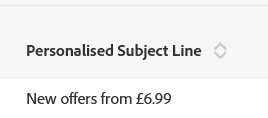



The field is all string and there's no edits made to the data between the WF and delivery. Is there an extra constraint that may need to be applied to the string to prevent the output in the screenshot?

This post is no longer active and is closed to new replies. Need help? Start a new post to ask your question.
Best answer by stevendavis09

Hi @satheeskannak . I was able to work around this by using subString() which seems to be outputting correctly in the proof now. A bit strange as it was already a text type but it's processing OK with the amendment.


Thanks.

1 reply

SatheeskannaK
Community Advisor
Community Advisor
February 6, 2023

Hi @stevendavis09,


Although it's a string field we use something like this to display the price properly by applying the round function.

ToString(Round(ToDouble(@price), 2))

Thanks, Sathees
stevendavis09AuthorAccepted solution
February 6, 2023

Hi @satheeskannak . I was able to work around this by using subString() which seems to be outputting correctly in the proof now. A bit strange as it was already a text type but it's processing OK with the amendment.


Thanks.