Not able to import/export or package the application | Community
Skip to main content
joydeep_kundu
Level 2
April 17, 2015
Solved

Not able to import/export or package the application

  • April 17, 2015
  • 20 replies
  • 15012 views

Not able to package and deploy/import the application.

Currently we have organized our application under a folder  i.e., we kept all our schema, delivery templates, web forms etc. under these folders. We are facing the below challenges.

  1. We are able to package our total application but not able to import it Sandbox in a same folder structure used in Training Server.
  2. If a schema is linked with other schemas, we are not able to export the data.

Even if its showing import is completed 100% but showing error at least one element is required by the package but missing from the instance.  As a result the import is failing.
This post is no longer active and is closed to new replies. Need help? Start a new post to ask your question.
Best answer by Linda_Stinson

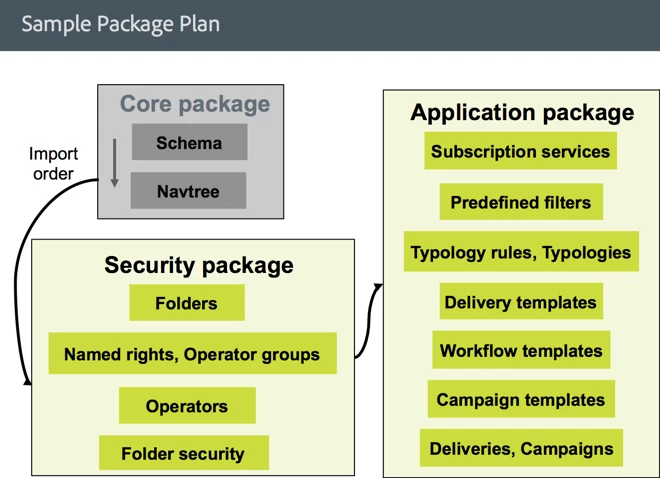
Here is a diagram that suggests an export order and packaging:

You can also consult the documentation...

Data packages

In particular see the part about dependencies.

You can also create a "sample" package to get an idea of what types of entities to include, and the correct order, but only use that as a reference.

Linda

20 replies

joydeep_kundu
Level 2
May 22, 2015

Thanks Linda.

We have given unique name to all of them. But still facing the workflow related issue.

for offers, Yes. we have included in standard folder structure. But still offers are not visible after import in destination environment. In source env. no issue.

Please help us here.

Linda_Stinson
Adobe Employee
Adobe Employee
May 22, 2015

Hi Joydeep,

  Regarding the Offers - can you show me a screenshot of the Data tab for the xtk:offer schema in your Explorer view with the Folder column added?

  Regarding the workflows - make sure that you don't have xtk:workflow as one of the entities to export in your package, as the workflow will get exported with the campaign.

Thanks,

  Linda

joydeep_kundu
Level 2
May 26, 2015

Linda,


We have build our package currently in the following way:

So, we are only including the campaign not the workflows

For offers, previously included only offerSpace and offer. Do we need to include offerContext (offer weight) as well. Please let us know.

Thanks & Regards,

Joydeep

Linda_Stinson
Adobe Employee
Adobe Employee
May 26, 2015

Hi Joydeep,

  It is a bit of trial and error to get the package contents exactly right. You should be able to tell by the error messages you get on import whether there is something missing or out of order in the package. If you get an error on import right after the loading of an entity succeeds, then you know it is the next line in the package definition that the import failed on. The entities are included in the package in the order that you define the package contents. I do not know offhand about the offerContext. If it is not in the package after you generated the package, then that means you probably do need to explicitly add it. If you can define an offer context and use it across multiple offers, then it probably would not be exported automatically otherwise it would get included multiple times.

Linda

joydeep_kundu
Level 2
May 27, 2015

Hi Linda,

we have imported with the above package, but again the offers, campaign and workflows are not showing. table shows offers are inserted (highlighted) but they are not visible.

please help.

Joydeep

joydeep_kundu
Level 2
August 8, 2015

Hi Linda,

Any update on this?

Thanks & Regards,

Joydeep

Linda_Stinson
Adobe Employee
Adobe Employee
August 8, 2015

Hi Joydeep,

  Add the folder/@fullName to the Data tab. It seems like these entities are not getting the folder set. This will be indicated by a null string or if you just add the folder column you will see (). What you need to do is give each of the custom folders a unique internal name and include them in the package before the folder contents. For example neoBankHealthInsuranceOfferCategory.

Linda

kapilKochar
Level 6
September 11, 2015

Hi Linda,

Is there is any document you can provide to us which will have all the guidelines which we can follow while transferring packages from DEV environment to UAT environment.

This will definitely help us to do confirm and prepare a checklist what to check before doing export and import.

Thanks you so much.

Thanks,

Kapil Kochar

anupamv75110721
Level 2
October 11, 2016

Hi Linda,

Can you please share a document which contains steps to create a package definition. In my case I have a folder structure which contains real time email, resources (Images, Delivery Template, Personalization Block) Operators, Operator Groups.

Please advise.

Thanks,

Anupam

Linda_Stinson
Adobe Employee
Linda_StinsonAdobe EmployeeAccepted solution
Adobe Employee
October 20, 2016

Here is a diagram that suggests an export order and packaging:

You can also consult the documentation...

Data packages

In particular see the part about dependencies.

You can also create a "sample" package to get an idea of what types of entities to include, and the correct order, but only use that as a reference.

Linda