Not able to import/export or package the application | Community
Skip to main content
joydeep_kundu
Level 2
April 17, 2015
Solved

Not able to import/export or package the application

  • April 17, 2015
  • 20 replies
  • 15012 views

Not able to package and deploy/import the application.

Currently we have organized our application under a folder  i.e., we kept all our schema, delivery templates, web forms etc. under these folders. We are facing the below challenges.

  1. We are able to package our total application but not able to import it Sandbox in a same folder structure used in Training Server.
  2. If a schema is linked with other schemas, we are not able to export the data.

Even if its showing import is completed 100% but showing error at least one element is required by the package but missing from the instance.  As a result the import is failing.
This post is no longer active and is closed to new replies. Need help? Start a new post to ask your question.
Best answer by Linda_Stinson

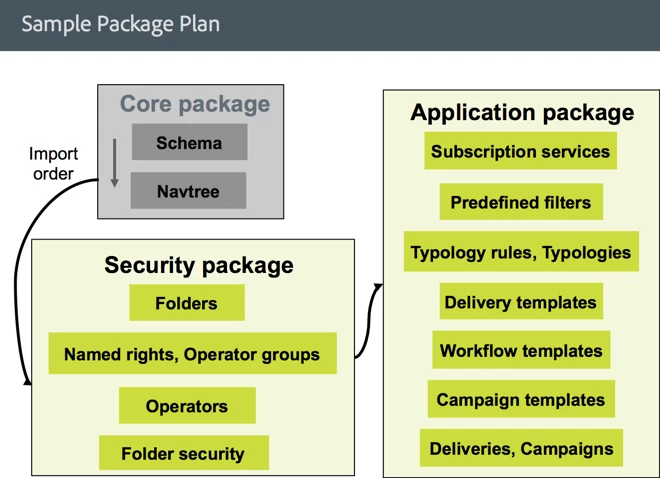
Here is a diagram that suggests an export order and packaging:

You can also consult the documentation...

Data packages

In particular see the part about dependencies.

You can also create a "sample" package to get an idea of what types of entities to include, and the correct order, but only use that as a reference.

Linda

20 replies

Linda_Stinson
Adobe Employee
Adobe Employee
April 28, 2015

It sounds like you are missing something from the package and need to go back and add it and export the package again. Please provide the error details (screenshot or text) that would be helpful in resolving your issue.

Generally you should not be using packaging to export "data", e.g. Recipients or Sales Transactions. For this purpose you would use an Export job or a Data extraction (file) activity in a workflow. What type of data are you trying to export?

Linda

joydeep_kundu
Level 2
May 1, 2015

Thanks for your reply Linda.

We have created our application under a certain folder structure. At root we have the application folder. Then we are keeping say all delivery templates under Delivery Templates, all web forms under Web application folder etc. That is how we have organized the application.

Application folder

                Delivery Templates

                Web application

                Workflows

                Offers

We have created a package definition and added our component there. With that package, we are exporting our application. Export is successful.


But when we are importing the package, all components are getting scattered and not coming in the same folder structure we used when creating the application.

Linda_Stinson
Adobe Employee
Adobe Employee
May 1, 2015

Are you exporting the folder structure including the Application folder? Have you changed the internal names on the folders, by assigning a prefix, prior to exporting them? If you can attach or e-mail me your export file, I will take a look.

I have looked at the file and there are no folders included in your export. You must export the folders as I describe here, otherwise the entities are getting placed in the default folder locations.

joydeep_kundu
Level 2
May 18, 2015

Hi Linda,

Thanks. You want to say that

1.  all components and the different folders, we need to give an internal name

2.  during export. when creating an package definition, we need to include explicitely the folders as well.

Please let me know if I understood correctly.

Linda_Stinson
Adobe Employee
Adobe Employee
May 18, 2015

Yes Joydeep, that is exactly right.

Linda

Linda Stinson

Campaign Partner Delivery Lead

Adobe

781.266.8618 (tel)

stinson@adobe.com<mailto:stinson@adobe.com>

275 Washington Street

Newton, MA, 02458

www.neolane.com<http://www.neolane.com/>;

joydeep_kundu
Level 2
May 20, 2015

Hi Linda,

Thanks for the reply. we followed the two steps:

1.  all components and the different folders, we gave an internal name

2.  during export. when creating an package definition, we included explicitly the folders as well and for different folder we gave internal names.

but we are now facing the below issue when importing from the xml:

I have mailed the xml to you.

Please help.

Thanks & Regards,

Joydeep

Linda_Stinson
Adobe Employee
Adobe Employee
May 21, 2015

Hi Joydeep,

  I looked and the entities listed are in your package. However they are probably not in the right order with regard to dependencies. So they are being referenced before they have been imported. So for example, your package imports a number of Deliveries that reference the Typology neokartTypology before you have imported it. The Typology doesn't come until later in the package. You need to be aware of these dependencies. You can reorder the entities in the package definition by moving them up and down in the list.

Linda

joydeep_kundu
Level 2
May 22, 2015

Thanks Linda.

We are able to solve the issue mentioned in the earlier screen shot by adding the style referenced, adding the SMS typology and including the opsecurity entry for saras.

We are able to import it now but facing two issues:


1.     Offers are not showing/coming. But in the nms:offer table we saw entry of our offers in that table.


2.. Question: we have added the campaign when creating the package def. Do we need to add each and every workflows as well comes under the campaign?


3.     In the import dialog it is showing error regarding duplicate key in workflows.

Error Log:

Submitting job to the server

17:13:07 - Enumerating the file entities...

17:13:07 - Writing entities in the database...

17:13:07 - Saving data related to packages...

17:13:07 - Package 'Neokart': Saving entities of type 'xtk:folder'...

17:13:07 - Package 'Neokart': Saving entities of type 'nms:webApp'...

17:13:08 - Package 'Neokart': Saving entities of type 'nms:delivery'...

17:13:09 - Package 'Neokart': Saving entities of type 'nms:operation'...

17:13:09 - PostgreSQL error: ERROR:  duplicate key value violates unique constraint "xtkworkflow_id"

17:13:09 - SQL statement 'INSERT INTO XtkWorkflow (iWorkflowId, sInternalName, sLabel, iModifiedById, tsLastModified, sTimezone, iFolderId, iOperationId, iCreatedById, tsCreated, iHistory, iOnError, iBuiltIn, iIsModel, iFolderProcessId, iStatus, iProduction, iState, iStartState, iPriority, mData) VALUES (:#(1)#, :#(2)#, :#(3)#, :#(4)#, :#(5)#, :#(6)#, :#(7)#, :#(8)#, :#(9)#, :#(10)#, :#(11)#, :#(12)#, :#(13)#, :#(14)#, :#(15)#, :#(16)#, :#(17)#, :#(18)#, :#(19)#, :#(20)#, :#(21)#)' could not be executed. 

17:13:09 - Param(0)=505066920 Param(1)=neokartSubscriptionWorkflow Param(2)=Subscription Workflow Param(3)=504985015   Param(4)=05/21/2015 11:43:09 AM   Param(5)= Param(6)=2926   Param(7)=505066919   Param(8)=504985015   Param(9)=05/21/2015 11:43:09 AM   Param(10)=30   Param(11)=0 Param(12)=0   Param(13)=0   Param(14)=0 Param(15)=0   Param(16)=0   Param(17)=0 Param(18)=0   Param(19)=0   Param(20)=<?xml version='1.0'?> <workflow background="xtk:backgrounds/neolane.png" modelName="opEmpty" sce

17:13:09 - nario-cs="Notification of the workflow supervisor" scenario-id="2875" schema="nms:recipient" showSQL="false" simulation="false"><activities><deliveryRecurring

17:13:09 - Package 'Neokart': Saving entities of type 'nms:typology'...

17:13:09 - Package 'Neokart': Saving entities of type 'nms:typologyRule'...

17:13:09 - Package 'Neokart': Saving entities of type 'nms:offerSpace'...

17:13:09 - Package 'Neokart': Saving entities of type 'nms:offer'...

17:13:09 - Package 'Neokart': Saving entities of type 'nms:service'...

17:13:10 - Package 'Neokart': Saving entities of type 'xtk:formRendering'...

17:13:10 - Package 'Neokart': Saving entities of type 'xtk:opsecurity'...

17:13:10 - Package 'Neokart': Saving entities of type 'xtk:specFile'...

17:13:10 - Installation of packages successful.

But we have provided unique internal names to the workflows.


Please suggest.

Linda_Stinson
Adobe Employee
Adobe Employee
May 22, 2015

Hi Joydeep,

Good questions one and all. Did you define the Offers in one of the standard folders? Also, if you are using Interaction, the offers might not be “Live” yet. Did you approve the offers? Once approved it takes some time for them to move to the live environment. In the Data tab of the Offer schema, configure the list and add the folder link and this will tell you what folder the offers have been placed in, if any.

Linda

Linda Stinson

Campaign Partner Delivery Lead

Adobe

781.266.8618 (tel)

stinson@adobe.com<mailto:stinson@adobe.com>

275 Washington Street

Newton, MA, 02458

www.neolane.com<http://www.neolane.com/>;

Linda_Stinson
Adobe Employee
Adobe Employee
May 22, 2015

Joydeep, you are correct that the workflows should be included automatically with the Campaign, but if you ran into an error like uniqueness violation, then it was unable to store the workflow detail. That is why you are not seeing your activities. Did you determine if a workflow already exists in the target environment with the same internal name? If so, and it is one that you created, maybe you can delete it and try again. As you noted, you would have to give each workflow a unique name.

Also, note that Campaigns and Campaign templates are stored in the same table, as are deliveries and delivery templates, and probably workflows and workflow templates. So uniqueness has to apply across the template as well.

Linda

Linda Stinson

Campaign Partner Delivery Lead

Adobe

stinson@adobe.com<mailto:stinson@adobe.com>

275 Washington Street

Newton, MA, 02458

www.neolane.com<;http://www.neolane.com/>