Hi Mano,
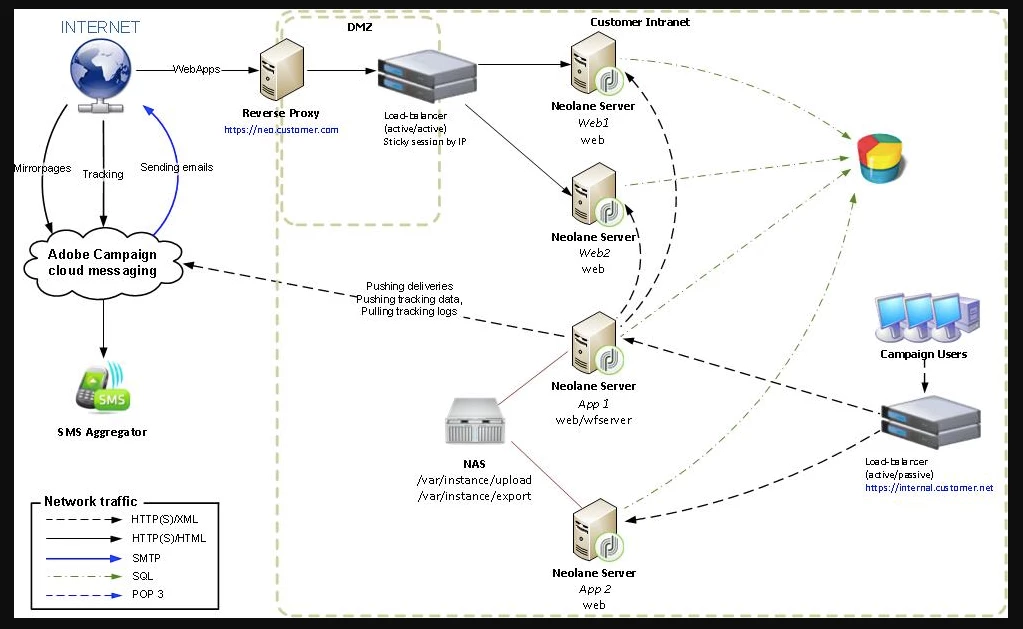
Host 1: Application server (nlserver web)
This process exposes the full range of Adobe Campaign functionality via Web Services APIs (SOAP - HTTP + XML). Furthermore, it can dynamically generate the Web pages used for HTML-based access (reports, Web forms, etc). To achieve this, this process includes an Apache Tomcat JSP server. This is the process to which the console connects.
Host 2 and host 3 : Workflow engine (nlserver wfserver)
It executes the workflow processes defined in the application.
It also handles periodically executed technical workflows, including:
Tracking: Recovering and consolidating tracking logs. It enables you retrieve the logs from the redirection server and create the aggregate indicators used by the reporting module.
Cleanup: Database cleaning. Used to purge old records and avoid the database growing exponentially.
Billing: Automatic sending of an activity report for the platform (database size, number of marketing actions, etc.).
Is there some special configuration required to set this up. In other words is there a cluster configuration (binding) required for setting this system.
Yes, you need some additional configurations.
You can configure several workflow servers (wfserver) and distribute them on two or more machines. If you choose this type of architecture, configure the connection mode of the load balancers according to the Adobe Campaign access.
For access from the web, select the load balancer mode to limit connection times.
If accessing via the Adobe Campaign console, choose hash or sticky ip mode. This lets you maintain the connection between the rich client and the server and prevent a user session from being interrupted during an import or export operation, for example.
You can choose to force the execution of a workflow or a workflow activity on a particular machine. To do this, you must define one or more affinities for the concerned workflow or activity.
- Create the affinities of the workflow or activity by entering them in the Affinity field.You can freely choose the affinity names. Nevertheless, make sure you do not use spaces or punctuation marks. If you use different servers, specify different names.


- The drop-down list contains formerly used affinities. It is completed over time with the different entered values.
- Open the nl6/conf/config-<instance>.xml file.
- Modify the line which matches the wfserver module as follows:<wfserver autoStart="true" affinity="XXX,YYY"/>
Regards,
Amit