Error connecting to SFTP using File Transfer to collect files. | Community
Skip to main content
Level 2
September 24, 2018
Solved

Error connecting to SFTP using File Transfer to collect files.

  • September 24, 2018
  • 6 replies
  • 6788 views

Hello,

My requirement is to pick a file from SFTP location and then process it.

  • For that I am using, FILE TRANSFER Activity.
  • I had configured SFTP Details in External Accounts.
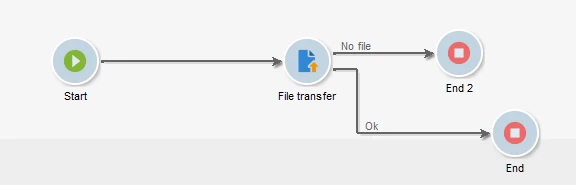
  • Below is my workflow:


  • Now when I run workflow, below error I am getting:

So ideally, if File not found in SFTP location, it should go to FILE NOT FOUND flow and end there, as per my workflow, instead it's breaking before step.

Please let me know, how to solve it?

NOTE: One more question to transfer files from SFTP location in Adobe campaign, we should be using ideally File collector or File Transfer activity?

cc : Adhiyan

This post is no longer active and is closed to new replies. Need help? Start a new post to ask your question.
Best answer by Amit_Kumar

Hi,

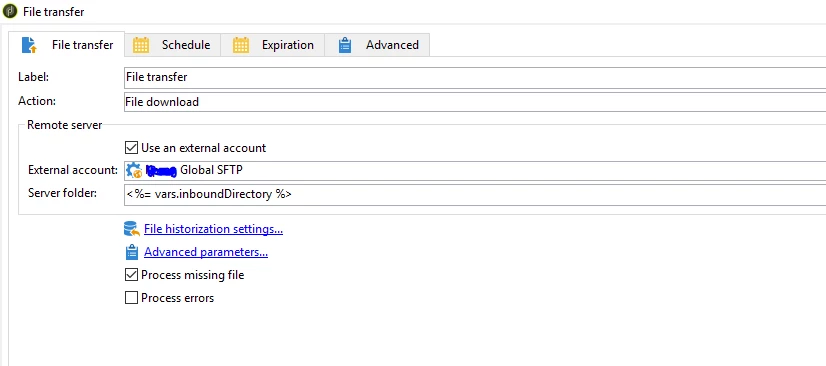
From the error it seems, you have not assigned the proper directory+file name to file transfer activity. the error indicates that there is no file name so script considers folder name as file and fails.

you need to ensure that directory does exist and the existence of the file is optional.

The 'Server folder' contains the file path to the file on the sFTP that you wish to import, you will be provided the filename in the ticket. Simply paste in the filename provided after the folder directory (with extension) after '/custom-folder/file-name.csv'

Regards,

Amit

6 replies

vraghav
Adobe Employee
Adobe Employee
September 24, 2018

Hi sonikad8559822,

Use File Collector if you are trying to download file from Adobe provided sFTP to Adobe Campaign. For any other external sFTP you should use File Transfer.

The error looks strange and definitely not the expected behavior.

Out of curiosity, I can see that the workflow says there is 1 file to transfer and then says File not found.

Regards,
Vipul

Level 2
September 24, 2018

Vipul Raghav can you please specify which scenario I should be using File collector and File Transfer? And which purpose each one is for?

Level 2
September 24, 2018

Vipul Raghav​,  Could you make out the error? I was confused with it. As not able to figure out is linking between SFTP and ACM is done properly or not.

vraghav
Adobe Employee
Adobe Employee
September 24, 2018

Hi,

As stated above Use File Collector if you are trying to download file from Adobe provided sFTP to Adobe Campaign. For any other external sFTP you should use File Transfer.

File Collector is to fetch a file from a directory on the sevrver. As Campaign provided sFTP is basically another directly on the app server it is recommended to use File Collector.

File Transfer on the other hand is there to connect to any external sFTP through connection details provided on external account and then upload/download a file from there.

Regards,

Vipul

Level 2
September 24, 2018

We are currently using External SFTP folder, so I will be using FILE TRANSFER Activity as suggested.

So, coming back to the above error screenshot, let me know how to resolve it.

Amit_Kumar
Amit_KumarAccepted solution
Level 10
September 24, 2018

Hi,

From the error it seems, you have not assigned the proper directory+file name to file transfer activity. the error indicates that there is no file name so script considers folder name as file and fails.

you need to ensure that directory does exist and the existence of the file is optional.

The 'Server folder' contains the file path to the file on the sFTP that you wish to import, you will be provided the filename in the ticket. Simply paste in the filename provided after the folder directory (with extension) after '/custom-folder/file-name.csv'

Regards,

Amit