"Do not enable" vs "Enable but do not execute" | Community
Skip to main content
pavlinao8032150
Level 2
October 18, 2016
Solved

"Do not enable" vs "Enable but do not execute"

  • October 18, 2016
  • 3 replies
  • 4350 views

Hello folks,

can you elaborate on the difference between the "Do not enable" vs "Enable but do not execute" actions on an activity in a workflow?

I am not sure I understand which one I can use in which case, which results I should expect and in which state is my workflow going to get.

Here is an example workflow I created, which after execution goes into the Paused state:
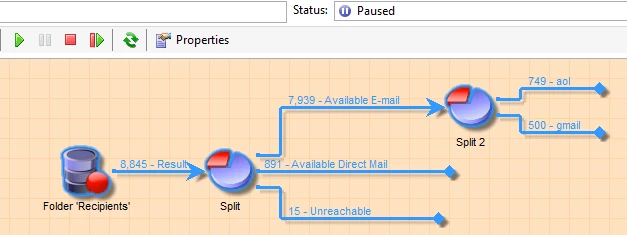
On the second Split activity I am selecting to "Enable but do not execute" and restart the workflow. I see it doesn'r execute further and it goes into the Paused state.
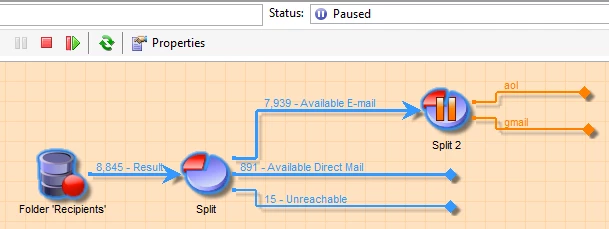
Then I change to "Do not enable" for the Split 2 activity and restart the workflow. I see the same.
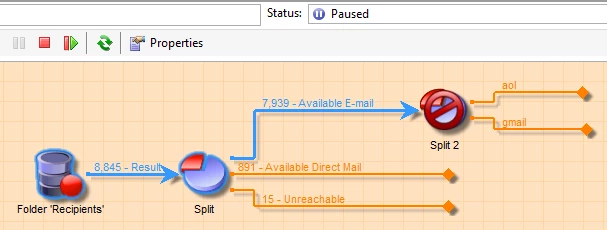
How are those two options different? Can you give me an example/screenshot from the practice?

In which case the workflow would skip the activity and execute till finished state?

Thanks!

Pavlina

This post is no longer active and is closed to new replies. Need help? Start a new post to ask your question.
Best answer by vraghav

Hi pavlinao80321508​,

Referring to the first screenshot, when you execute the workflow and it goes into a Paused state because your workflow is not configured to end. To move the workflow to a Finished state you need to have an End activity connected to the two transitions.

Enable but do not execute

When you configure an activity with this option the workflow will execute until this activity. In other words, the current activity will not be executed and the workflow will keep the temporary worktable of previous activity intact for data review.

We use this option mostly to review the contents of output coming from previous activity.

Do not enable

When you select this option on an activity, it is same as the activity doesn't exist in the workflow. Even if you have additional activities connected to the disabled activity, the workflow will discard all of them and will run up to the disabled activity before moving to a Finished state.

It will then purge the temporary worktables created in the background.

you can read more about it from here Workflow life cycle

Hope this helps.

3 replies

vraghav
Adobe Employee
vraghavAdobe EmployeeAccepted solution
Adobe Employee
October 18, 2016

Hi pavlinao80321508​,

Referring to the first screenshot, when you execute the workflow and it goes into a Paused state because your workflow is not configured to end. To move the workflow to a Finished state you need to have an End activity connected to the two transitions.

Enable but do not execute

When you configure an activity with this option the workflow will execute until this activity. In other words, the current activity will not be executed and the workflow will keep the temporary worktable of previous activity intact for data review.

We use this option mostly to review the contents of output coming from previous activity.

Do not enable

When you select this option on an activity, it is same as the activity doesn't exist in the workflow. Even if you have additional activities connected to the disabled activity, the workflow will discard all of them and will run up to the disabled activity before moving to a Finished state.

It will then purge the temporary worktables created in the background.

you can read more about it from here Workflow life cycle

Hope this helps.

pavlinao8032150
Level 2
October 18, 2016

Hello Vipul,

in this case which option would cause to skip the activity and execute the workflow till finished state?

Do not enable or Enable but do not execute?

Regards,

Pavlina

vraghav
Adobe Employee
Adobe Employee
October 18, 2016

Hi Pavlina,

There is no way to skip an activity in a workflow. If you don't want to execute an activity but execute the remaining workflow, you will have to delete the activity from the workflow or disconnect it from the workflow transition and select Do not enable.

Regards,

Vipul