Audience Lists limits | Community
Skip to main content
Level 3
March 21, 2019
Solved

Audience Lists limits

  • March 21, 2019
  • 10 replies
  • 8766 views

How can i set an Audience List to only be shown to specific users who are under a specific Security group?

Example:

Group A:

     Audience Lists Z

Group B:

     Audience Lists X

When users log in, i only want them to see the lists that are associated with the group they belong to.

This post is no longer active and is closed to new replies. Need help? Start a new post to ask your question.
Best answer by DavidKangni

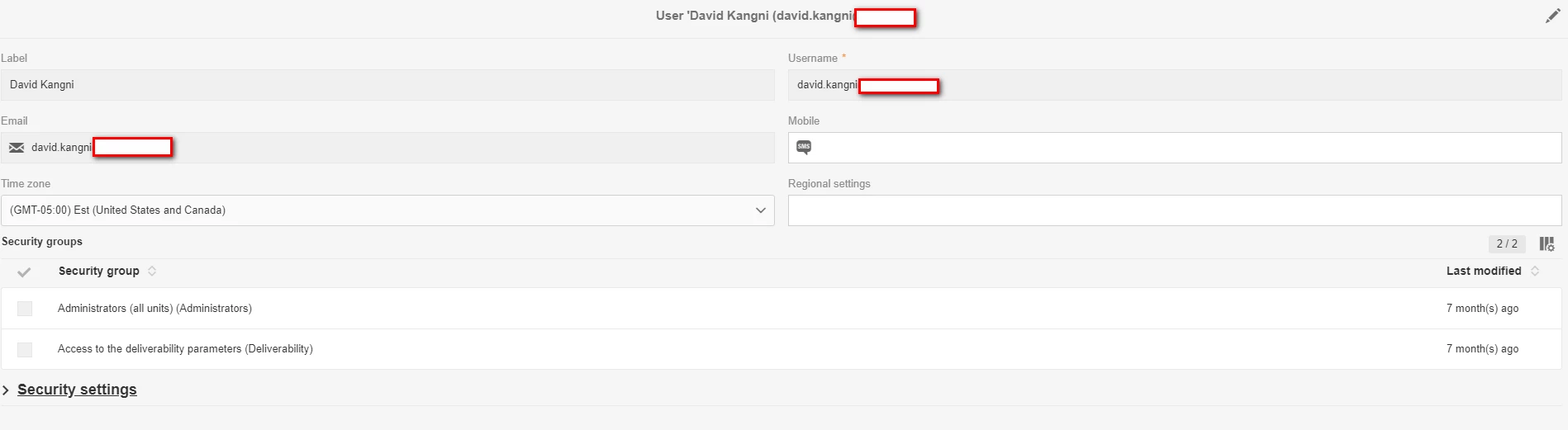
Can you check in ACS the user information. Here is an example. I'm admin with org unit all and i created org units for US and Canada.

Users with orgCanada can only see canadian recipients and objects dedicated to them as I explained previously.

10 replies

DavidKangni
Community Advisor
Community Advisor
March 21, 2019

You can use org unit to accomplish this

David Kangni
itd6Author
Level 3
March 22, 2019

i have org units set up but it doesn't seem to be limiting what is being seen by the user. i have custom profiles in the admin console as well that match the org name.

DavidKangni
Community Advisor
Community Advisor
March 22, 2019

If it set up correctly, make sure that:

  • for profiles and custom resources, you created the org unit and you're populating the profiles or schemas with the org unit.

  • for other objects, you need to set up the access authorization in the object settings (screenshot of a workflow  below)

David Kangni
itd6Author
Level 3
March 26, 2019

I looked at the above and I have all of that added to my items but it still shows everything when the test user is logged in. Is there something we have to turn on for it to work or other settings?

DavidKangni
Community Advisor
Community Advisor
April 1, 2019

is the only right the operator has? If he has other right then it will be able to see everything.

David Kangni
itd6Author
Level 3
April 1, 2019

i only want the user to see specific items. I have added this user to a specific product profile but she doesn't even get access to the campaign. Not sure what I am doing incorrectly.

DavidKangni
Community Advisor
DavidKangniCommunity AdvisorAccepted solution
Community Advisor
April 1, 2019

Can you check in ACS the user information. Here is an example. I'm admin with org unit all and i created org units for US and Canada.

Users with orgCanada can only see canadian recipients and objects dedicated to them as I explained previously.

David Kangni
itd6Author
Level 3
April 1, 2019

I have the test user in the Security Group "CGH". I renamed it to try to follow what the instructions here Adobe Campaign Help | Managing groups and users  says to do but not sure it is connecting correctly.

Security Group

Admin Console

DavidKangni
Community Advisor
Community Advisor
April 1, 2019

Ok can you change the access authorization of a workflow to this org Unit and check if the user can see only this workflow?

see documentation here Adobe Campaign Help | Organizational units

David Kangni
itd6Author
Level 3
April 2, 2019

Thanks so much everyone! I was able to get it working and we think it was an errant space in the tests versions.
