ACS formatDate "%4Y/%2M/%2D" | Community
Skip to main content
Level 3
July 15, 2023
Solved

ACS formatDate "%4Y/%2M/%2D"

  • July 15, 2023
  • 1 reply
  • 1330 views

I need to format a date in an email, but is not working, is this only working for adobe campaign classic and not standard? I tried formating in the query activity but didnt work, so I thought I tried in the email html body but doesnt work either,? I need to display a timestamp by removing the time so it only shows as ie. 10/08/2023


<%= formatDate(/cusmylink/lastlogindate, "%2D/%2M/%4Y") %>


update*

I came up with the following expression, but is not clean enough, isnt there an more straight forward method such as formatDate?

ToDate(Left(ToString([cusNacMemberLink/@lastlogindate]), 10))


 

This post is no longer active and is closed to new replies. Need help? Start a new post to ask your question.
Best answer by ParthaSarathy

Hi @o_x ,

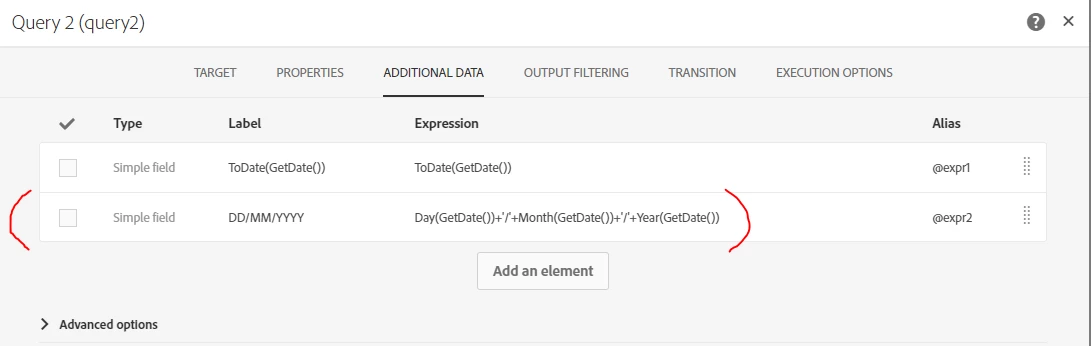
In your query try the below expression,

Day(GetDate())+'/'+Month(GetDate())+'/'+Year(GetDate())


Instead of GetDate(), you can use your attribute.


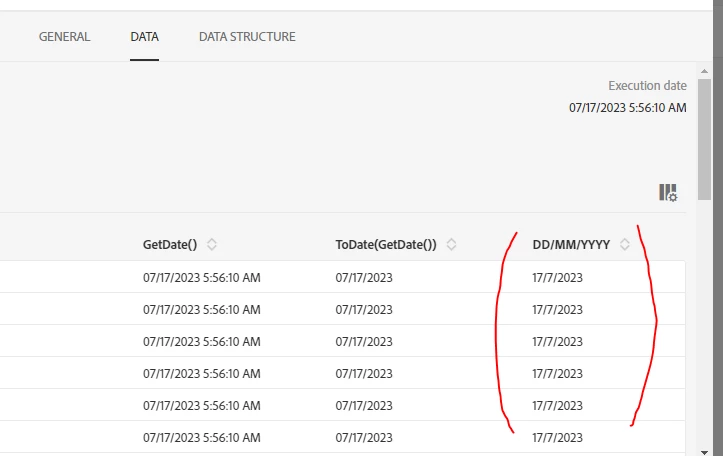
Output:


1 reply

ParthaSarathy
Community Advisor
ParthaSarathyCommunity AdvisorAccepted solution
Community Advisor
July 17, 2023

Hi @o_x ,

In your query try the below expression,

Day(GetDate())+'/'+Month(GetDate())+'/'+Year(GetDate())


Instead of GetDate(), you can use your attribute.


Output:


~  ParthaSarathy S~  Click here to join ADOBE CAMPAIGN USER GROUP for Quarterly In-person | Hybrid | Virtual Meetups