Abandoned basket triggers - not reconciling in ACS | Community
Skip to main content
October 19, 2022
Solved

Abandoned basket triggers - not reconciling in ACS

  • October 19, 2022
  • 1 reply
  • 956 views

Hello, 


I need your help with a query please. 


We have setup an abandoned basket live trigger for a client, and we`re having some issues when reconciling back in Adobe Campaign Standard. 


When the event is triggered, despite it appearing in the Experience Cloud Triggers correctly, it`s still appearing in ACS triggers as my MID rather than the correct customer number and it doesn`t reconcile because of this.
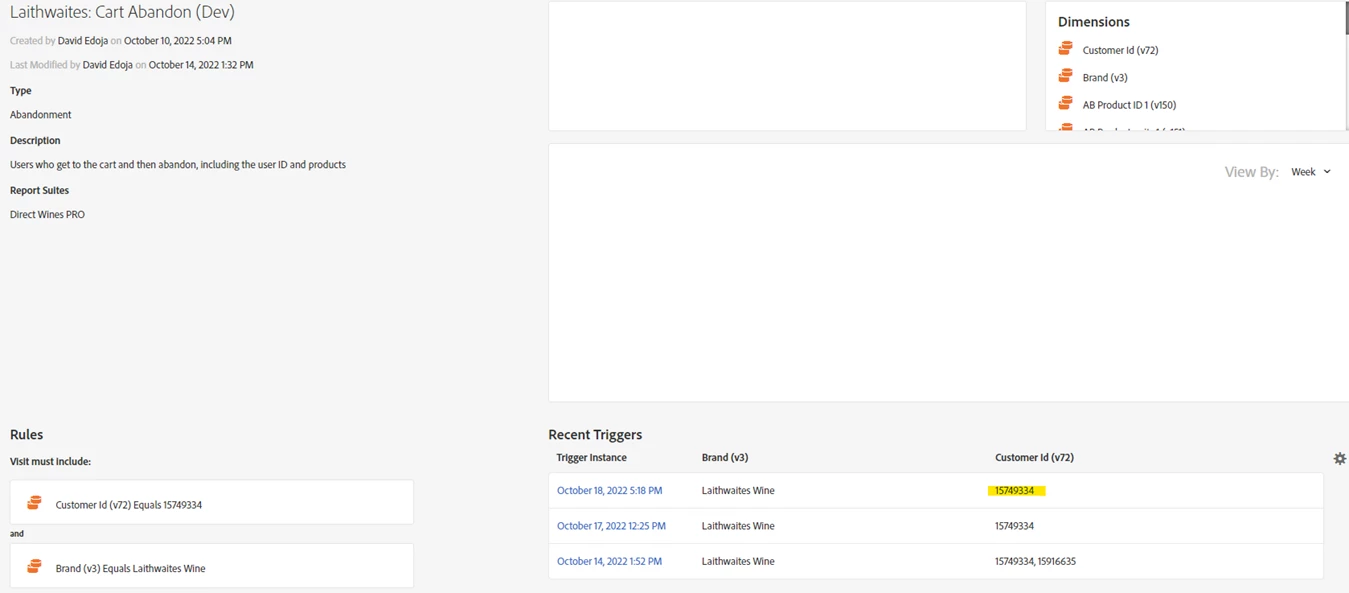
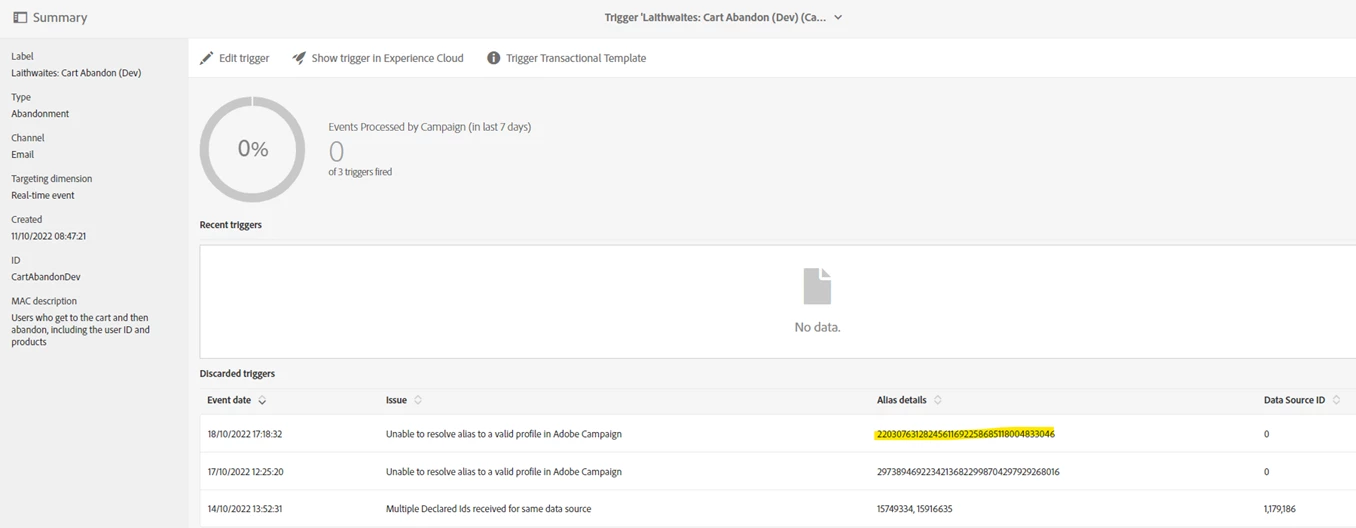


I think the issue is something to do with the data source configuration, as it seems to be defaulting to Visitor ID rather than the Declared ID (customer id):

 

Could you please let me know what I`m doing wrong and how to correct this? 


Thank you. 


Regards,

Lucian


This post is no longer active and is closed to new replies. Need help? Start a new post to ask your question.
Best answer by costa_n11

HI @lucianbuhoci1 

This configuration is sensitive to what is captured by the ECID Service setCustomerIDs function and your issue is most likely due to a missing link between the logged-in user on the site, ECID Service, Customer Attributes and ACS

So in order, you need to:

  1. Create a Customer Attribute in People Core Services with an alias / integration code (make the alias all lowercase, for instance "customerid", the value you will put in there comes from the site and must match a reconciliation field set on the Profile in ACS
  2. When the user authenticated on the website, you need to set the customerid in the ECID setCustomerIDs function
  3. In the trigger you need to pass this cusotmer id as part of the paylaod sent to ACS
  4. In ACS you define a Data Source with the newly Customer Attributes as an integration code
  5. You also set up the priority of the Data Source to be higher than the MCID data sources
  6. In the event that is created from the trigger, you use the field representing the customer id to reconcile with Profile

A few notes in ACS:

The transactional event must be of type Profile

Which then in turn means that the Profile with the customer id MUST exist in ACS prior the event is sent to ACS

What ACS does exactly is to

  • Find the profile using the customer id field (higher priority data source)
  • If not found, trying to find the Profile using the MCID / ECID (looking at tracking logs)

This is the reason you will always see MCID reconciliation in ACS if it fails to find the profile via the customer id.


Hope this helps,

Thanks

Denis

1 reply

costa_n11Adobe EmployeeAccepted solution
Adobe Employee
October 19, 2022

HI @lucianbuhoci1 

This configuration is sensitive to what is captured by the ECID Service setCustomerIDs function and your issue is most likely due to a missing link between the logged-in user on the site, ECID Service, Customer Attributes and ACS

So in order, you need to:

  1. Create a Customer Attribute in People Core Services with an alias / integration code (make the alias all lowercase, for instance "customerid", the value you will put in there comes from the site and must match a reconciliation field set on the Profile in ACS
  2. When the user authenticated on the website, you need to set the customerid in the ECID setCustomerIDs function
  3. In the trigger you need to pass this cusotmer id as part of the paylaod sent to ACS
  4. In ACS you define a Data Source with the newly Customer Attributes as an integration code
  5. You also set up the priority of the Data Source to be higher than the MCID data sources
  6. In the event that is created from the trigger, you use the field representing the customer id to reconcile with Profile

A few notes in ACS:

The transactional event must be of type Profile

Which then in turn means that the Profile with the customer id MUST exist in ACS prior the event is sent to ACS

What ACS does exactly is to

  • Find the profile using the customer id field (higher priority data source)
  • If not found, trying to find the Profile using the MCID / ECID (looking at tracking logs)

This is the reason you will always see MCID reconciliation in ACS if it fails to find the profile via the customer id.


Hope this helps,

Thanks

Denis

October 19, 2022

Hi Denis, 


Hope you`re well.


Thank you very much for your speedy answer. Will implement the above and get back to you to confirm if it worked!

Appreciate your help.


Regards,


Lucian