You must define a key value for the elements error in adobe campaign classic | Community
Skip to main content
Level 4
July 17, 2024
Question

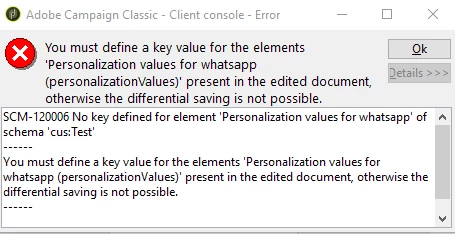
You must define a key value for the elements error in adobe campaign classic

  • July 17, 2024
  • 3 replies
  • 1884 views

Hi Everyone,


I'm learning input forms. I'm facing error while i try to create new data in personalization field.


Schema code:

<element label="Personalization values" name="personalizationValues">
<attribute label="content" name="content" type="string"/>
</element>


<key name="personalizationValues">
<keyfield xpath="personalizationValues/@content"/>
</key>


Code used in input form:

<container label="Personalization fields">
<input type="list" xpath="personalizationValues">
<input xpath="@content"/>
</input>
</container>



Am i doing anything wrong here? Please help me sort this error.


Regards,

Sujith Kumar.

This post is no longer active and is closed to new replies. Need help? Start a new post to ask your question.

3 replies

Level 4
July 17, 2024

Can someone help me here please?

Manoj_Kumar
Community Advisor
Community Advisor
July 18, 2024

Hello @sujith_02kumar  Like the error says. You will have to Set a Primary key in Schema. Add autopk as highlighted and it should work.


<element label="Personalization values" name="personalizationValues" autopk="true">
<attribute label="content" name="content" type="string"/>
</element>

Manoj     Find me on LinkedIn
ParthaSarathy
Community Advisor
Community Advisor
July 18, 2024

Hi @sujith_02kumar ,

Goto /Administration/Configuration/Data schemas/ and search for cus:Test schema.

In element tag, add autopk="true" and update the database structure.

<element autopk="true" label="test" name="Test"/>

Disconnect and reconnect the console and now check your input form.

~  ParthaSarathy S~  Click here to join ADOBE CAMPAIGN USER GROUP for Quarterly In-person | Hybrid | Virtual Meetups
Level 4
July 18, 2024

@parthasarathy , @_manoj_kumar_ ,


Thanks for replying.


This is my schema xml:

<element autopk="true" desc="Test" label="Test" labelSingular="Test" name="Test">

<attribute desc="Template Id for whatsapp" label="Template Id" length="150" name="templateId"
type="string"/>
<element label="Personalization values for whatsapp" name="personalizationValues">
<attribute label="content" name="content" type="memo"/>
</element>

<attribute desc="Media url for whatsapp" label="Media url" length="255" name="mediaUrl"
type="string"/>
<attribute desc="Media type for whatsapp" expr="Iif(@mediaUrl='', 'Text', 'Media')"
label="Media type" length="50" name="mediaType" type="string"/>
<attribute desc="Button link for whatsapp" label="Button link" length="255" name="buttonLink"
type="string"/>
<attribute desc="Channel type" enum="channelType" label="Channel type" length="50"
name="channelType" type="byte"/>

</element>
I have already defined primary key.


Below is my input form code:

<container>
<input xpath="@channelType"/>
</container>

<container type="visibleGroup" visibleIf="@channelType=1">
<container type="notebook">
<container label="Whatsapp template Id">
<input xpath="@templateId"/>
</container>
<container label="Whatsapp Personalization fields" xpath="personalizationValues">
<container>
<static>If you have multiple values, please enter them separated by commas (,).</static>
</container>
<input type="list" xpath="@content"/>
</container>
<container label="Whatsapp media url">
<input xpath="@mediaUrl"/>
</container>
<container label="Whatsapp Button link">
<input xpath="@buttonLink"/>
</container>
</container>
</container>


Do you see any issue here? If i try to create new values in personlization value column, adobe is getting closed.


If i use below code,

<input type="list" xpath="personalizationValues">
<input xpath="@content"/>
</input>

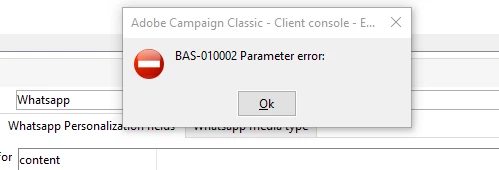
I'm getting parameter error.


How can I solve it?


Regards,

Sujith Kumar

Level 4
July 23, 2024

Can anyone help here?


Regards,

Sujith Kumar.