xtk.session.Write - Will not update Data field on Output | Community
Skip to main content
Level 4
February 3, 2023
Solved

xtk.session.Write - Will not update Data field on Output

  • February 3, 2023
  • 1 reply
  • 1854 views

All, 


I've asked this question before in a previous post, and never really got a good answer. Here's my dilemma: 

I'm creating a process that will convert a numeric into a string, where I format it to look like Currency (the Format Currency function in ACC does not work). So I create the following JS to perform this function, and to write out the data. The issue is, the data is being converted in the Script, but not posting to the field.  
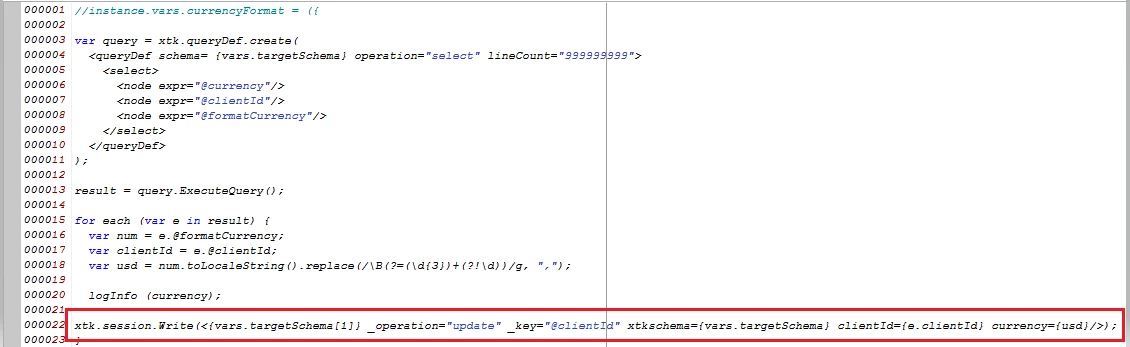
 

I used an Enrichment prior to this script where I define the Currency field as NULL, and now I'm trying to populate the field with the var usd I create; but it returns NULL values. 


All this because I need the Currency field to appear with Commas. And using any of the OOTB Adobe functions to convert my numeric to String removes the Commas. 


What am I missing?
 

This post is no longer active and is closed to new replies. Need help? Start a new post to ask your question.
Best answer by montezh2001

@akshayanand , 


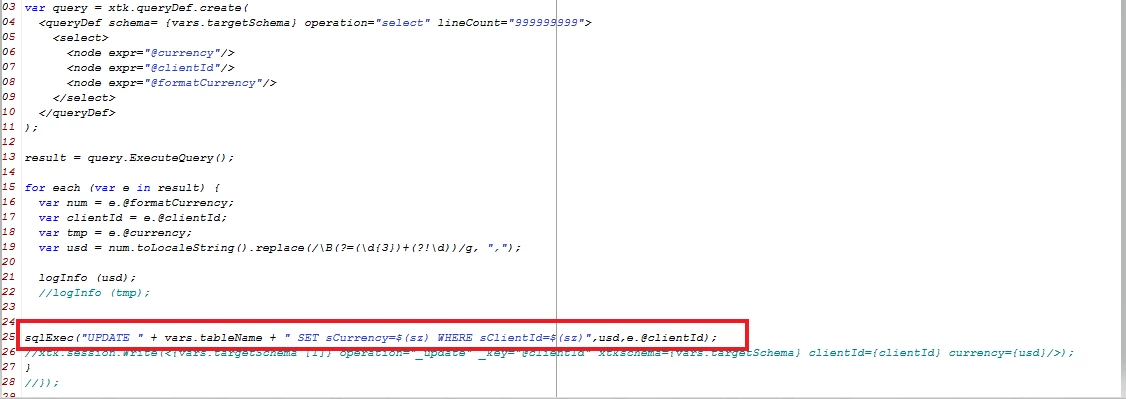
After reading other posts through Experience League, it seems using the write method I was using is not going to work because I'm trying to write to a temp table. So instead, I used a sqlExec and it works now. 


1 reply

AkshayAnand
Community Advisor
Community Advisor
February 6, 2023

Hi @montezh2001 


I used the below code and it worked fine.

var num = 123456789 ; var usd = num.toString().replace(/(\d)(?=(\d\d\d)+(?!\d))/g, "$1,"); logInfo("Currecy is "+usd); Customer_Name = 'abc'; xtk.session. Write (<Schema operation="update" key="@Customer_Name" xtkschema="cus:Schema" Customer_Name={Customer_Name} Currecy={usd}/>);


Please find the screenshot below :-


I used the regex code that I got from here.


Regards

Akshay

montezh2001AuthorAccepted solution
Level 4
February 6, 2023

@akshayanand , 


After reading other posts through Experience League, it seems using the write method I was using is not going to work because I'm trying to write to a temp table. So instead, I used a sqlExec and it works now. 


AkshayAnand
Community Advisor
Community Advisor
February 7, 2023

Hi @montezh2001 


Thanks for the information and good to know it worked for you. 🙂


Regards

Akshay