
workflow question: multiple variables from JS node into email template | Community
Skip to main content
Michael_Soprano
Level 10
August 13, 2024
Solved

workflow question: multiple variables from JS node into email template

  • August 13, 2024
  • 1 reply
  • 975 views

I am using Campaign V8 client console.

My workflow looks like this:
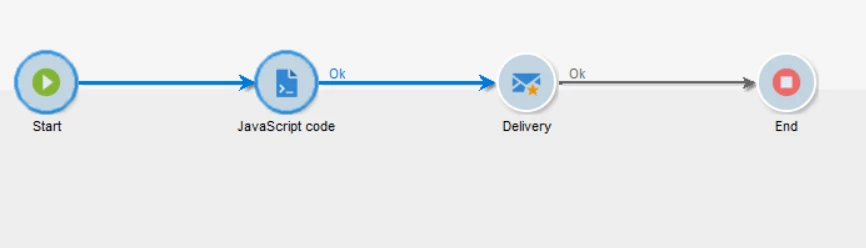
 

As an output of JS node in workflow I have these variables - I assume that these become workflow variables:

instance.vars.x1 = price1;
instance.vars.x2 = name1;
instance.vars.x3 = image1;


In the delivery script node I put something like this:
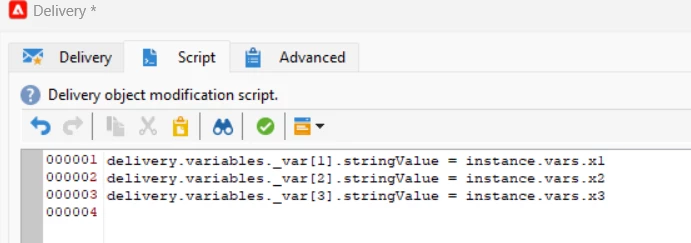
Then I would like to use them in the template. More or less like this: 
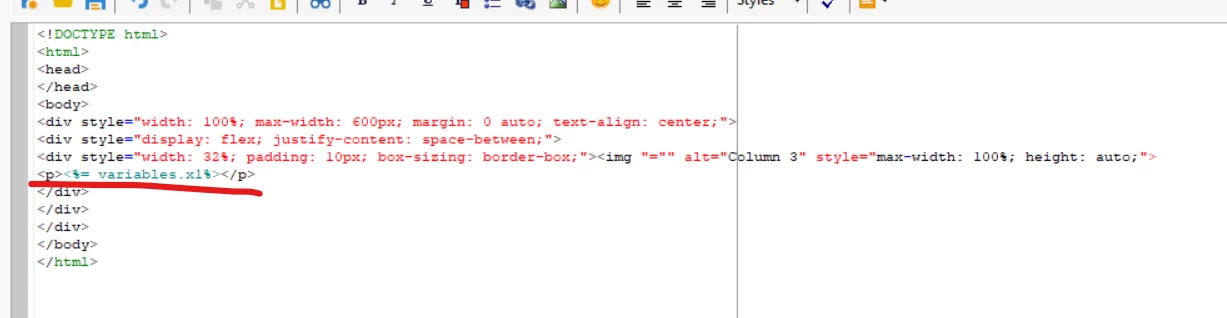
Could you tell me why its not working? 



This post is no longer active and is closed to new replies. Need help? Start a new post to ask your question.
Best answer by ALangridge

It's actually an annoyingly obtuse process! You need to define a variable in the properties section, then assign the instance.vars.XXXX variable to it in the initialisation script section. 

I wrote a quick guide here:
https://alexlangridge.com/adobe-campaign--use-defined-variables-in-an-email

1 reply

ALangridge
ALangridgeAccepted solution
Level 4
August 13, 2024

It's actually an annoyingly obtuse process! You need to define a variable in the properties section, then assign the instance.vars.XXXX variable to it in the initialisation script section. 

I wrote a quick guide here:
https://alexlangridge.com/adobe-campaign--use-defined-variables-in-an-email

Michael_Soprano
Level 10
August 14, 2024

Thanks a lot!

Do you know how to dynamically change the source of the photo in html email template like that?


ALangridge
Level 4
August 15, 2024

Hmm! Just checking, you may need to amend the delivery script node, because it's zero indexed. 

delivery.variables._var[0].stringValue would correspond to the FIRST variable you've set up in the properties > variables section.


In my example, 

delivery.variables._var[0].stringValue would be for mobileExistsCount,

delivery.variables._var[1].stringValue for validityCheckFail

and delivery.variables._var[2].stringValue for validityCheckPass