Use of data-nl* in WebApp for radio buttons | Community
Skip to main content
Level 2
July 25, 2023
Solved

Use of data-nl* in WebApp for radio buttons

  • July 25, 2023
  • 1 reply
  • 1136 views

I have a WebApp in which I'm successfully bringing through text entered in a text box in a page activity into a subsequent JavaScript activity that uses the text entered in a variable.
I am unable to use the same method to capture data from a fieldset of radio buttons to do the same thing:

Successful with text box
Text box on page activity:
<input name="boxName" id="boxId" data-nl-type="string" data-nl-ismandatory="false" data-nl-bindto="xpath" text="">


Text box reference in JavaScript activity:

var myBoxText = request.getParameter("boxName");


Unsuccessful with radio buttons

buttons on page activity:

<input type="radio" id="rad1" value="one" name="radioButton" data-nl-type="string" data-nl-ismandatory="false" data-nl-bindto="xpath">

<input type="radio" id="rad2" value="two" name="radioButton" data-nl-type="string" data-nl-ismandatory="false" data-nl-bindto="xpath">

<input type="radio" id="rad3" value="three" name="radioButton" data-nl-type="string" data-nl-ismandatory="false" data-nl-bindto="xpath">


Radio button reference in JavaScript activity:

var myRadioButton = request.getParameter("radioButton");


Is anyone able to advise why this is not working please?
 

This post is no longer active and is closed to new replies. Need help? Start a new post to ask your question.
Best answer by rga2024

Hi @dandrews2 , 

You can do something like below if you want to do some custom 

HTML Code :

<div class="row mb-3" id="testRadio"><label class="col-sm-2 col-form-label nl-dce-translate" for="testRadio">Select Radio </label>
<div class="col-sm-10">
<input type="radio" id="rad1" value="one" name="radioButton" data-nl-type="string" data-nl-ismandatory="false" />Radio 1
<input type="radio" id="rad2" value="two" name="radioButton" data-nl-type="string" data-nl-ismandatory="false"/>Radio 2
<input type="radio" id="rad3" value="three" name="radioButton" data-nl-type="string" data-nl-ismandatory="false" /> Radio 3

</div>
</div>


/*jQuery Code on the html page to capture the value of radio selection in a ctx variable */

$('#rad1').change(function() {
var rad1 = document.getElementById("rad1").value;
document.controller.setValue('/ctx/vars/rad1', rad1);
});

$('#rad2').change(function() {
var rad2 = document.getElementById("rad2").value;
document.controller.setValue('/ctx/vars/rad2', rad2);
});

$('#rad3').change(function() {
var rad3 = document.getElementById("rad3").value;
document.controller.setValue('/ctx/vars/rad3', rad3);
});

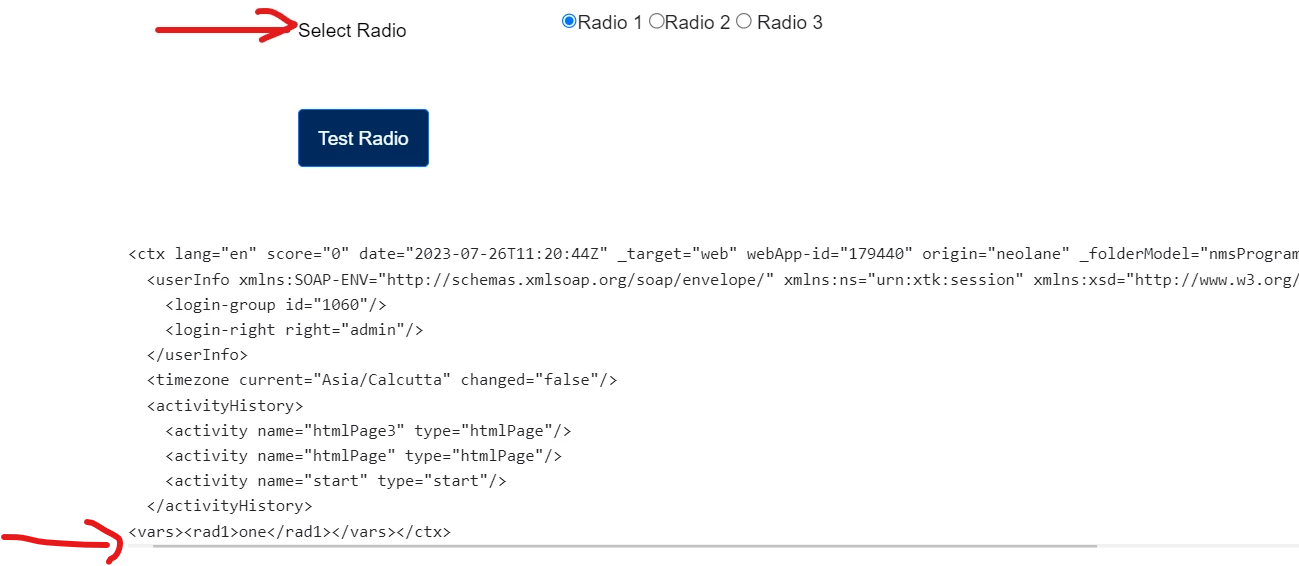
Snip of HTML :


You can then use the variables (rad1) in the next JavaScript of the web application something like this :

var radio1 = ctx.vars.rad1;


Thanks

Rahul


1 reply

rga2024Accepted solution
Level 2
July 26, 2023

Hi @dandrews2 , 

You can do something like below if you want to do some custom 

HTML Code :

<div class="row mb-3" id="testRadio"><label class="col-sm-2 col-form-label nl-dce-translate" for="testRadio">Select Radio </label>
<div class="col-sm-10">
<input type="radio" id="rad1" value="one" name="radioButton" data-nl-type="string" data-nl-ismandatory="false" />Radio 1
<input type="radio" id="rad2" value="two" name="radioButton" data-nl-type="string" data-nl-ismandatory="false"/>Radio 2
<input type="radio" id="rad3" value="three" name="radioButton" data-nl-type="string" data-nl-ismandatory="false" /> Radio 3

</div>
</div>


/*jQuery Code on the html page to capture the value of radio selection in a ctx variable */

$('#rad1').change(function() {
var rad1 = document.getElementById("rad1").value;
document.controller.setValue('/ctx/vars/rad1', rad1);
});

$('#rad2').change(function() {
var rad2 = document.getElementById("rad2").value;
document.controller.setValue('/ctx/vars/rad2', rad2);
});

$('#rad3').change(function() {
var rad3 = document.getElementById("rad3").value;
document.controller.setValue('/ctx/vars/rad3', rad3);
});

Snip of HTML :


You can then use the variables (rad1) in the next JavaScript of the web application something like this :

var radio1 = ctx.vars.rad1;


Thanks

Rahul


Dandrews2Author
Level 2
August 24, 2023

Thank you Rahulgarg 🙂