
Use enumeration label instead of value in email delivery | Community
Skip to main content
Heku_
Level 5
October 28, 2024
Solved

Use enumeration label instead of value in email delivery

  • October 28, 2024
  • 1 reply
  • 1304 views

Hello, I'm trying to use the enumeration label in a delivery instead of the internal value in an email delivery. I would like to know how to do it.
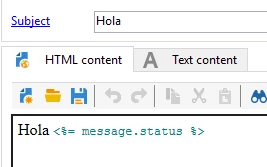
I've already tried with exportFormat/analyze="true", but I think it only works for deliveries that generate a file.

How should I do this for the email delivery?

Thank you in advance.



This post is no longer active and is closed to new replies. Need help? Start a new post to ask your question.
Best answer by ccg1706

Hi @heku_,


Sorry that was a mistake by my side, the NLWS is supported in Adobe Campaign Standard. 


You can try to use queryDef to retrieve the label for a specific enumeration value that comes from the xtk: enumValue schema.


A solution as a guidance:

var enumSchema = "EnumSchema"; var enumValue = "fieldtouse"; var queryDef = `<queryDef schema="xtk:enumValue"> <select> <node expr="@label" alias="label"/> </select> <where> <condition expr="@name='${enumSchema}'"/> <condition expr="@value='${enumValue}'"/> </where> </queryDef>`; try { var query = xtk.queryDef.create(queryDef); var result = query.ExecuteQuery(); if (result.length > 0) { var label = result[0].label; logInfo("Label: " + label); } else { logError("No label found."); } } catch (e) { logError("Error: " + e.message); } ** Replace "EnumSchema" with your enum schema name ** Replace "fieldtouse" with the enum value you need


Finally I leave you with some documentation links:

Adobe API JS 

 queryDef 

Regards, 

Celia

1 reply

ccg1706
Community Advisor
Community Advisor
October 30, 2024

Hi @heku_,


I share with you some useful documentation links that can help you to solve your issue:

Managing enumerations 

Comfiguring export jobs 

JavaScript scripts and templates 


Some solutions that come to my mind, that you can try are:


-Create a custom function inside a JavaScript Activity, before the delivery to transform the enumeration value into it's label. Store the label in a temporary field in order to use it in the delivery.

-Create a content block where you use JavaScript  to retreive and display the enumeration. I share with you a possible solution as a guidance.


<%=NLWS.nmsEnum.getLabel("EnumSchema", fieldtouse) %> *Inside EnumSchema, insert the schema name for the enumeration *Inside field to use put the field you want to use


Regards,

Celia

Heku_
Heku_Author
Level 5
October 31, 2024

Hello, where did you get this from? 

<%=NLWS.nmsEnum.getLabel("EnumSchema", fieldtouse) %>

 I've tried to use it like this, but the message does not even arrive.

When i try to use it in a js activity NLWS.nmsEnum it says that this function does not exist. I have AC v7

ccg1706
Community Advisor
ccg1706Community AdvisorAccepted solution
Community Advisor
November 2, 2024

Hi @heku_,


Sorry that was a mistake by my side, the NLWS is supported in Adobe Campaign Standard. 


You can try to use queryDef to retrieve the label for a specific enumeration value that comes from the xtk: enumValue schema.


A solution as a guidance:

var enumSchema = "EnumSchema"; var enumValue = "fieldtouse"; var queryDef = `<queryDef schema="xtk:enumValue"> <select> <node expr="@label" alias="label"/> </select> <where> <condition expr="@name='${enumSchema}'"/> <condition expr="@value='${enumValue}'"/> </where> </queryDef>`; try { var query = xtk.queryDef.create(queryDef); var result = query.ExecuteQuery(); if (result.length > 0) { var label = result[0].label; logInfo("Label: " + label); } else { logError("No label found."); } } catch (e) { logError("Error: " + e.message); } ** Replace "EnumSchema" with your enum schema name ** Replace "fieldtouse" with the enum value you need


Finally I leave you with some documentation links:

Adobe API JS 

 queryDef 

Regards, 

Celia