Updating the gender column via Job | Community
Skip to main content
March 4, 2021
Solved

Updating the gender column via Job

  • March 4, 2021
  • 2 replies
  • 1728 views

Hi, I'm uploading a Job with several columns, one of them is the "gender" column but since it's an "integer type" I'm not being able to get the update of this column done and it keeps showing as "None specified".

This post is no longer active and is closed to new replies. Need help? Start a new post to ask your question.
Best answer by ParthaSarathy

Hi @belcds ,

data type of @gender is "byte" (Integer 8 Bit) in Recipient schema.
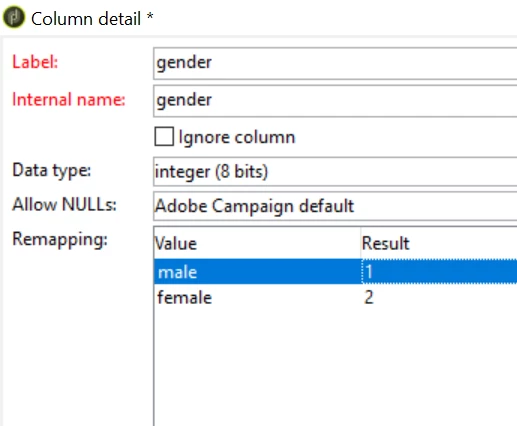
Value of male is 1 and female is 2. (Value of None specified/unknown is 0)
In you are updating the gender using JOB import, then in your file change the gender format as 1 for male and 2 for female.
Select data type as integer (8 bit) for gender by clicking 'click here to change the file format' and follow the rest import JOB procedure. Gender field will get updated now.
 
Alternative way:
You can use a workflow to upload the file data in schema by using data loading activity.
Here, you no need to make the gender format as 1 for male and 2 for female in original file. you can have as 'male' and 'female' and need to remap this value as 1 and 2 in data loading activity.
 
Regards,
ParthaSarathy S
2 replies

Level 6
March 4, 2021

Hi,
I guess the values in the file/job for Gender column are strings and that's why it is not getting updated.

You may need to convert these to appropriate integers and the load the data.

It would be great if you can put your job details for a precise solution.

Thanks,

Deb

ParthaSarathy
Community Advisor
ParthaSarathyCommunity AdvisorAccepted solution
Community Advisor
March 4, 2021

Hi @belcds ,

data type of @gender is "byte" (Integer 8 Bit) in Recipient schema.
Value of male is 1 and female is 2. (Value of None specified/unknown is 0)
In you are updating the gender using JOB import, then in your file change the gender format as 1 for male and 2 for female.
Select data type as integer (8 bit) for gender by clicking 'click here to change the file format' and follow the rest import JOB procedure. Gender field will get updated now.
 
Alternative way:
You can use a workflow to upload the file data in schema by using data loading activity.
Here, you no need to make the gender format as 1 for male and 2 for female in original file. you can have as 'male' and 'female' and need to remap this value as 1 and 2 in data loading activity.
 
Regards,
ParthaSarathy S
~  ParthaSarathy S~  Click here to join ADOBE CAMPAIGN USER GROUP for Quarterly In-person | Hybrid | Virtual Meetups
BelCDSAuthor
March 4, 2021
Thanks, changing the format in the file when uploading the job wasn't working but updating the data via Wkf did worked!