Updating name field length on the xtk:group schema from 64 to 128 | Community
Skip to main content
Level 2
September 10, 2024
Solved

Updating name field length on the xtk:group schema from 64 to 128

  • September 10, 2024
  • 1 reply
  • 639 views

Hello!


I am following instructions given to add a new named right and need to update a field length for the xtk:group name field from 64 to 128 bytes. I am working from the Adobe documentation for campaign classic v7.

I am not able to get this work. The group table isn’t listed for update when I perform the step ‘Update the data structure’.

Here is the process I followed:

  1. Create a new schema > select 'extension of a schema' > schema:xtk:group
  2. Add this to the script changing the length from 64 to 128.

<attribute defOnDuplicate="true" default="GetOption('XtkInstancePrefix')+Iif(@type=0, 'LOGIN', Iif(@type=1, 'GRP', 'RIGHT'))+CounterValue('xtkOperator')"

label="Name" length="128" name="name" required="true" type="string"/>/&gt;

  1. Save
  2. Update the database structure

On the edit table step it does not show the change or update for xtk:group. This screen shot is taken from Adobe documentation as an example.
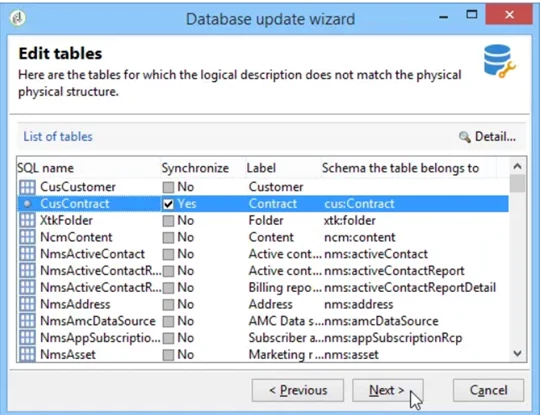
This is as far as I have gone in the process since it will not recognize that the group schema needs updating.

Also, here are a couple of helpful discussions on EL that I reviewed as well: https://experienceleaguecommunities.adobe.com/t5/adobe-campaign-classic-questions/can-activity-name-length-be-modified-in-adobe-campaign-classic/td-p/608907

https://experienceleague.adobe.com/en/docs/campaign-classic/using/installing-campaign-classic/accessing-external-database/configure-fda/remote-database-access-rights


Can someone advise on what I’m missing?

Thanks!


This post is no longer active and is closed to new replies. Need help? Start a new post to ask your question.
Best answer by MaryWa1

I resolved this issue. I repositioned the change between the element tags as below and it worked.


<element desc="Application operator groups" img="xtk:group.png" label="Operator groups"
labelSingular="Operator group" name="group">
<attribute defOnDuplicate="true" default="GetOption('XtkInstancePrefix')+Iif(@type=0, 'LOGIN', Iif(@type=1, 'GRP', 'RIGHT'))+CounterValue('xtkOperator')"
label="Name" length="128" name="name" required="true" type="string"/>/&gt;
</element>


1 reply

MaryWa1AuthorAccepted solution
Level 2
September 10, 2024

I resolved this issue. I repositioned the change between the element tags as below and it worked.


<element desc="Application operator groups" img="xtk:group.png" label="Operator groups"
labelSingular="Operator group" name="group">
<attribute defOnDuplicate="true" default="GetOption('XtkInstancePrefix')+Iif(@type=0, 'LOGIN', Iif(@type=1, 'GRP', 'RIGHT'))+CounterValue('xtkOperator')"
label="Name" length="128" name="name" required="true" type="string"/>/&gt;
</element>