Reviewing the typology rules, we have found that the typology rule that comes by default in the system “Unqualified address” has nothing in the “Filter” section (I include screenshot), does this mean that it is not really doing anything or we are looking at something wrong?)
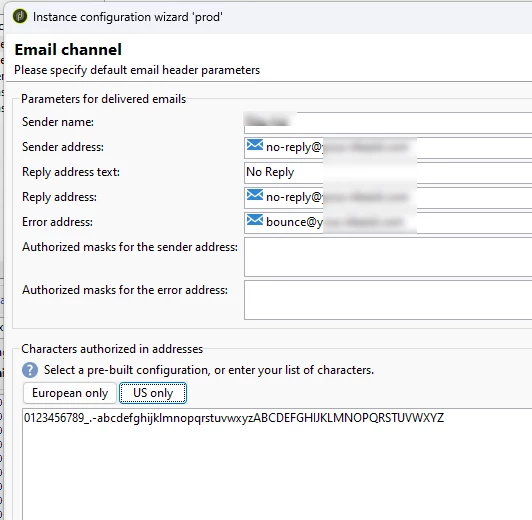
Bad quality address, it's specific to email. Adobe is using a regex in data policy js combined with character authorized in addresses as defined per deployment wizard (also available in Options XtkEmail_Characters)
  case "email":
      var aPart = str.split("@");
      if (aPart.length === 2 && aPart[0].match(/^[\S]+$/) &&
          aPart[1].match(/^([\w\-]+\.)+[\w\-]+$/)) {
        return str.toLowerCase();
      }
In Adobe Campaign Classic, a typology rule with an empty "Filter" section doesn't mean it's not doing anything; it means it's applying to all addresses that haven't already been assigned to another typology.
The "Unqualified address" typology rule is a default rule that acts as a catch-all. If an address doesn't match the criteria of any other typology rule, it's automatically assigned the "Unqualified address" typology. The absence of a filter ensures that this rule is applied to all remaining addresses after other, more specific rules have been processed.
Eg: You have 20 email addresses and three typology rules (let's call them Rule 1, Rule 2, and Rule 3). The "Unqualified address" rule is always the last rule processed.
Here's the step-by-step process:
Rule 1 Evaluation: ACC evaluates Rule 1 against all 20 email addresses. Any addresses that meet Rule 1's criteria are assigned the corresponding typology and are removed from further processing. The remaining addresses are passed to the next rule.
Rule 2 Evaluation: ACC evaluates Rule 2 against the remaining addresses (those that didn't match Rule 1). Addresses meeting Rule 2's criteria are assigned their typology and removed from further processing.
Rule 3 Evaluation: The same process happens for Rule 3.
"Unqualified Address" Rule:After all other typology rules have been processed, the "Unqualified address" rule is applied. Crucially, this rule has no filter. Therefore, all addresses that remain—those that didn't match any of the preceding rules—are automatically assigned the "Unqualified address" typology.
And being assigned the "Unqualified address" typology does not automatically exclude an email address from being sent.
I have understood how the filter works in the typology rule but then I have the doubt of how to see the logic that applies, in this case, how you have explained, the assigment to “Unqualified address”, I am not interested in this case, I would be interested what in your example would be the rules 1,2 and 3 of evaluation. I need to know the rules that excludes an email because I thought that the typology rule did.
I would need to know how the emails are excluded because of the format (I imagine that, bad-quality address do this). In this case, I can see that the filter also applies to every recipient but I can't see how it works either.
Bad quality address, it's specific to email. Adobe is using a regex in data policy js combined with character authorized in addresses as defined per deployment wizard (also available in Options XtkEmail_Characters)
  case "email":
      var aPart = str.split("@");
      if (aPart.length === 2 && aPart[0].match(/^[\S]+$/) &&
          aPart[1].match(/^([\w\-]+\.)+[\w\-]+$/)) {
        return str.toLowerCase();
      }