Hi @gowthamr123 ,
Step-1:
In your 1st ETL Workflow, Begin the workflow with a scheduler activity.
And in other ETL Workflow's, begin the workflow with 'External signal'. (Make sure that internalName of the external signal activity is 'signal' (open external signal activity > advanced tab > Name: signal)
Step-2:
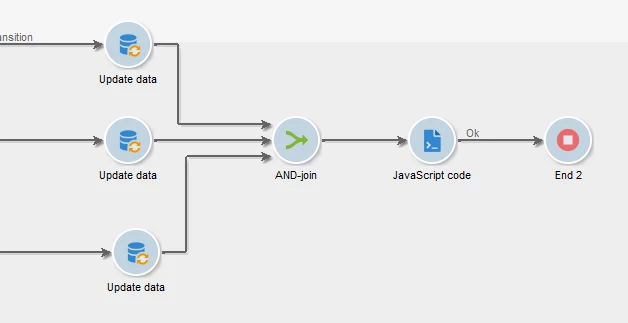
In 1st ETL Workflow as you're updating 3 schemas in it, connect the 3 update data activity's transition to 'AND join' activity, followed by a JavaScript code activity.
(In 'AND-Join' select any of the transition as primary set)
Step-3:
In JavaScript activity, trigger the 2nd WKF using xtk.workflow.PostEvent method
Syntax:
xtk.workflow.PostEvent("internalName_of_next_Workflow", "internalName_of_next_Workflow's_Signal_Activity", "", <variables/>, false);

//Example: if the 2nd ETL WKF's internal name is 'ETL_WKF2' then,
xtk.workflow.PostEvent("ETL_WKF2", "signal", "", <variables/>, false);
Step-4:
Repeat the same in all other ETL workflows, by connecting all update data activity with AND join and with JS to trigger next Workflow.
Step-5:
In the last ETL Workflow, instead of JavaScript activity, use 'Alert' activity, and configure the message as 'ALL ETL Workflows Ran successfully'.
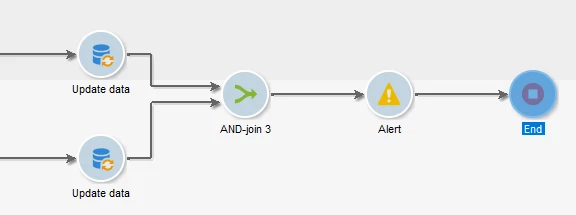
So now you will be receiving a Unified alert message.
Note:
1. All the ETL workflow should be in started state.
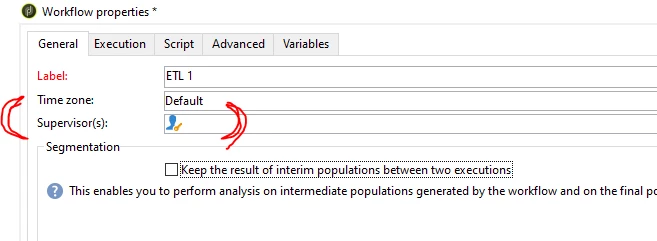
2. In all workflow's property > General tab > select a 'Supervisor' group to get alert if any Workflow fails.