Unable to edit list with group table in adobe campaign client console | Community
Skip to main content
Level 2
February 14, 2022
Solved

Unable to edit list with group table in adobe campaign client console

  • February 14, 2022
  • 2 replies
  • 926 views

Hi Folks,


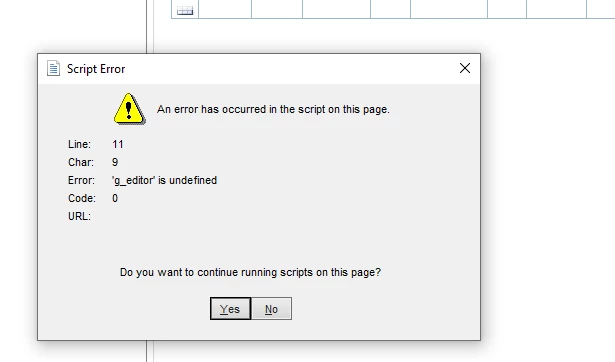
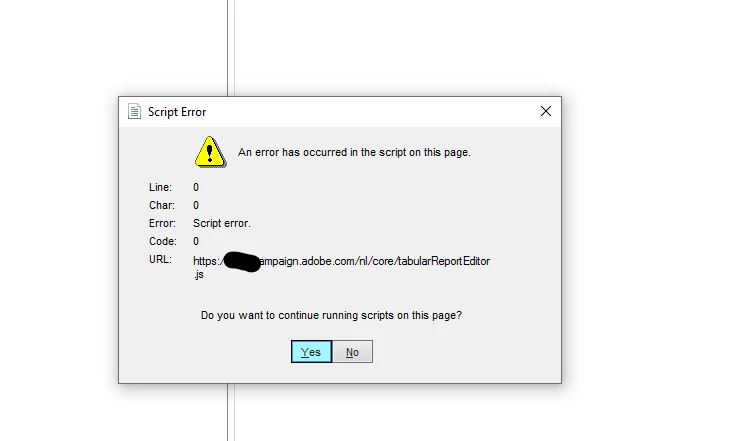
I am working on reporting for the marketing campaigns. However, While using the list with group table editor in the report, I'm getting the below scripts error. This same is working fine in my colleague's machines. Also, from the error, it clearly seems that it is related to console error, and not the instance issue. I have already tried uninstalling and installing the console again, but no luck. 
 

Any suggestions on this topic are highly appreciated.


Regards,
Nitesh Anwani

This post is no longer active and is closed to new replies. Need help? Start a new post to ask your question.
Best answer by Tobias_Lohmann

Hi,

this seems to be a browser issue. If I remember correctly the Campaign Client will use the Edge or Internet Explorer settings on the machine. Can you try to find differences between your and your colleagues machine? 

Eg.:

  • use the same default browser as the other machine
  • check the trusted sites setup, proxies and any other security related settings 
  • you might need to look at the Edge specific settings and/or the Internet Options in Internet Explorer

I would look at the Internet Explorer Options first, because I think the client console is tied to that. 

Best regards, Tobias

2 replies

Tobias_Lohmann
Adobe Employee
Tobias_LohmannAdobe EmployeeAccepted solution
Adobe Employee
February 15, 2022

Hi,

this seems to be a browser issue. If I remember correctly the Campaign Client will use the Edge or Internet Explorer settings on the machine. Can you try to find differences between your and your colleagues machine? 

Eg.:

  • use the same default browser as the other machine
  • check the trusted sites setup, proxies and any other security related settings 
  • you might need to look at the Edge specific settings and/or the Internet Options in Internet Explorer

I would look at the Internet Explorer Options first, because I think the client console is tied to that. 

Best regards, Tobias

Sukrity_Wadhwa
Community Manager
Community Manager
February 24, 2022

Hi @nitesh_anwani,

Were you able to resolve this query with the help of the given solution or do you still need more help here? Do let us know.
Thanks!

Sukrity Wadhwa