Transpose data adobe campaign classic | Community
Skip to main content
August 15, 2020
Solved

Transpose data adobe campaign classic

  • August 15, 2020
  • 3 replies
  • 3225 views

Hi All,

Can you please help me in finding a way to transpose the data from different columns into a single for a customer. I am using adobe campaign V7 


PartyIdMonthMoney_arrears
123Jan20
123Feb27
123Mar45


I am looking for transposing the data into something like


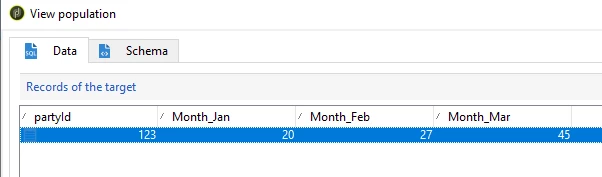
PartyIdMonth_JanMonth_FebMonth_March
123202745


Many Thanks

Chinni


This post is no longer active and is closed to new replies. Need help? Start a new post to ask your question.
Best answer by tapcxm_josh

Hi @chinni ,


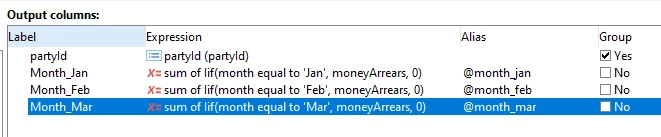
Using a query activity in a workflow, leave the filtering conditions blank and configure the output columns to look something like this:


The records outputted will be grouped by partyId, and the newly month colums will sum the Money_arrears values for each partyId, but only if the month is equal to the one you specify. (Remember to disable automatic adding of primary key in the query's advanced parameters.)


Thanks,


Josh

3 replies

Milan_Vucetic
Level 9
August 16, 2020

Hi @chinni

try to explore posibilities of Change dimension node in AC.

Check this similar example: Pivot and unpivot functions 

Regards,

Milan

tapcxm_josh
tapcxm_joshAccepted solution
Level 2
August 18, 2020

Hi @chinni ,


Using a query activity in a workflow, leave the filtering conditions blank and configure the output columns to look something like this:


The records outputted will be grouped by partyId, and the newly month colums will sum the Money_arrears values for each partyId, but only if the month is equal to the one you specify. (Remember to disable automatic adding of primary key in the query's advanced parameters.)


Thanks,


Josh

July 16, 2021

Hi,

You can use enrichment activity to do the transpose of data(rows to column). Please follow below steps.

Step1: Take the enrichment activity and make the self join with same table with the help of 1: N join while giving join condition.

Step2: While adding the data please make sure to add column(No. of records to retrieve as per your convenience (By default it will be max 3 rows) ). So it will create multiple enrichment table based on your records to retrieve. If you have chosen 3 then it will create 3 different temp enrichment table. 

Step3: Take final enrichment activity and then add your data from these different temp enrichment table.


Thanks,

Anil


Level 3
July 25, 2022

Hi @anilr1717 I like your solution better.

However, I wanted to know if the process of creating the columns can be dynamic? Lets say 1 record has 2 months so only 2 enrichment tables (only display 2 columns) but other record has 4 months, so display 4 columns?