Tracking One CLick Unsubscription in Adobe Campaign Classic | Community
Skip to main content
Level 2
December 19, 2024
Solved

Tracking One CLick Unsubscription in Adobe Campaign Classic

  • December 19, 2024
  • 2 replies
  • 846 views

We are implementing a 'One-Click Unsubscription' feature in Adobe Campaign Classic. So far, we have successfully customized the out-of-the-box web app provided by Adobe to handle unsubscriptions and track them programmatically.

Our next challenge is identifying which delivery was used by a recipient to unsubscribe. Specifically, we want the web app to retrieve the delivery code associated with the recipient's unsubscription click. This would allow us to track the types of deliveries prompting unsubscriptions and manage service-level unsubscriptions more effectively.

What We Have Done So Far:

  1. Customized the default web app with custom scripts to handle unsubscriptions.
  2. Added logic to update recipient information when unsubscribing.

What We Need Help With:

We want to:

  • Retrieve the delivery code of the delivery the recipient interacted with.
  • Embed this delivery code in the web app script so it can be stored for tracking purposes.

Is there a straightforward way to include the delivery code in the web app's context or fetch it programmatically? Are there best practices for handling delivery-level unsubscriptions to make this process more efficient?


Any guidance or examples on better handling and tracking of One Click Unsubscription would be greatly appreciated!
This post is no longer active and is closed to new replies. Need help? Start a new post to ask your question.
Best answer by costa_n11

Hi @shubhamborse 

What you'd like to do is relatively easy to achieve. Be aware the post is a bit long as there are several steps to implement. 

Also, the solution that will be described below is applicable if the unsubscription page is hosted by Adobe Campaign and is considered as a customisation of your Adobe Campaign solution as such, you will be responsible for its maintenance, etc...


  1. ACC Landing Page Configuration
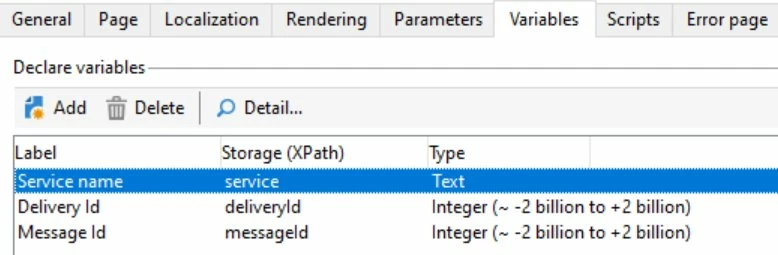
    1. Add 3 variables

      • Service
      • deliveryId
      • messageId
      •  


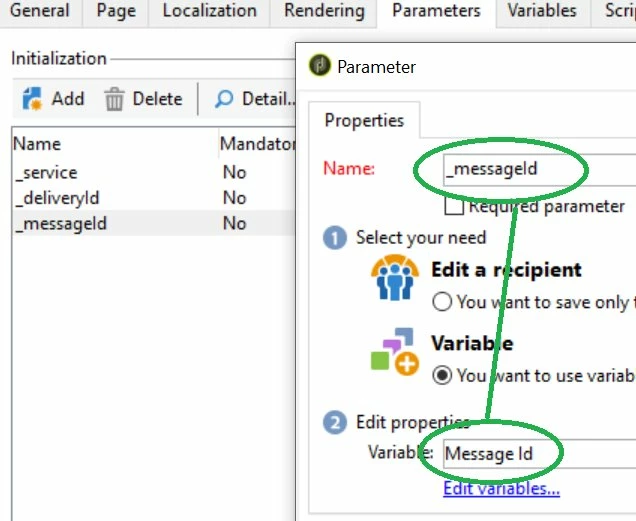
    2. Add 3 parameters mapped to their respective parameters

      • _service
      • _deliveryId
      • _messageId
      • Parameter id is the default and stand one containing the encrypted recipient Id
      •  


  2. ACC Landing Page Structure
    1.  


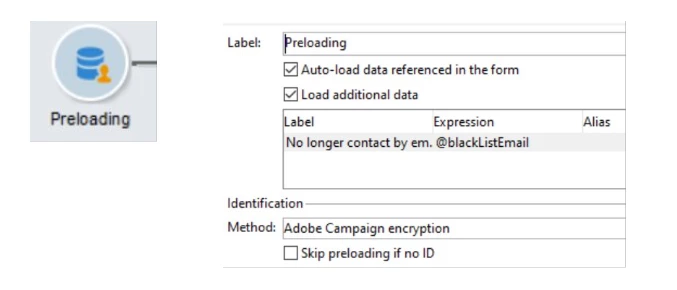
    2. Preload Activity


  3. ACC Landing Page JS Activity
    1. The activity will retrieve the parameters, look for the existing tracking URL matching the 1-click landing page internal name, if not found, will create a tracking URL record and then will create a tracking log
    2. JS File


if (NL.isEmpty(ctx.@secret)) logError("invalid secret..."); var secret = decryptString(ctx.@secret); if (NL.isEmpty(secret)) logError("invalid secret..."); this.secret = JSON.parse(secret); if (NL.isEmpty(this.secret)) logError("invalid secret..."); if (this.secret.method != ctx.@_method || this.secret.identifier != ctx.@_identifier || this.secret.key != ctx.recipient.@_key ) { logError("invalid secret..."); } if( String(ctx.recipient.@id) != decryptString(this.secret.identifier) ) logError("The webApp inputs are corrupted."); // remove descenants @_key to protecte against sql injection var descendantNode = ctx.recipient.descendants(); for (var i = 0; i < descendantNode.length(); i++) { delete descendantNode[i].@_key; delete descendantNode[i].@_operation; } var debug = true; // Should be set to false in Production // Local variable from the context var deliveryId = ctx.vars.deliveryId; var messageId = ctx.vars.messageId var recipientId = ctx.recipient.@id; // Local variable for the tracking URL and tracking log var logDate = formatDate(new getCurrentDate(), "%4Y-%2M-%2D %2H:%2N:%2S"); var landingPageName = "myUnsubNoClick"; // Should be changed to the internal name of the ACC unsubscription landing page var source = getOption("NmsServer_URL") + "/webApp/"+ landingPageName + "?id="; var label="Opt-out (1-Click)"; var type = 3; // opt-out // Here you do manage your unsubscription as per your requirements. in standard if a service is provided (name) nms.subscription.Unsubscribe(ctx.vars.service, ctx.recipient) // Opt-out the recipient, adapt to your unsubscription requirements // Please note that in this context, 2 new fields have been added unsubscribeDate and unsubscribeReason, adapt to your own unsubscription solution xtk.session.Write(<recipient xtkschema="nms:recipient" _key="@id" id={recipientId} _operation="update" blackListEmail="1" unsubscribeDate={logDate} unsubscribeReason={label} />); // If the delivery identifier is filled in, create a tracking log of type opt-Out if (debug) logInfo(landingPageName + " - deliveryId: " + deliveryId + " messageId: " + messageId + " recipientId: " + recipientId + " On " + logDate); if (deliveryId != 0 && messageId != 0) { try { var createTrackingUrl = false; var trackingUrlId = 0; var xmlQuery = <queryDef schema="nms:trackingUrl" operation="select"> <select> <node expr="@id"/> </select> <where> <condition expr={ "[@delivery-id]=" + deliveryId} /> <condition expr={ "@source like '%" + landingPageName + "%'"} /> </where> </queryDef>; var qry = xtk.queryDef.create(xmlQuery); var xmlTrackingUrl = qry.ExecuteQuery(); if (debug) logInfo(landingPageName + " - query result: " + xmlTrackingUrl ); if (xmlTrackingUrl != '' ) { for each (var trackingUrl in xmlTrackingUrl.trackingUrl) { trackingUrlId = trackingUrl.@id; if (debug) logInfo(landingPageName + " - trackingUrlId: " + trackingUrlId); break; } } // The URL for landing page link does not exist for the delivery, we need to create id // This will be executed on the 1st 1-click usage for each delivery if (trackingUrlId == 0) { xtk.session.Write(<trackingUrl _operation="insert" source={source} label={label} delivery-id={deliveryId} type={type} xtkschema="nms:trackingUrl"/>); // Since we need its Id, we need to query the class again var xmlQuery1 = <queryDef schema="nms:trackingUrl" operation="select"> <select> <node expr="@id"/> </select> <where> <condition expr={ "[@delivery-id]=" + deliveryId} /> <condition expr={ "@source like '%" + landingPageName + "%'"} /> </where> </queryDef>; var qry1 = xtk.queryDef.create(xmlQuery1); var xmlTrackingUrl1 = qry1.ExecuteQuery(); if (debug) logInfo("query result: " + xmlTrackingUrl1 ); if (xmlTrackingUrl1 != '' ) { for each (var trackingUrl1 in xmlTrackingUrl1.trackingUrl) { trackingUrlId = trackingUrl1.@id; if (debug) logInfo(landingPageName+ " - trackingUrlId after save: " + trackingUrlId); break; } } } // Now we should have a tracking URL identifier, write the tracking log xtk.session.Write(<trackingLogRcp _operation="insert" recipient-id={recipientId} delivery-id={deliveryId} broadLog-id={messageId} url-id={trackingUrlId} logDate={logDate} xtkschema="nms:trackingLogRcp"/>); } catch( e ) { logError("An error occurs in landing page " + landingPageName + " - register tracking): " + e); throw e; } }


  • Resulting URL: <%@ include option='NmsServer_URL' %>/webApp/myUnsubNoClick?id=<%=escapeUrl(recipient.cryptedId)%>&_deliveryId=<%= delivery.id %>&_messageId=<%= message.id %>&_service=newsletter
  • Note that the name of the landing page should match the one created and should match ​the variable landingPageName in the JS script
  • ACC Delivery Additional SMTP Header Configuration
    1. It should be looking similar to the one below


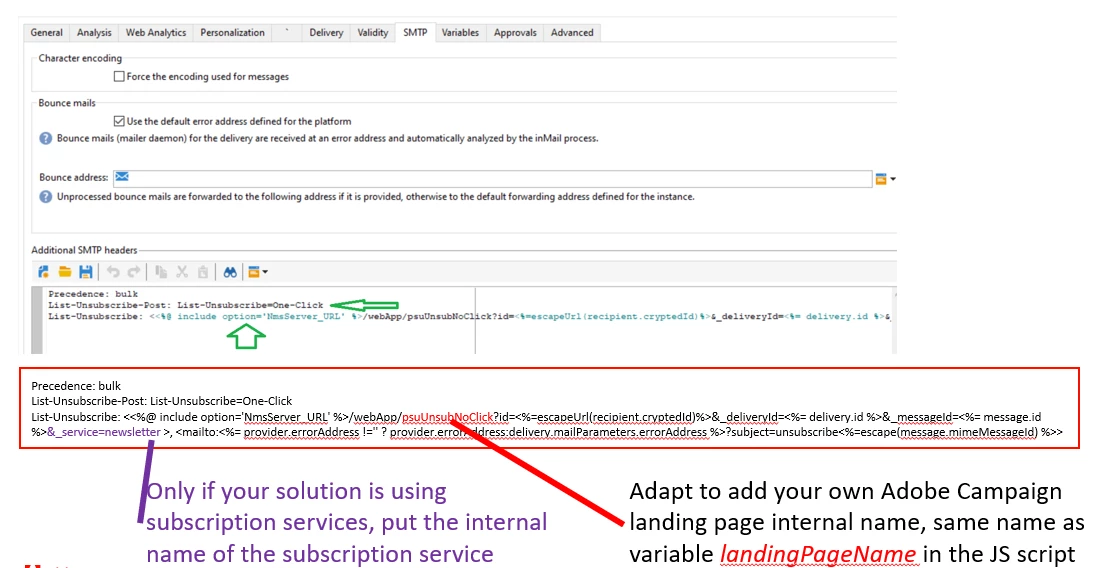
Precedence: bulk List-Unsubscribe-Post: List-Unsubscribe=One-Click List-Unsubscribe: <<%@ include option='NmsServer_URL' %>/webApp/myUnsubNoClick?id=<%=escapeUrl(recipient.cryptedId)%>&_deliveryId=<%= delivery.id %>&_messageId=<%= message.id %>&_service=newsletter >, <mailto:<%= provider.errorAddress !='' ? provider.errorAddress:delivery.mailParameters.errorAddress %>?subject=unsubscribe<%=escape(message.mimeMessageId) %>>


  • Please note that the name of the landing page should be adapted to the one you have created and must be the same name as the variable landingPageName in the JS script
  •  

  • Results
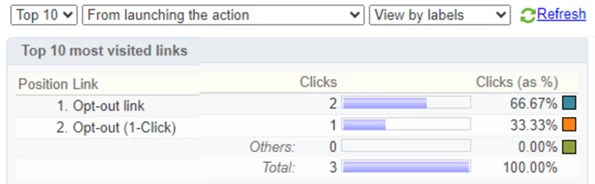
    1. Delivery Tracking
      1. Tracking URL created once 


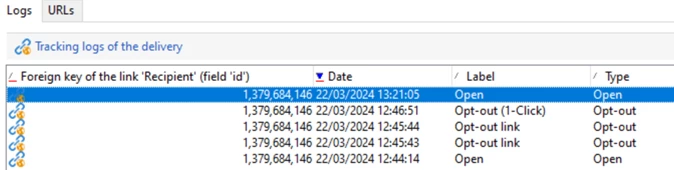
      2. Tracking Logs 


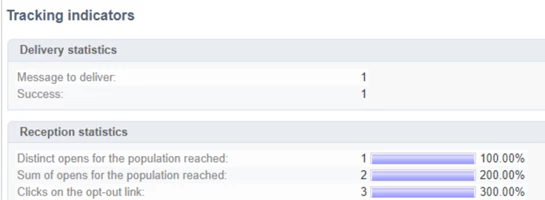
      3. Tracking Indicators 


      4. URL & Clickstreams  
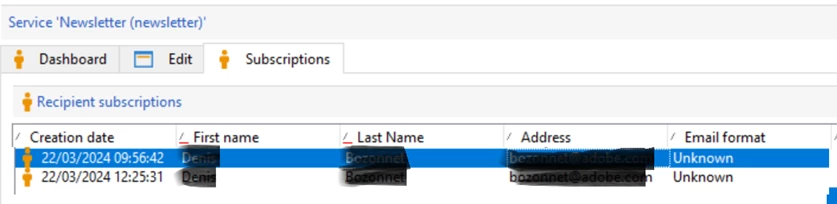
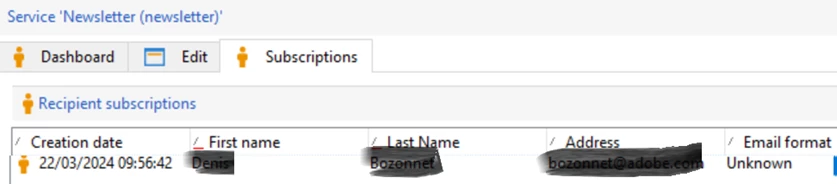
    2.  Service Subscription
      1. Before – Active Subscription 


      2. After – Active Subscription 


      3. After – History Subscription 


    3. Recipient: if you have a custom unsubsciption field, it should be reflected too 


  • If your unsubscription mechanism is performed via a non-Adobe Campaign landing page, it is possible to
    1. Setup an Adobe Campaign landing page as described in this document
    2. Invoke the Adobe Campaign landing page from your external application as a server to server call via a POST request
    3. Your external landing page would have to accept the expected ACC parameters: encrypted recipient or similar, and same paraeters than the step 1 above: delivery and message identifiers as well as a service parameter if your Adobe Campaign solution is using such capacity.


Hope this helps,


Denis.

2 replies

Level 2
December 31, 2024

Hello,

One way could be to include the delivery id in the unsubscription link parameters and use it in the web app to read delivery code.

You can refer to delivery id with <%= delivery.id %>


Regards

 Tero

costa_n11Adobe EmployeeAccepted solution
Adobe Employee
December 31, 2024

Hi @shubhamborse 

What you'd like to do is relatively easy to achieve. Be aware the post is a bit long as there are several steps to implement. 

Also, the solution that will be described below is applicable if the unsubscription page is hosted by Adobe Campaign and is considered as a customisation of your Adobe Campaign solution as such, you will be responsible for its maintenance, etc...


  1. ACC Landing Page Configuration
    1. Add 3 variables

      • Service
      • deliveryId
      • messageId
      •  


    2. Add 3 parameters mapped to their respective parameters

      • _service
      • _deliveryId
      • _messageId
      • Parameter id is the default and stand one containing the encrypted recipient Id
      •  


  2. ACC Landing Page Structure
    1.  


    2. Preload Activity


  3. ACC Landing Page JS Activity
    1. The activity will retrieve the parameters, look for the existing tracking URL matching the 1-click landing page internal name, if not found, will create a tracking URL record and then will create a tracking log
    2. JS File


if (NL.isEmpty(ctx.@secret)) logError("invalid secret..."); var secret = decryptString(ctx.@secret); if (NL.isEmpty(secret)) logError("invalid secret..."); this.secret = JSON.parse(secret); if (NL.isEmpty(this.secret)) logError("invalid secret..."); if (this.secret.method != ctx.@_method || this.secret.identifier != ctx.@_identifier || this.secret.key != ctx.recipient.@_key ) { logError("invalid secret..."); } if( String(ctx.recipient.@id) != decryptString(this.secret.identifier) ) logError("The webApp inputs are corrupted."); // remove descenants @_key to protecte against sql injection var descendantNode = ctx.recipient.descendants(); for (var i = 0; i < descendantNode.length(); i++) { delete descendantNode[i].@_key; delete descendantNode[i].@_operation; } var debug = true; // Should be set to false in Production // Local variable from the context var deliveryId = ctx.vars.deliveryId; var messageId = ctx.vars.messageId var recipientId = ctx.recipient.@id; // Local variable for the tracking URL and tracking log var logDate = formatDate(new getCurrentDate(), "%4Y-%2M-%2D %2H:%2N:%2S"); var landingPageName = "myUnsubNoClick"; // Should be changed to the internal name of the ACC unsubscription landing page var source = getOption("NmsServer_URL") + "/webApp/"+ landingPageName + "?id="; var label="Opt-out (1-Click)"; var type = 3; // opt-out // Here you do manage your unsubscription as per your requirements. in standard if a service is provided (name) nms.subscription.Unsubscribe(ctx.vars.service, ctx.recipient) // Opt-out the recipient, adapt to your unsubscription requirements // Please note that in this context, 2 new fields have been added unsubscribeDate and unsubscribeReason, adapt to your own unsubscription solution xtk.session.Write(<recipient xtkschema="nms:recipient" _key="@id" id={recipientId} _operation="update" blackListEmail="1" unsubscribeDate={logDate} unsubscribeReason={label} />); // If the delivery identifier is filled in, create a tracking log of type opt-Out if (debug) logInfo(landingPageName + " - deliveryId: " + deliveryId + " messageId: " + messageId + " recipientId: " + recipientId + " On " + logDate); if (deliveryId != 0 && messageId != 0) { try { var createTrackingUrl = false; var trackingUrlId = 0; var xmlQuery = <queryDef schema="nms:trackingUrl" operation="select"> <select> <node expr="@id"/> </select> <where> <condition expr={ "[@delivery-id]=" + deliveryId} /> <condition expr={ "@source like '%" + landingPageName + "%'"} /> </where> </queryDef>; var qry = xtk.queryDef.create(xmlQuery); var xmlTrackingUrl = qry.ExecuteQuery(); if (debug) logInfo(landingPageName + " - query result: " + xmlTrackingUrl ); if (xmlTrackingUrl != '' ) { for each (var trackingUrl in xmlTrackingUrl.trackingUrl) { trackingUrlId = trackingUrl.@id; if (debug) logInfo(landingPageName + " - trackingUrlId: " + trackingUrlId); break; } } // The URL for landing page link does not exist for the delivery, we need to create id // This will be executed on the 1st 1-click usage for each delivery if (trackingUrlId == 0) { xtk.session.Write(<trackingUrl _operation="insert" source={source} label={label} delivery-id={deliveryId} type={type} xtkschema="nms:trackingUrl"/>); // Since we need its Id, we need to query the class again var xmlQuery1 = <queryDef schema="nms:trackingUrl" operation="select"> <select> <node expr="@id"/> </select> <where> <condition expr={ "[@delivery-id]=" + deliveryId} /> <condition expr={ "@source like '%" + landingPageName + "%'"} /> </where> </queryDef>; var qry1 = xtk.queryDef.create(xmlQuery1); var xmlTrackingUrl1 = qry1.ExecuteQuery(); if (debug) logInfo("query result: " + xmlTrackingUrl1 ); if (xmlTrackingUrl1 != '' ) { for each (var trackingUrl1 in xmlTrackingUrl1.trackingUrl) { trackingUrlId = trackingUrl1.@id; if (debug) logInfo(landingPageName+ " - trackingUrlId after save: " + trackingUrlId); break; } } } // Now we should have a tracking URL identifier, write the tracking log xtk.session.Write(<trackingLogRcp _operation="insert" recipient-id={recipientId} delivery-id={deliveryId} broadLog-id={messageId} url-id={trackingUrlId} logDate={logDate} xtkschema="nms:trackingLogRcp"/>); } catch( e ) { logError("An error occurs in landing page " + landingPageName + " - register tracking): " + e); throw e; } }


  • Resulting URL: <%@ include option='NmsServer_URL' %>/webApp/myUnsubNoClick?id=<%=escapeUrl(recipient.cryptedId)%>&_deliveryId=<%= delivery.id %>&_messageId=<%= message.id %>&_service=newsletter
  • Note that the name of the landing page should match the one created and should match ​the variable landingPageName in the JS script
  • ACC Delivery Additional SMTP Header Configuration
    1. It should be looking similar to the one below


Precedence: bulk List-Unsubscribe-Post: List-Unsubscribe=One-Click List-Unsubscribe: <<%@ include option='NmsServer_URL' %>/webApp/myUnsubNoClick?id=<%=escapeUrl(recipient.cryptedId)%>&_deliveryId=<%= delivery.id %>&_messageId=<%= message.id %>&_service=newsletter >, <mailto:<%= provider.errorAddress !='' ? provider.errorAddress:delivery.mailParameters.errorAddress %>?subject=unsubscribe<%=escape(message.mimeMessageId) %>>


  • Please note that the name of the landing page should be adapted to the one you have created and must be the same name as the variable landingPageName in the JS script
  •  

  • Results
    1. Delivery Tracking
      1. Tracking URL created once 


      2. Tracking Logs 


      3. Tracking Indicators 


      4. URL & Clickstreams  
    2.  Service Subscription
      1. Before – Active Subscription 


      2. After – Active Subscription 


      3. After – History Subscription 


    3. Recipient: if you have a custom unsubsciption field, it should be reflected too 


  • If your unsubscription mechanism is performed via a non-Adobe Campaign landing page, it is possible to
    1. Setup an Adobe Campaign landing page as described in this document
    2. Invoke the Adobe Campaign landing page from your external application as a server to server call via a POST request
    3. Your external landing page would have to accept the expected ACC parameters: encrypted recipient or similar, and same paraeters than the step 1 above: delivery and message identifiers as well as a service parameter if your Adobe Campaign solution is using such capacity.


Hope this helps,


Denis.

Level 2
March 20, 2025

Hi @costa_n11 ,


Thank you for the detailed solution; it has been very effective for us. However, we are still encountering an issue in the test environment as solution is implemented in Test only for now. When clicking the unsubscribe button in the email, it does not function as expected and does not correctly address the web application. However, when we copy the URL from the "Show Original" option in the browser and manually unsubscribe the recipient, it works correctly, and the tracking logs are generated as expected.

What could be the possible reason for this behavior? Could this be specific to the test environment? Your assistance in resolving this issue would be greatly appreciated.