SELECT DISTINCT on Campaign V7 | Community
Skip to main content
Level 6
September 27, 2023
Solved

SELECT DISTINCT on Campaign V7

  • September 27, 2023
  • 3 replies
  • 1304 views

I need to now the unique elements of the column: DESCORREOAF from Recipients table. 

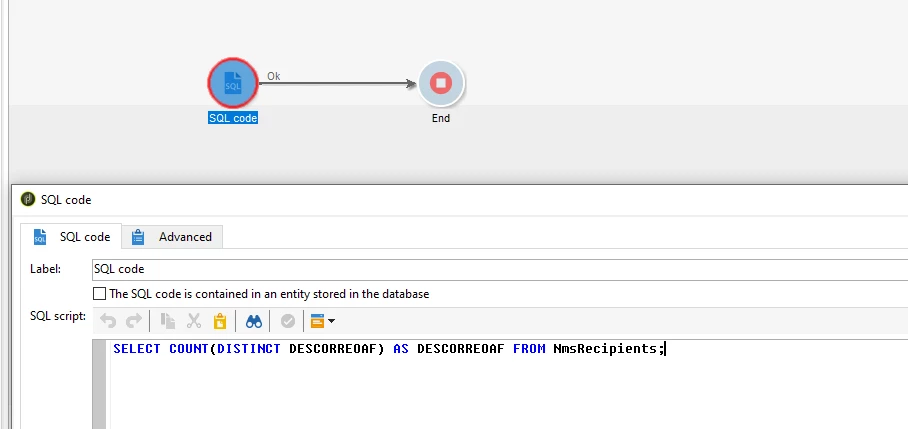
I used this query:

SELECT COUNT(DISTINCT DESCORREOAF) AS DESCORREOAF FROM NmsRecipients;

But is giving error: 

27/09/2023 17:28:54 PGS-220000 PostgreSQL error: ERROR: relation "nmsrecipients" does not exist LINE 1: ...T COUNT(DISTINCT DESCORREOAF) AS DESCORREOAF FROM NmsRecipie... ^ .

The column I need to query is this in XML: <attribute name="DESCORREOAF" type="string"/>


This post is no longer active and is closed to new replies. Need help? Start a new post to ask your question.
Best answer by SD_11

Hi @god_prophet ,

As your data type is string, you need to give 's' in prefix of the attribute name while running the SQL code.
Please try the below SQL code and execute it - it will work!

SELECT COUNT(DISTINCT sDESCORREOAF) AS DESCORREOAF FROM NmsRecipients;

Thanks,
Sanchari

3 replies

Manoj_Kumar
Community Advisor
Community Advisor
September 28, 2023

Hello @god_prophet 


If you are doing some testing and want to know the numbers, You can use the distribution of values functionality.

You can use the query activity, add the column, and click the " don't he highlighted " icon. It will give you the count and distinct values.


If you want these records in a workflow, then you can do this

  • Use query activity and pull all the records by condition id > o
  • Then click "Add data" and click the Next button 2 times.
  • Then select the output columns like this: Replace the Age column with your column.


  • Click on save.
  • Then click on edit additional data to disable the adding of primary keys.


Manoj  | https://themartech.pro
SD_11Accepted solution
Level 2
September 28, 2023

Hi @god_prophet ,

As your data type is string, you need to give 's' in prefix of the attribute name while running the SQL code.
Please try the below SQL code and execute it - it will work!

SELECT COUNT(DISTINCT sDESCORREOAF) AS DESCORREOAF FROM NmsRecipients;

Thanks,
Sanchari

LakshmiPravallika
Community Advisor
Community Advisor
September 28, 2023

Hi @god_prophet ,


Please check the values of SQL Table name with name "sqltable" and also the SQL Column name "sqlname" from the Preview Tab of Data Schema and try running the SQL Code .


In your Example, the SQL Code can be as shown below:


SELECT COUNT(DISTINCT {sqlname to be checked in Preview Tab in Recipient Schema}) AS DESCORREOAF FROM NmsRecipient;


Regards,

Pravallika.
