SCM-120008 Unable to find key values for element 'Condition' ( document with Schema 'delivery' ) | Community
Skip to main content
Level 5
June 27, 2022
Question

SCM-120008 Unable to find key values for element 'Condition' ( document with Schema 'delivery' )

  • June 27, 2022
  • 3 replies
  • 5353 views

Hi Team,


I am using a workflow and trying to follow the article 

https://experienceleaguecommunities.adobe.com/t5/adobe-campaign-classic-questions/operation-id-campaign-link-is-empty-for-continuous-deliveries/td-p/363544


When the save gets executed on the JS Activity, it leads to the error.  I had logged the info at multiple points and its that when save is called, the below error is thrown
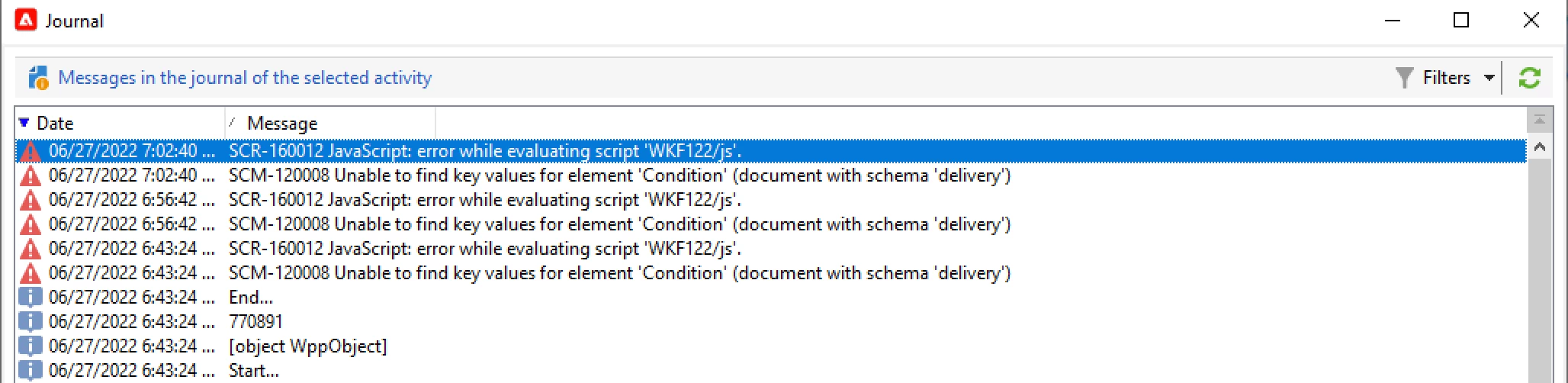


Request help on the same


Regards,

DG


This post is no longer active and is closed to new replies. Need help? Start a new post to ask your question.

3 replies

Amine_Abedour
Community Advisor
Community Advisor
June 27, 2022

Hello @dipendu_g;


Can you share your JS code? 

Br,

Amine 

Amine ABEDOUR
dipendu_gAuthor
Level 5
June 27, 2022
var delivery = NLWS.nmsDelivery.load(vars.deliveryId);
delivery.operation_id=instance.operation_id;
delivery.workflow_id=instance.id;
delivery.save();

Hi @amine_abedour 


We are on ACC v8. One thing that i saw was, if I only have 2 lines of code, ie Line 1 and Line 4, the error still comes. The error only is triggered on save, if we comment that out, it works properly

dipendu_gAuthor
Level 5
June 28, 2022

@amine_abedour , @adhiyan , @darren_bowers Please suggest / help.


Manoj_Kumar
Community Advisor
Community Advisor
June 28, 2022

Hello @dipendu_g 

Here's the right way to do it.


For Recurring delivery:

  • Select the delivery from the actions tab.


  • Now select your delivery template and configure other options
  • In the advanced tab this code:
    delivery.operation_id = instance.operation_id;

For Continous delivery:

  • After your continuous delivery add a javascript activity.
  • and then the code:
    var delivery = NLWS.nmsDelivery.load(vars.deliveryId);
    delivery.operation_id=instance.operation_id;
    delivery.workflow_id=instance.id;
    delivery.save();​


Manoj     Find me on LinkedIn
dipendu_gAuthor
Level 5
June 29, 2022

@_manoj_kumar_, Thanks for your reply.

Actually when I execute the second piece of code, the one you mentioned for Continuous Delivery, I get the error SCM-120008 error, that I have raised in this 


Request, if you can help me by providing a resolution


BR, 

DG


Manoj_Kumar
Community Advisor
Community Advisor
June 29, 2022

Hello @dipendu_g 

Replace vars.deliveryId with the actual primary key of the delivery.


The first line should look like this:

var delivery = NLWS.nmsDelivery.load("1234");


Manoj     Find me on LinkedIn
Sukrity_Wadhwa
Community Manager
Community Manager
July 12, 2022

Hi @dipendu_g,

Were you able to resolve this query or do you still need more help here? Do let us know.

Thanks!

Sukrity Wadhwa
dipendu_gAuthor
Level 5
July 14, 2022

@sukrity_wadhwa , No I am still facing the issue. I need some help in resolving the same

Update:


While investigating the issue, I found that, if I use the below Workflow Activities, directly in a workflow, there is no error


The JS has the following code

logInfo("Delivery Id :" + vars.deliveryId ); logInfo("operation_id :" + instance.operation_id ); logInfo("workflow_id :" + instance.id ); var delivery = NLWS.nmsDelivery.load(vars.deliveryId); delivery.operation_id=instance.operation_id; delivery.workflow_id=instance.id; delivery.save();

The operation_id value as expected in 0, and the JS excutes properly


But if I take the same workflow and associate it with a Campaign ( i.e create the same Workflow inside a Campaign ), it gives me an error. The same error that I mentioned earlier, but in case all the operation_id has a value associated with it


Regards,

DG

dipendu_gAuthor
Level 5
July 18, 2022

Hi @dipendu_g 
Sadly, none. i know the above works for one-off and Recurring, will have to check with Continuous delivery.....have you try a basic campaign and delivery with very simple HTML? Is your campaign enable Approval?

Thanks

Denis


Yeah, Just a few text within the Delivery email. Tried with both, with and without approval.

Same issue


Can it be a Schema related issue ?

Regards,

DG